bkendel
Members
-
Joined
-
Last visited
Everything posted by bkendel
-
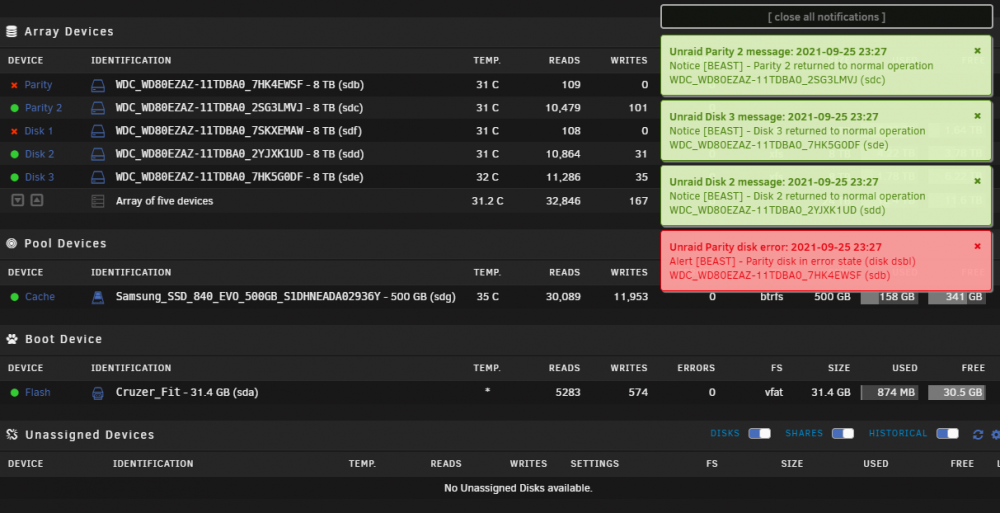
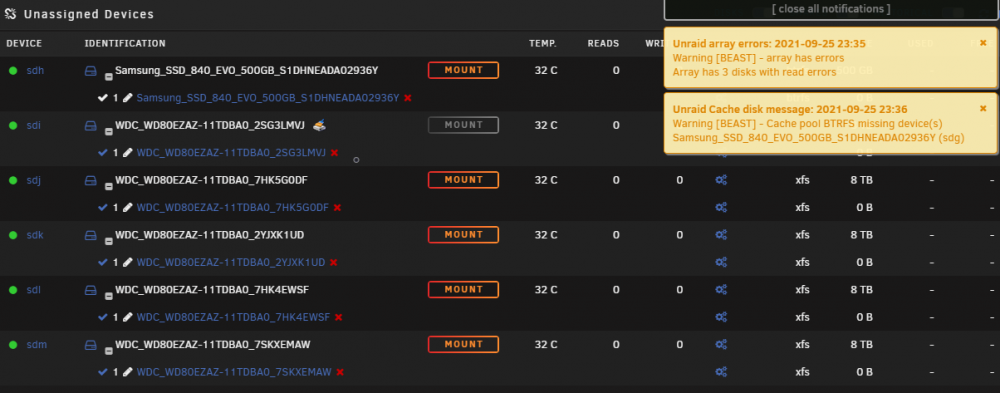
I think you are right about the controller. I rebooted it and the same errors of “no device” I tried again with the power removed. It started the array with 4 disks and filled the log file to 100% with read errors faster than I could check it. Then all 6 disks showed up in Unassigned Devices and the system was almost completely unresponsive. All cores where at 100%. I was able to stop all the dockers that auto start but could not get the array to stop. I waited an hour then did a system shutdown. I let the system run for two hours then I had to you the idrac to force a shutdown. I removed all drives from the system and it starts with no problems. I am going to order another H310 mini in IT mode but that is going to take a month to get. In the meantime I am going to get a new HDD and see if the system can do a pre clear on a new drive. Thanks for your help trurl
-
I don’t know of any power or cooling issues. The server has two 1100w power supplies. One on them is on a 900 Watt APC UPS RS 1500MS on a 108 watt load. For temps Inlet_Temp = 25 Exhaust_Temp = 35 CPU1_Temp = 45 CPU2_Temp = 44 The highest temp on a CPU I have seen is 55C before the fans rev up and bring it down under 50C Please give any suggestions on where I can check for power or cooling problems or test I can run to find them . Thanks
-
The server is a Dell PowerEdge R720xd The HDD Parity 1,2 and disks 1-3 are on the front-panel through a h310 mini in it mode The SSD Cache is on the back-panel
-
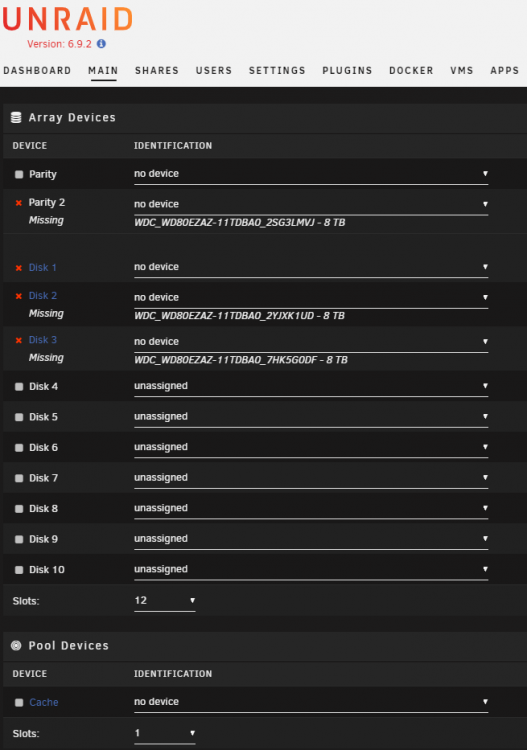
I am trying to find out if there is something I can try before I shut down the server and start replacing parts. On Monday, Jellyfin stopped responding. I thought a cache was full but all cache said they had room. I stopped and restarted the array anyway. Jelly fin worked for about ten minutes then stopped. Then, I stopped the dockers and some drives showed up as unassigned. I stopped the array which resulted in Parity drive 1 and disk 1 showing “no device” and showed the missing drive name. Even though, I haven't change anything, now Parity drive 1 and disk 1 still show as "no device", yet don't even have the missing drive names and the rest of the drives are showing "no device" with the missing drive names. I have not stopped the server yet. It’s been running for 4 months now. It’s on Unraid version 6.9.2 Fix common Problems shows mcelog shows Array Devices shows I thinks the problem starts in the syslog.txt at Sep 20 18:57 beast-diagnostics-20210921-2120.zip