





ekim
Members
-
Joined
-
Last visited
Everything posted by ekim
-
All working now. Just started my preclear. Thanks
-
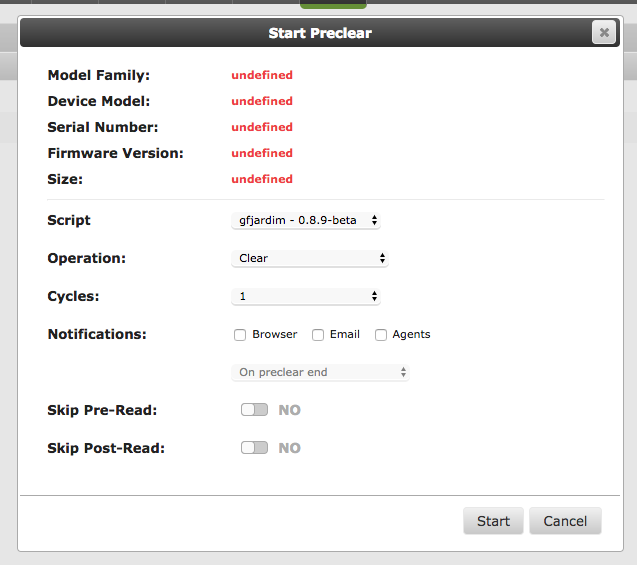
Both of the drives show the same "undefined" thing. WCC4N0KZLNH1 is already precleared (did that about a month ago). WCC4N0NF1KKN is a new drive to me (although second hand) and what I was looking to preclear.

-
Think so. This is the version I am running: 2017.07.04

-
Just installed a new drive. Was about to preclear it however, everything about the drive is coming up undefined. It is the same for the other drive that I have (which is already precleared). Any ideas? Have attached a screengrab and logs. tower-diagnostics-20170705-2126.zip
-
Asus X99-WS IPMI Usage: UnRaid with plenty of dockers, and single VM. Plus points: Onboard VGA Able to manage server remotely through browser through IPMI interface (useful if your server, like mine, is hidden away in a cupboard without easy access) Plenty of SATA ports 5 PCIe ports Board is well laid out and easy to work with. Able to passthrough one of the USB controllers on board without having to fiddle with BIOS settings Two ethernet ports (I haven't tried passing one directly to a VM). Minus points: Expensive! If you update the BIOS all setting return to default. Inno3D - GeForce GTX 1070 8GB iChill X3 Video Card Usage: Gaming on Windows 10 VM Plus points: Easy to passthrough, no issues. Minus points: Very big card, takes up a lot of space.
-
Dropped down to 4 cores and the VM boots up fine in CPU Passthrough mode. Will look in to that TSC errors but I think it was unrelated in the end.
-
I used the guide here: https://wiki.lime-technology.com/UnRAID_6/VM_Management I had also set up a VM before Christmas that I had been running until recently. It started running slowly so I decided to rebuild from scratch (although I accidentally removed the config and image for that VM). I mean the VM runs fine using QEMU as opposed to just pass-through so I can live with it. But wasn't sure if I was missing something. I might try running the VM again this evening with less cores (I had been passing 8 cores through when it froze)
-
One thing to note. If I use CPU passthrough and only pass through one core everything boots fine. If I choose multiple cores everything freezes.
-
I have managed to get a Windows 10 VM up and running however when I try and use CPU Passthrough the VM will not boot and actually locks up my Unraid Web GUI. I have to kill it from the console. If I used emulated CPU however, everything works fine. I have attached my diagnostics, if anyone has any idea as to why my CPU Passthrough isn't working that'd be great! The QEMU option works fine, but would like to see if pass-through helps in performance at all. tower-diagnostics-20170521-2230.zip
-
I tried a few different things - my motherboard is a Gigabyte X99-SLI so your board may be different. Initially I tried enabling/disabling XHCI and EHCI hand-off. I tried (I think) all combinations. It didn't have any affect. There was another option call XHCI mode of which I had a few settings: Smart Auto, Auto, Enabled, Disabled, Manual. I tried Manual but I couldn't find anyway/where to change the settings manually. Choosing Disabled separated the USB controllers for me. The only trade off as far as I could see what that everything shifted to the USB 2.0 Controllers. As I am only using the ports for USB Soundcard, Keyboard and Mouse I was happy with the trade off.
-
I managed to get it working in the end. I played with some setting in the BIOS and managed to isolate some of the USB ports on the back of the motherboard to their own PCI Controller. All working as expected now and able to plug in to the hub on my monitor.
-
I don't have any system logs or similar to hand as I only had a quick chance on trying to do this last night and had some issues. As far as I could tell my motherboard (Gigabyte X99-SLI) has 4 USB controllers. I checked all of the different USB Ports that I had access to and it appeared as though pretty much all of them were on either Bus 3 or Bus 4. My UnRaid booth USB is on Bus 3, however when I looked into the PCI number, both Bus 3 and Bus 4 were on the same. Bus 1 and Bus 2 were both on their on unique numbers. I'm guessing trying to pass Bus 4 through to the VM might cause issues as it shares a PCI number is Bus 3? I'm going to spend some more time on it this evening but thought I'd post in here first in case anyone else has any ideas as to why all of my USB ports are only on 2 of my 4 buses! I would just install another set of USB ports using a PCI-Express port but at the moment I don't have any spare - all four of my PCI-Express ports are full.
-
I had thought that might be the case. Was 2gb different for my first disk transfer. The rsync check came back fine so figured it was all good. The second drive came back 8gb different and just checking the rsync now.
-
Just working through converting my drives at the moment. I did my first transfer of files but the space free on each drive according to UnRaid is different? I would expected it to be the same. I am verified the files and nothing came up different. Any obvious reasons that the file space remaining wouldn't be equal between the two drives?


