





nwr122
Members
-
Joined
-
Last visited
-
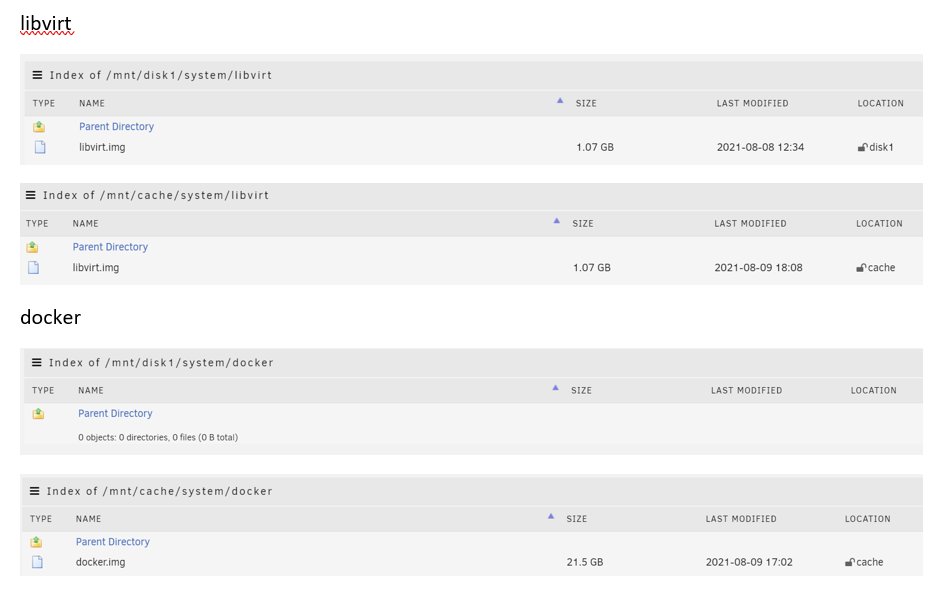
Hi Trurl, Thanks for the detailed response, in general I get the point about asking before action, lesson learnt. Same goes for using Wiki and terminology. Just a couple of follow up: - I took a diagnostics on the Friday as soon as I realised the drive had failed. I've attached it to this post. The drive in question, 1EHVP1BZ, shows as having passed SMART which at the time confused me but I did not think to question it. Having plugged the drive into the WD caddy and plugged into my laptop, it shows all green in CrystalDiskInfo so I am questioning whether it needs to be returned. I can see the syslog files as well but I am not ashamed to admit I'm not really sure what I should be looking for in here but happy to be educated/learn. Ok, thanks, although my docker.img is currently only on my cache and not on disk1 I'll take a look at those guides and have a go at restoring my dockers and Vm. Many thanks again for your reply. yavin-diagnostics-20210806-2202.zip
-
Morning, I've had a few frantic days with my Unraid box, timeline below: - Friday 6th - Parity disk failed late in the evening, can't recall seeing a reason but I went ahead and ordered a replacement from Amazon. At this point dockers and VMs were still running and continued to be used until..... Sunday 8th - Swapped out failed parity with replacement. Parity sync/rebuild started but at a very slow speed (time to complete c145 days on a 8TB drive). Some googling of these symptoms suggested re-sitting/replacing SATA cables, only having array drives connected. A combination of these solutions kick started the speed and the repair was estimated to complete within 12 hours or so. Prior to my last reboot and re-starting of the parity repair, I set all my dockers/VMs to not auto start After the repair got underway for the final time and with healthy speed I then noticed the next problem which was one of the previous healthy array disks now stated it was unmountable. As I could still access shares remotely, I decided to leave the parity repair to complete and see what happened. I could see the unmountable disk was still being read from during the repair After the parity repair completed, the afore mentioned unmountable disk was still showing unmountable even after a reboot. Some more googling and I undertook the suggested fix in this post as symptoms felt similar. This addressed the problem and previously unmountable drive was back and all green. And now my current problem, no dockers or VMs can be found, both GUI tabs are completely empty. I can still see all my appdata folder, VM disks and docker image files in the file system, but all the tabs in the GUI are empty suggesting there are no dockers or VMs Sorry for the long winded post but wanted to give as much detail as possible. I have also attached latest diagnostics as well. Any help or advice would be appreciated. Regards nwr122 yavin-diagnostics-20210809-0919.zip
