





SDC82
Members
-
Joined
-
Last visited
-
RAM is not overclocked to my knowledge. If it is, it was default on the mobo as I've never changed it. I have finally got back online and what a long journey it was. New Cache New Flash Restore Cache from backup Change Docker from File Folder to disk image Recreate docker images Some shares would still not create, appear as though the file exists but not accessible and could not mkdir. Created those shares under new names and modify docker accordingly. No data loss other than most recent downloads and tdarr work in progress. Once I get brave I'm going to stop the array again and format the original cache and if it's working I'll test it as my tdarr dir.
-
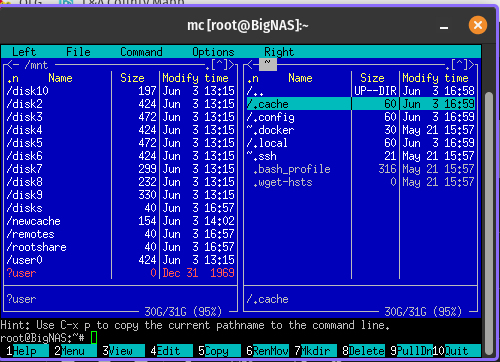
Good Afternoon, I really hope somebody is able to help me out here as I'm banging my head. I'll do my best to layout all that I'm aware of, and all I did that probably made it worse. Everything was plugging away fine this afternoon and seemingly stopped responding with all docker interfaces. I was seeing errors which said the drive was read only, which lead me to believe it was a disk issue. I popped in another SSD, named it "newcache" and copied directories from the old to the new. I then changed all the shares from cache to new cache. This did not seem to help. I then ran a restore from backup, and a few containers started but didn't seem to work. Browsing the File System from the GUI shows only user0. When I open Midnight Commander I see the below screen shot with user? Somewhere in the course of the day I went up to 6.10.2 and back down, so hopefully didn't make it worse. Diagnostics included. bignas-diagnostics-20220603-1707.zip
-
Are you able to elaborate on how to check or change the permissons. I am having a similar issue and have had no luck getting anywhere. The most I can confirm is that Emby cannot see anything inside of /mnt
