




Skip to content
View in the app

A better way to browse. Learn more.

Unraid

A full-screen app on your home screen with push notifications, badges and more.

To install this app on iOS and iPadOS
  1. Tap the Share icon in Safari
  2. Scroll the menu and tap Add to Home Screen.
  3. Tap Add in the top-right corner.
To install this app on Android
  1. Tap the 3-dot menu (⋮) in the top-right corner of the browser.
  2. Tap Add to Home screen or Install app.
  3. Confirm by tapping Install.

Stoffel324

Members
  • Joined

  • Last visited

  1. Hi. I also got this Warning but I didn't need to add the variable. As mentioned by @CorneliousJD it was already there.
  2. I have the same issue, stuck on connecting.
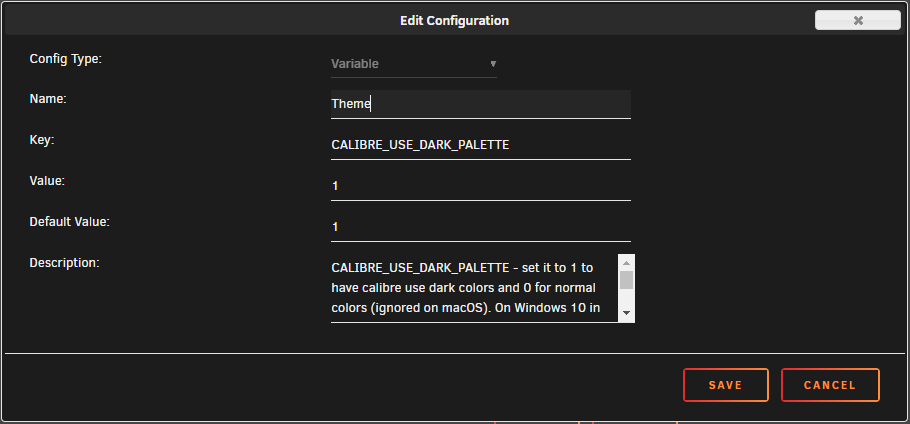
  3. Hello All If you are like me you like everything to use dark mode/theme. To enable/force Calibre to use dark mode you need to add a variable to this docker. Here is the explanation for the variable from Calibre website. CALIBRE_USE_DARK_PALETTE - set it to 1 to have calibre use dark colors and 0 for normal colors (ignored on macOS). On Windows 10 in the absence of this variable, the Windows system preference for dark colors is used. See Image for how I defined the variable.
Account

Navigation

Search

Search

Configure browser push notifications

Chrome (Android)
  1. Tap the lock icon next to the address bar.
  2. Tap Permissions → Notifications.
  3. Adjust your preference.
Chrome (Desktop)
  1. Click the padlock icon in the address bar.
  2. Select Site settings.
  3. Find Notifications and adjust your preference.