





Zotarios
Members
-
Joined
-
Last visited
-
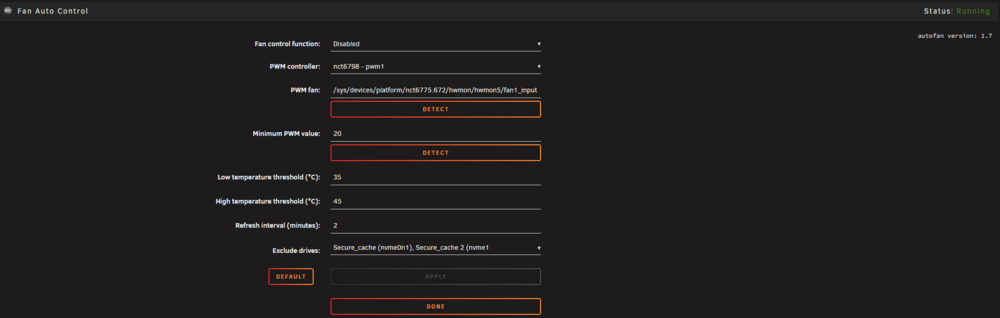
I have a problem with Dynamix Auto Fan Control Fans are set to full speed and pwm control in BIOS (so it is fully handled via software) and then I can control them via terminal. When I enable the plugin it detects the fans and it controls them but, the fans are always off. The plugin is detecting 0ºC for all the drives grep -i autofan /var/log/syslog Jun 12 01:51:08 server autofan: Highest disk temp is 0C, adjusting fan speed from: FULL (100% @ 1577rpm) to: OFF (0% @ 602rpm) Jun 12 01:51:08 server autofan: Highest disk temp is 0C, adjusting fan speed from: FULL (100% @ 1925rpm) to: OFF (0% @ 565rpm) Jun 12 01:51:08 server autofan: Highest disk temp is 0C, adjusting fan speed from: FULL (100% @ 0rpm) to: OFF (0% @ 0rpm) Jun 12 01:51:43 server autofan: killing autofan process 90699 Jun 12 01:51:53 server autofan: killing autofan process 90735 Jun 12 01:51:58 server autofan: killing autofan process 90791 Jun 12 01:52:04 server ool www[79948]: /usr/local/emhttp/plugins/dynamix.system.autofan/scripts/rc.autofan 'start' Jun 12 01:52:04 server autofan: autofan process ID 94465 started, To terminate it, type: autofan -q -c /sys/devices/platform/nct6775.672/hwmon/hwmon5/pwm1 -f /sys/devices/platform/nct6775.672/hwmon/hwmon5/fan1_input Jun 12 01:52:04 server autofan: autofan excluding drives nvme0n1,nvme1n1 from max temp calculations Jun 12 01:52:04 server autofan: autofan process ID 94501 started, To terminate it, type: autofan -q -c /sys/devices/platform/nct6775.672/hwmon/hwmon5/pwm4 -f /sys/devices/platform/nct6775.672/hwmon/hwmon5/fan4_input Jun 12 01:52:04 server autofan: autofan excluding drives nvme0n1,nvme1n1 from max temp calculations Jun 12 01:52:04 server autofan: autofan process ID 94557 started, To terminate it, type: autofan -q -c /sys/devices/platform/nct6775.672/hwmon/hwmon5/pwm5 -f /sys/devices/platform/nct6775.672/hwmon/hwmon5/fan5_input Jun 12 01:52:04 server autofan: autofan excluding drives nvme0n1,nvme1n1 from max temp calculations Jun 12 01:52:09 server autofan: Highest disk temp is 0C, adjusting fan speed from: FULL (100% @ 1925rpm) to: OFF (0% @ 540rpm) Jun 12 01:52:09 server autofan: Highest disk temp is 0C, adjusting fan speed from: FULL (100% @ 1228rpm) to: OFF (0% @ 569rpm) Jun 12 01:52:09 server autofan: Highest disk temp is 0C, adjusting fan speed from: FULL (100% @ 0rpm) to: OFF (0% @ 0rpm) Jun 12 01:58:02 server autofan: killing autofan process 94465 Jun 12 01:58:12 server autofan: killing autofan process 94501 Jun 12 01:58:17 server autofan: killing autofan process 94557Fan 1-4-5 are the front fans, the ones that I want to control the drive temperature. And they are idle no matter what so I had to disable the plugin. cat /var/local/emhttp/disks.ini | grep temp temp="50" temp="47" temp="51" temp="53" temp="52" temp="48" temp="50" temp="51" temp="49" temp="48" temp="53" temp="50" temp="51" temp="50" temp="43" temp="43" temp="43" temp="43"The drives are reporting the correct temperature. Here's a screenshot of a fan configuration (had to disable it else my drives would burn).
-
If it hits the docker limit, it doesn't mean it hits the system max ram usage, right? In that case, is it safe system-wide? Will it only kill some processes in the docker itself?
-
It keeps happening from time to time... is it still Plex's fault? zotarios-diagnostics-20260105-1328.zip
-
But if it has a max memory (16 GB in your case), it should never kill unraid OS processes as there's plenty of free memory available
-
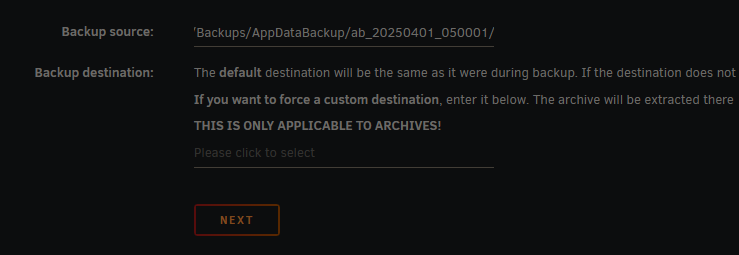
First time trying to use the restore option, it gives me an error: `Invalid source. The selected source seems invalid` zotarios-diagnostics-20250402-1149.zip

-
Downgraded to 7.0.0 and the issue went away
-
I have the Plex docker limited to 25GB of RAM. Only plex and qbittorrent use some amount of RAM but never more than 35GB out of 64GB... --runtime=nvidia --memory=25G
-
After updating to 7.0.1 it appears this error. I have 64GB of RAM with no VMs and few dockers, can't imagine what would the cause be... zotarios-diagnostics-20250303-1334.zip
-
Daily, with automatic and partial scans checked, as you do. Scanner at low priority too. It has always worked as expected: when new media is added it detects it, integrates to Plex and then looks for intro credits and stuff. But now, every day during the afternoon, full scan that takes hours and hours. Full scans have never taken that long and logs tell that it only takes 7 seconds so... I don't know what's causing that behaviour
-
My Plex server is scanning for new shows and films in a daily basis and for hours. When I put new content, it doesn't show up after many hours to the server. Unraid logs says nothing as the Plex docker logs, I don't know where to try to find more info to see why it is always scanning...
-
Is there a way in bash to know if the script is running? I have another script that needs to check if a container is stopped because there's a backup in process or else.
-
Is it possible to just run a bash command instead of a script file?
-
I could boot into safe mode, but then I needed to boot in normal mode for server normal operation. There is still this command in the syslog which is issued every minute all day: "flash_backup: adding task: /usr/local..." I don't think this is at fault for the server unresponsiveness, yet it's kinda annoying. I deactivated the flash backup with myunraid plugin as it was it that was filling my syslog. Furthermore, I'm not logging into the GUI with a browser, just checking the logs via SAMBA.
-
Tonight at 1AM approx became unresponsive again and this morning it was up and running, it didn't reboot or nothing. I could connect to the WireGuard tunnel but dockers, SSH nor webgui were working I see a lot of: Feb 10 23:54:27 Zotarios flash_backup: adding task: /usr/local/emhttp/plugins/dynamix.my.servers/scripts/UpdateFlashBackup update On my syslog log, but I don't know if this is the cause of the crash… syslog-10.10.10.100.log zotarios-diagnostics-20240219-1325.zip
-
Hello! I would like to know if this GUID is blacklisted as I requested a replacement for it, but at the end the drive wasn't faulty, it was the GPU. GUID: 090C-1000-0347-920120016715 If it is, I would like to ask for a second replacement (as I took a spared usb waiting for a new one).

