MylesDB
Members
-
Joined
-
Last visited
-
Yeah, that's right. I'm speaking in the scope of checking the FS: I used the below to check the FS after I wrote a new GPT partition to each data drive to check XFS. For my disk (disk2) which actually had XFS errors, I used:
-
You're right, in my case it was: xfs_repair -v -n /dev/mdxp1
-
I should have mentioned that for every disk I performed the procedure on I executed: xfs_repair -v -n /dev/sdx Just to make sure the fs was okay, and that's why I was also using maintenance mode. Hopefully nothing bad comes of this. I'll probably just leave it as is, unless you could foresee any likely ramifications of having it GPT as opposed to MBR. Much appreciated.
-
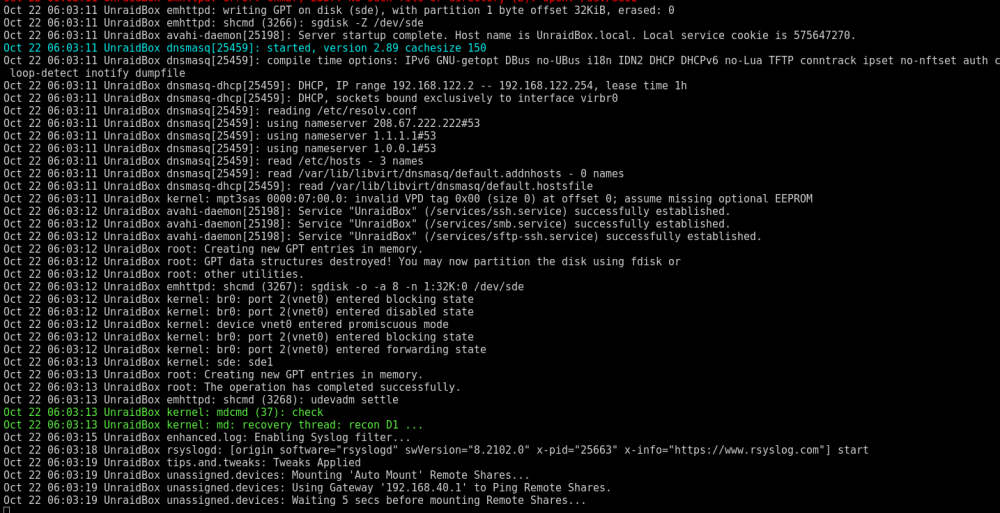
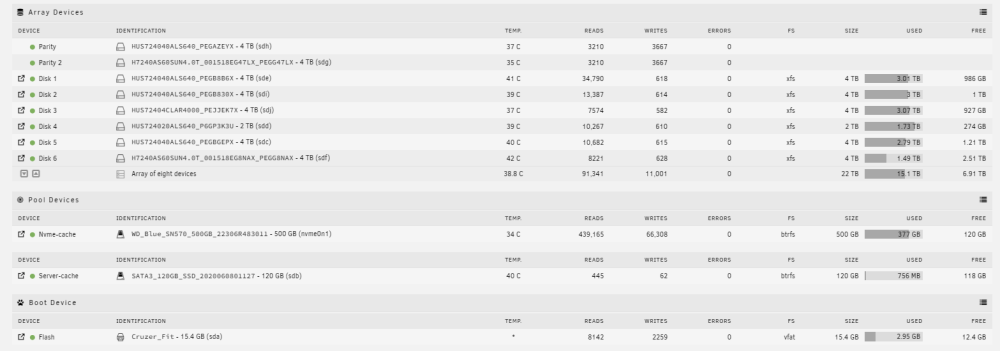
Hey so I've managed to get the array all up and working now. So as for the crashing when stopping the array, this issue was two-pronged. A.) I had XFS errors on disk2, so I fixed it with: xfs_repair /dev/md2p1 B.) I was seeing opcode errors. I'm using Ryzen 1st Gen CPU architecture. In the process of trying to get the new HBA working I reset bios, and thus it reset settings relating to C-states and idle power. So I changed those to the apropos settings. As for fixing it all I did the following: When replacing my disk with parity, I actually viewed the syslog to see what UnRaid was doing to create the GPT partitions: Screenshot from GPU using capture card.. (not sure if gui syslog would have been running to see) Once I fixed my crashing issue I proceeded to: 1.) Start the array in maintenance mode. 2.) Run the following commands (x denoting the appropriate disk): sg_disk -Z /dev/sdx sg_disk -o -a 8 -n 1:32K:0 /dev/sdx 3.) Stopped the array and then started it in normal mode. The drive mounted and I did it with the rest of my data drives, one by one - just to be safe. For my 2TB disk in my array, UnRaid said the disk was smaller than the original disk.. so I'm assuming the partition I wrote to it is not what UnRaid would usually use for a 2TB disk. But to get around this I just created a new config, preserving disk assignments. I then started the array and it mounted successfully, albeit it's not using what UnRaid would have intended for its partition, however, I'm assuming it's not a big deal. As you can see below all disks are mounted successfully. I have some lost+found directories within the disk I mounted in R/W so that's on me. All the other disks are fine. I hope the following may be useful for anyone who finds themselves in a similar situation and doesn't wish to replace each disk through parity. Lastly, thanks Jorge for the support, it's been very much appreciate.
-
Okay, so I tried to use gdisk to correct the GPT the drive, and it completed successfully. However, after a reboot, it still wasn't able to mount. So, I decided to go down the route of rebuilding the parity. In order to do the prior I had unassigned all the drives and created a new array (new config - > preserved no array assignments). So I restored super.dat from a flash backup to revert to the previous array assignments. I managed to rebuild the drive. After that, I attempted to stop the array and then start it again to check if the drive would be recognized as mounted when the array was started. However, the system became inaccessible; there was no web GUI or SSH access. I restarted the system after waiting for about 20 minutes. Hoping that it was a one-time occurrence, I tried turning on the array again, but the same issue occurred. unraidbox-diagnostics-20231022-0519.zip
-
So in theory: Create a new config (not keeping assignments for array devices) gdisk drive (the one which is out of sync first) Assign disk and then start array and check. Repeat without step 1 for the rest of data drives, only if it seems to be working (drive mounts and contents look okay). Assign parity at the end Is this how you'd go about it in theory? If I attempt this and it isn't successful with the first disk, I can redo assignments (as they were before) and do the parity rebuild instead? Thanks a tonne.
-
I understand and appreciate that. I guess the reason I'd like to give this a try is because a few of my drives have died recently and I've got more of the same batch installed. So that's why I'm a bit hesitant to rebuild every drive. Would you be willing to speculate on whether you suspect that there would be any risk to the array if I were to use gdisk : w on the drive I unassigned. You don't have to make any recommendations, I'm curious to hear your thoughts. I'm just thinking if it doesn't work then I can always rebuild that drive, and then just go down the parity rebuild route for the whole array. Just curious if you think or could foresee a way in which gdisking the drives compromise the array. I appreciate your help
-
Unfortunately not, I realised a few moments later and there were some writes (47). It shows as contents emulated. I am able to proceed with a data rebuild. Is it best for me to do it in maintenance mode, or does it not matter? And just out of curiosity why is this easier than fixing the GPT headers (assuming that's the other way)? Is parity rebuild more safe? I know a lot of disks of mine are old and quite used so I'm a bit worried about getting any drive failures during the rebuild process. Given that, is parity rebuild is still the easiest option? Appreciate the help
-
Hey everybody, After swapping an ADAPTEC Raid Controller (ASR-5805Z) for an LSI 9211-8i I find myself with the drives saying: "Unmountable: Unsupported partition layout". I wanted to change because of some issues I've been having with Adaptec Card, and I knew it was bad practice running it so wanted to change. Just to preface - it's an Inspur "LSI 9211-8i" in IT mode. After hours of trying to get it working with my server, I finally got it working by disabling ROM boot in HBA BIOS, swapping it with what was my GPU's PCIE lane and eventually got it working by adding: "append pci=realloc=off initrd=/bzroot" to syslinux.cfg. All those things being necessary to get it to work. Drives always showed in HBA BIOS, but never passed through to the OS. After this I could finally access webgui I noticed the SAS drive names were slightly different. So I proceeded to create a new config and started the array. That's when I was met with the aforementioned "Unsupported partition layout" warning. Following this, I perused through the forums, seeing other people have found themselves in similar situations. So, I'm aware that I may want to rebuild the data drives through my parity drives, also aware it could be the case I might just want to fix the partition. However, I don't feel confident in knowing that is necessarily the right thing to do and I'd heavily appreciate some assistance in how best to proceed. I did unassign a drive and mount it through unassigned drives. The data I took a look at is seemingly in tact. Thanks guys! unraidbox-diagnostics-20231020-2058.zip