




Skip to content
View in the app

A better way to browse. Learn more.

Unraid

A full-screen app on your home screen with push notifications, badges and more.

To install this app on iOS and iPadOS
  1. Tap the Share icon in Safari
  2. Scroll the menu and tap Add to Home Screen.
  3. Tap Add in the top-right corner.
To install this app on Android
  1. Tap the 3-dot menu (⋮) in the top-right corner of the browser.
  2. Tap Add to Home screen or Install app.
  3. Confirm by tapping Install.

ECisney

Members
  • Joined

  • Last visited

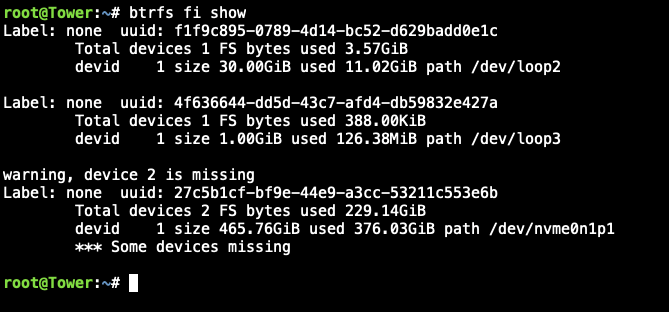
  1. I just saw that, I didn't think I had a second one. I had an extra SSD in the case but didn't think it was in use. Is there a way to recover? I may have wiped it out on accident while I was trying to solve another issue with a separate computer. The SSD with the same brand name shows nothing on it and I'm 98% confident it's the one that was in the case.
  2. Here's the results:
  3. My cache drive, same M2 SSD I've used forever says it's "Unmountable: Wrong or no file system" tower-diagnostics-20240718-1016.zip
  4. My cache pool says it's Unmountable: wrong or no file system. Same M2 I've been using for years. tower-diagnostics-20240718-1016.zip
Account

Navigation

Search

Search

Configure browser push notifications

Chrome (Android)
  1. Tap the lock icon next to the address bar.
  2. Tap Permissions → Notifications.
  3. Adjust your preference.
Chrome (Desktop)
  1. Click the padlock icon in the address bar.
  2. Select Site settings.
  3. Find Notifications and adjust your preference.