





LilDrunkenSmurf
Members
-
Joined
-
Last visited
-
It sure did. I'm also very confused.
-
I rebooted into safe mode, with VMs and Docker disabled, and I can start the array, but I can't stop it again. Dec 6 14:29:58 voyager emhttpd: shcmd (279): /usr/sbin/zfs unmount -a Dec 6 14:29:58 voyager root: cannot unmount '/mnt/akademiya/data': pool or dataset is busy Dec 6 14:29:58 voyager root: cannot unmount '/mnt/akademiya': pool or dataset is busy Dec 6 14:29:58 voyager emhttpd: shcmd (279): exit status: 1 Dec 6 14:29:58 voyager emhttpd: shcmd (280): umount /mnt/user Dec 6 14:29:58 voyager root: umount: /mnt/user: target is busy. Dec 6 14:29:58 voyager emhttpd: shcmd (280): exit status: 32 Dec 6 14:29:58 voyager emhttpd: shcmd (281): rmdir /mnt/user Dec 6 14:29:58 voyager root: rmdir: failed to remove '/mnt/user': Device or resource busy Dec 6 14:29:58 voyager emhttpd: shcmd (281): exit status: 1 Dec 6 14:29:58 voyager emhttpd: shcmd (284): /usr/local/sbin/update_cron Dec 6 14:29:58 voyager emhttpd: Retry unmounting user share(s)...
-
I'm just going to stream of consciousness here for a sanity check/rubber ducky: Docker Settings: Docker vDisk location: /mnt/user/system/docker/docker.img Default appdata storage location: /mnt/user/docker/ VM Settings: Libvirt storage location: /mnt/user/system/libvirt/libvirt.img Default VM storage path: /mnt/user/domains/ Default ISO storage path: /mnt/user/isos/ I have a docker container (minio) that does access the pool.
-
Everythins is on `/mnt/cache`, and nothing is on `/mnt/akademiya`. I can move them... to Akademiya? Is it better to reference `/mnt/user` or `/mnt/cache`?
-
That's right. if either are enabled, I can't stop the array.
-
So I have a VM that has the vdisk on `/mnt/user/domains/<dir>` and that seems to stop me from stopping the array. I also have docker containers that reference `/mnt/user/docker` and that also seems to stop me from stopping the array.
-
I missed that the first time around. Yes, that seems to be working. Disabling docker + vms and rebooting into safe mode seems to let me stop the array. I'm just going to try and reverse this one at a time. The odd part is that all my docker containers/vms use the cache drive/pool, not the spinning rust. Testing these one at a time, rebooting, but not in safe mode, I can still safely stop the array. I'll continue, and see if it's something in my VMs or my Docker config, or both.
-
LilDrunkenSmurf changed their profile photo
-
Array Stopping•Retry unmounting user share(s)...System running in safe mode Dec 5 11:03:08 voyager emhttpd: Retry unmounting user share(s)... Dec 5 11:03:13 voyager emhttpd: shcmd (202): /usr/sbin/zfs unmount -a Dec 5 11:03:14 voyager root: cannot unmount '/mnt/akademiya/data': pool or dataset is busy Dec 5 11:03:14 voyager root: cannot unmount '/mnt/akademiya': pool or dataset is busy Dec 5 11:03:14 voyager emhttpd: shcmd (202): exit status: 1 Dec 5 11:03:14 voyager emhttpd: shcmd (203): umount /mnt/user Dec 5 11:03:14 voyager root: umount: /mnt/user: target is busy. Dec 5 11:03:14 voyager emhttpd: shcmd (203): exit status: 32 Dec 5 11:03:14 voyager emhttpd: shcmd (204): rmdir /mnt/user Dec 5 11:03:14 voyager root: rmdir: failed to remove '/mnt/user': Device or resource busy Dec 5 11:03:14 voyager emhttpd: shcmd (204): exit status: 1 Dec 5 11:03:14 voyager emhttpd: shcmd (207): /usr/local/sbin/update_cron Issue still occurs.
-
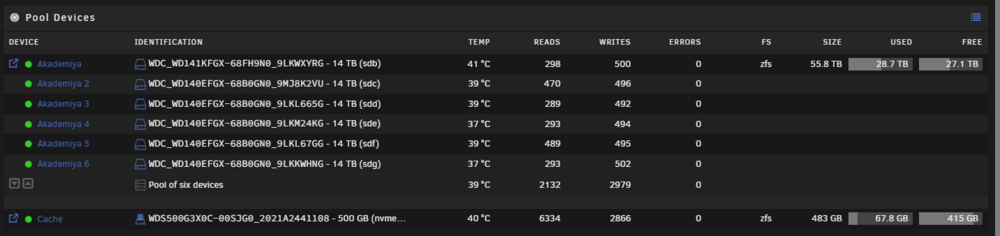
Hi there, this is technically unraid 7.0.0-rc.1, and I asked in discord, and was told to make a forum thread. I recently (in 6.12.13) migrated all my data from my array to a ZFS pool (raidz2) within unRAID. It works beautifully, but I'm unable to stop the array. When I do, it gets hung up in multiple places. 1) Datasets are busy 2) Pool is busy. ``` Dec 5 09:39:28 voyager emhttpd: shcmd (806): rmdir /mnt/user Dec 5 09:39:28 voyager root: rmdir: failed to remove '/mnt/user': Device or resource busy Dec 5 09:39:28 voyager emhttpd: shcmd (806): exit status: 1 Dec 5 09:39:28 voyager emhttpd: shcmd (809): /usr/local/sbin/update_cron Dec 5 09:39:29 voyager emhttpd: Retry unmounting user share(s)... Dec 5 09:39:34 voyager emhttpd: shcmd (810): /usr/sbin/zfs unmount -a Dec 5 09:39:34 voyager root: cannot unmount '/mnt/akademiya/kubernetes': pool or dataset is busy Dec 5 09:39:34 voyager root: cannot unmount '/mnt/akademiya/data': pool or dataset is busy Dec 5 09:39:34 voyager root: cannot unmount '/mnt/akademiya': pool or dataset is busy Dec 5 09:39:34 voyager emhttpd: shcmd (810): exit status: 1 Dec 5 09:39:34 voyager emhttpd: shcmd (811): umount /mnt/user Dec 5 09:39:34 voyager root: umount: /mnt/user: target is busy. Dec 5 09:39:34 voyager emhttpd: shcmd (811): exit status: 32 ``` If I ssh into the server, and run a `umount -l` on the datasets, they'll stop. I also shut down all NFS/SMB consumers, and lsof, fuser, and such all show there's nothing using the files. The pool just won't export, no matter what I do. If I go in and run a zpool import before the array (and services) start, I can freely export it with no issues. It's only after starting the array, and any services, that it has issues. Eventually I just opt to restart the server, and it eventually uncleanly stops the array, which won't automatically restart because of an unclean shutdown.
-
I do! I will give that a try, thank you.
-
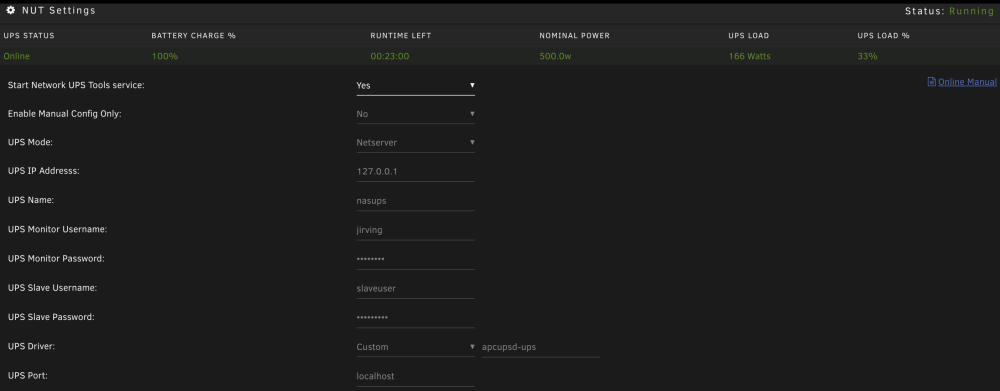
Is there a way to delay the startup of the plugin on server start? Currently, I'm using `custom -> apcupsd-ups` driver to pull from the apcupsd daemon, since it gives more information to me, but since they start at the same time, NUT fails to start. This means I need to go into the plugin, stop it, and manually start it again to get any data from it.
-
It showed nominal, but no load information.
-
Apparently, the apcuspd-ups driver pulls from the apcupsd daemon. So I can run APC, and pull the data in, which is working. Works for me, for now:
-
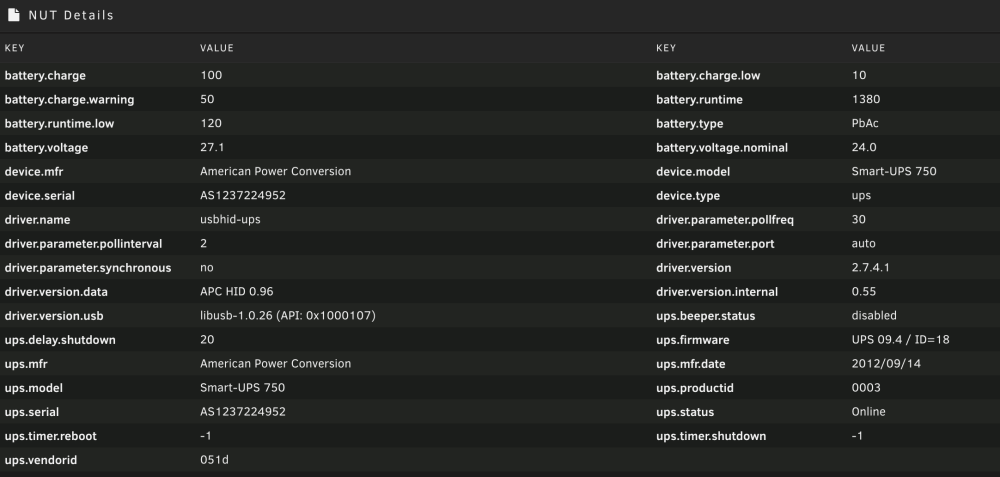
I just installed your plugin (which is how I found this thread). I'm trying to use the `apcupsd-ups` driver, but I guess it might not be installed. I can't find where the NUT version would be:
-
I have a similar issue. When I run apcupsd, I get all information, including load, nominal power, etc. With NUT, I get a red W for nominal, and no data for load or load%. I'm trying to run NUT so I can scrape it with prometheus, since I'm already running it on an RPI hooked up to another UPS.


