





Randomizer
Members
-
Joined
-
Last visited
-
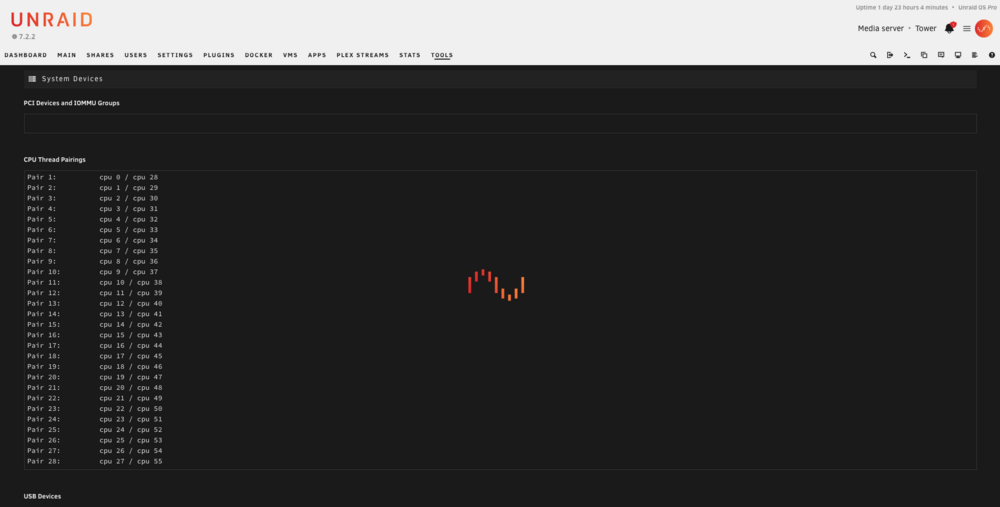
When attempting to pass a GPU to a VM I discovered that "PCI Devices and IOMMU Groups" never populates, it sticks at loading the page after all the other categories populate. IOMMU groups are visible via the CLI but never load in the GUI. tower-diagnostics-20251207-1036.zip
-
PCI Devices and IOMMU groups never populates from the GUI, it always sticks at loading.
-
TL;DR Unraid 7.2.2, libvirt 11.7.0, Dell R730. Tesla P100 (83:00.0) is correctly bound to vfio-pci. Any VM (even a brand‑new one) starts fine without the GPU. The moment I add 83:00.0 as a PCI device, VM start fails with: internal error: process exited while connecting to monitor: Start/autostart is disabled PCI Change detected. I’ve: Cleaned up all old PCI passthrough (no extra controllers). Recreated the VM from scratch. Recreated libvirt.img from scratch. Tested host firmware boot in both UEFI and legacy BIOS – no difference. Looking for: confirmation if this is a known issue, a way to reset/bypass the PCI‑change guard correctly, or anything obvious I’m missing. Tools>System Devices>PCI Devices and IOMMU groups never populates in the GUI That field stays loading indefinitely. The IOMMU groups are visible and correct from the CLI however Hardware / environmentServer: Dell R730XD Unraid OS: 7.2.2 libvirt: 11.7.0 (stock with 7.2.2) Boot mode: Tested both UEFI and legacy BIOS – same behavior. GPUs: 83:00.0 – NVIDIA Tesla P100 16GB (compute card, no outputs) 84:00.0 – NVIDIA T400 84:00.1 – T400 audio T400 is used by Unraid / Docker. P100 is intended exclusively for passthrough to a Linux VM. Target VMName: AI-Stack-Ubuntu (but the behavior is identical with a new test VM) Machine type: Q35 BIOS: OVMF (but I can recreate with SeaBIOS if needed) OS: Ubuntu Only passthrough device: Tesla P100 at 0000:83:00.0 Current vfio statusOn the Unraid host: bash lspci -nnk | egrep -A3 '83:00.0|84:00.0|84:00.1' 83:00.0 3D controller [0302]: NVIDIA Corporation GP100GL [Tesla P100 PCIe 16GB] [...] Kernel driver in use: vfio-pci 84:00.0 VGA compatible controller [0300]: NVIDIA Corporation TU117GL [T400 4GB] [...] Kernel driver in use: nvidia 84:00.1 Audio device [0403]: NVIDIA Corporation [...] Kernel driver in use: (none) /boot/config/vfio-pci.cfg: bash BIND=0000:83:00.0 dmesg confirms vfio-pci is loaded and the P100 is claimed by vfio-pci at boot. The T400 is left to the NVIDIA driver for the host and Docker, as intended.What works / what doesn’tWhat Works/What Doesnt Without any GPU attached, the VM boots fine (original VM and new test VM). As soon as I add 83:00.0 as a PCI device (via GUI “Other PCI Devices” or with matching XML), attempting to start the VM fails immediately with: This happens: Even when no other PCI devices are passed through (no ASMedia, no extra controllers, just the P100). Even on a brand‑new VM created via the GUI. Even after recreating libvirt.img from scratch. Regardless of whether the server is booted in UEFI or legacy BIOS. Steps already takenVerified devices and bindings Verified via lspci that: 83:00.0 = Tesla P100 84:00.0/84:00.1 = T400 + audio. Only 83:00.0 is in /boot/config/vfio-pci.cfg. lspci -nnk shows Kernel driver in use: vfio-pci for 83:00.0. Cleaned up all passthrough on the original VM Removed an earlier ASMedia SATA controller passthrough. Ensured only one hostdev block exists for 83:00.0 in the XML. Confirmed bus/slot/function in the XML matches the real device (bus 0x83). System Devices page issue On 7.2.2, Tools → System Devices never populates for me. Worked around it by editing /boot/config/vfio-pci.cfg directly. After reboot, correct vfio binding is confirmed by lspci -nnk and dmesg. Fresh libvirt image / new VM Stopped libvirt, moved aside existing libvirt.img, created a new one, remounted, restarted libvirt. Verified virsh list --all was empty. Created a brand-new test Ubuntu VM via GUI: Q35 + OVMF. New vdisk. No passthrough → VM starts fine. Add only 83:00.0 as a PCI device → start fails with: internal error: process exited while connecting to monitor: Start/autostart is disabled PCI Change detected. Logs and error output When start fails with that message: No useful QEMU/libvirt log for that VM appears (it seems to die before QEMU properly starts). /var/log/syslog: Does not show typical vfio errors such as “device already in use” or “no such device”. Just logs the GUI/libvirt failure text. No /var/log/vfio-pci-errors.log entries referencing 83:00.0. Earlier I saw a Docker container (“TheVault”) complaining about a GPU GUID not being available; that’s been resolved by pinning the Docker to the T400 only. The VM behavior did not change. Behavior matrix VM starts 100% of the time with no GPU attached. VM fails 100% of the time as soon as 83:00.0 is attached. Same for: Original VM definition. Freshly created test VM. Fresh libvirt.img. Host booted in either UEFI or legacy BIOS. What I suspectFrom the outside, it looks like Unraid’s “PCI Change detected / autostart disabled” logic is: Treating the presence of 83:00.0 (even though it’s correctly present and bound to vfio‑pci) as an invalid/unsafe PCI change, and Blocking VM startup before QEMU launches, which is why no normal QEMU log is produced. I don’t currently see: Any missing or extra addresses in vfio-pci.cfg. Any conflicting use of 83:00.0 on the host. Any obvious IOMMU or ACS problems (P100 is cleanly bound to vfio). Questions for the community / devsIs this a known issue with Unraid 7.2.2 and libvirt 11.7.0 around the “Start/autostart is disabled PCI Change detected” guard when passing through a GPU (particularly a Tesla P‑series card)? Is there a supported way to reset or override the PCI‑change/autostart guard for a VM (or globally) when: The VM is new. libvirt.img is new. The PCI device is valid and bound to vfio‑pci. Is there any additional logging for this PCI/autostart protection beyond: /var/log/syslog /var/log/libvirt/qemu/*.log Has anyone successfully passed through a Tesla P100 on 7.2.x in a similar scenario (one GPU for host/Docker, one Tesla for VM)? Are there any additional config files or flags (beyond vfio-pci.cfg and the usual VM XML) that might cause Unraid to think a PCI configuration has changed and refuse to start the VM? What I can provideHappy to attach or paste: Full diagnostics ZIP. Current syslinux.cfg. Full vfio-pci.cfg. Current VM XML for the test VM. lspci -nnk, dmesg | grep -i vfio, etc. At this point, I’m mainly trying to determine whether: I’ve missed something obvious in my configuration, or There’s a bug/edge case in 7.2.2’s VM autostart / PCI-change logic when dealing with a vfio‑bound GPU like the Tesla P100. Thanks in advance for any help or pointers to an existing bug/RC thread. tower-diagnostics-20251206-1206.zip
