





Helmer
Members
-
Joined
-
Last visited
Everything posted by Helmer
-
haha yeah, I also don't understand it, but that's where all the action happens nowedays, if you have self-hosted apps or are into home automation. Great to see that the plugin is working now. Please also register a (free) TMdb key, since that needs to be registered on a personal level (https://www.themoviedb.org/settings/api). Feel free to give more feedback, this is my first reel app and I just build it how i see fit. But if there are features missing, or not logical let me know. Btw the best way to really report issues would be on the github page (https://github.com/helmerzNL/DiscVault/issues), so they can also be properly tracked. I've added all your feature request there too and closed almost all of them.
-
Version 26.3.0 has been released with some new features (https://github.com/helmerzNL/DiscVault/releases/tag/v26.3.0) his release delivers a broader DiscVault Next feature set focused on faster location workflows, cleaner navigation, and improved collection editing ergonomics. What's newBox-set Wizard (new). Added the new Box-set Wizard flow to streamline creating and managing box-set structures with a guided, step-by-step experience. Location feature upgrades (more specific). Location handling now includes a dedicated location detail page flow, plus a QR deep-link bridge so location QR scans open the exact intended destination in the Next app. Location QR quality and control polish. QR rendering was improved to square PNG output, and related location page controls were refined for better reliability and consistency. Filtering and select cleanup with icon-first controls. Filtering/select interactions were cleaned up by replacing text-heavy action labels with clearer icon-based controls where appropriate, improving scanability and reducing UI noise. Profile action menu cleanup. Statistics actions are now kept in the Profile action scope to keep top-level navigation cleaner and more predictable. Expanded localization coverage. Translation coverage was extended and aligned across supported locales for the new location, QR, and UI cleanup flows. Notable stability fixesRemoved a duplicate QR URL declaration that could cause a blank page. Added a regression guard for an app shell JavaScript syntax issue.
-
And it should be resolved, at least I noticed another abroad connection in the Cloudflare logs (not being Germany).
-
I found what is causing the issue, it's a Cloudflare protection thing. So it has nothing to do with Discvault. I thought I solved it, since my external hosted test container was able to just fix it. Do you have Discord...? We could have a chat there (around 20:00 CET) to see how to solve it. That is faster then just going back and forth on a forum. The link to join the Discord is on the website.
-
I think i've found the issue. It's not related to DiscVault or Movievault, but a Coudflare issue. I think i've solved it, could you please try again?
-
Thanks, let me dive into this. I'll get back to you when I've found the cause.
-
Could you check the logs for me, in the Admin menu (the Audit tab) and then select the Plugins log and open the audit details and share the JSON (by pressing Copy JSON). You can share it here (or through a DM), please remove your IP address if you want.
-
26.2.57 is good. The DiscVault Image set to auto is good. What about the reset connection button for the plugin?
-
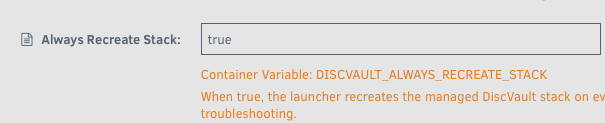
And if you select the beta version in the drop-down, which version do you see there? Interesting that you see 26.2.55, since the latest version (in PROD is 26.2.57). Could you try and set the Always recreate Stack to true and share the logs of the Discvault-26 container (after restarting it and after it ends with DiscVault launcher is ready) And for the plugin, can you click ' Reset connection'. That should initiate a new security handshake and let me know if you pressed that and I''ll take a look at the backend if I see something in the logs'.
-
This has also been resolved: https://github.com/helmerzNL/DiscVault/issues/111
-
This issue also has been resolved: https://github.com/helmerzNL/DiscVault/issues/108
-
This issue has been resolved: https://github.com/helmerzNL/DiscVault/issues/112
-
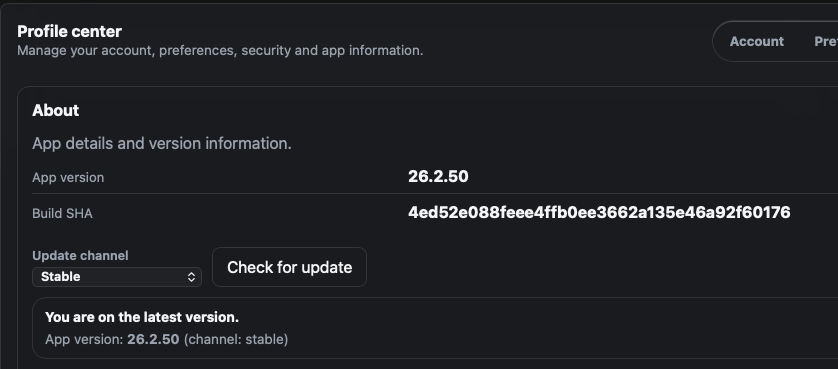
You should be running (at least) this version, which should work. If you have deployed the app with the DiscVault launcher, just restart the launcher should update the app to the version mentioned above. If it doesn't work, please let me know and I can help you troubleshoot.
-
Hi! Thanks a lot for testing stuff out. I'll need to do some checks and then respond to all the questions. One quick question, which build are you running? You should be able to see it in the Profile -> About page (should be something like 26.x.x) and are you running the beta (v26-beta) or stable (v26) built? The beta currently has a lot of new features (check the website for the list of new features), you should be able to move between the two without an issue. Plugin MovieVault26 errors out with "Health: connection error - HTTP 200" i had to disable it. neither version 1.5.0 nor 1.5.3 works for me. what do you mean by that? The Movievault plugin is the metadata plugin I developed, which seems to give an issue on your end. There have been some auth-sync changed being made, I don't see any requests coming in from an unknown/new DiscVault instance. I'll do some testing to see what's going on if there is a new DiscVault instance knocking on the door, maybe I did not push out the new stuff the pROD version yet.
-
Oke, if you btw have issues scanning certain (types) of movies, let me know. it's quiet difficult to get access to 'public' API's that allow for barcode readers, so i have something built in works for almost all my movies. But specific (older) DVD's for the Dutch market are not always recognized :-( That's why i also build an metadata search engine that movie data flows back into, so it only has be be contributed once. Not sure if it works with a barcode reader? It works with the camera of my laptop and the one on my iPHone, but the native iPHone app works best (and the fastest). Let me know if you want to test that one, and i'll send you the testflight linm If you could could reach your internal FQDN through the browser on your phone, then the app would also work. It just connects to your FQDN and you authenticate with your Passkey. If you could DM me your Apple ID then I can add you to TestFlight.
-
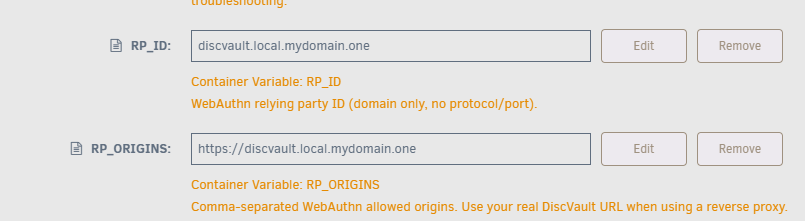
What did you fill out here (when you are configuring the app). This is how you should fill them out.
-
Btw, if you would be able to have your own service accessible from the outside (through a VPN etc). I'm currently in the process of developing an iOS/iPadOS native app. If you have an iPhone, I could add you to Testflight and you would be able to test it out. Although it's a bit rough on the edge still.
-
To be honest. What i use for my internal services is NPM Proxy Manager (on my Unraid), for which i have registered a *.local.domain.tld (which only resolves through my internal dns) and that way you can create local (FQDN) domainnames (so no need to access service on IP:port, but a clear https://discvault.local.domain.tld. That works great with Passkeys as well no access from the outside and not resolvable (since port 443 exposed to the outside world) and DNS is not giving any hosts away. But for this you do need to have a real domainname, that's it.
-
Were you able to get it up and running?
-
I've updated the FAQ with an article explaining why it's required and the wizard should now give you an understandable error if you don't have a fqdn setup.
-
Please use a fqdn, so for example RP_ID : disc.domain.com and RP_ORIGINS: https://disc.domain.com. That's a requirement for Passkeys, since they are domain-bound. You can obviously use an internal domainname, as long as you use one. I'll add some error-handling to the wizard, it can be a bit unclear what the issue is.
-
No problem :-) You did use the DiscVault 26 from the Community App Store to get it working, right? and what did you enter at the RP_ORIGINS and RP_ID fields?
-
btw, you were not running the 'legacy' version before? Or is this the first install/try?
-
I've tried Safari on my mac/iPhone/iPad and i've used Edge on Windows and all work fine. Let me see if i can reproduce it. I need to adjust the instructions above, since the new DiscVault 26 version has a little bit of a different approach then the legacy one. Did you use the
-
👋 Welcome to the official support thread for DiscVault — a self-hosted collection manager for your physical 4K UHD, Blu-ray, and DVD library. This thread covers the current DiscVault 26 line on Unraid, including the stable, beta, and legacy paths. When you post, please mention which channel you're running so support can be targeted correctly. 🎬 What is DiscVault? DiscVault lets you catalog, browse, and manage your physical disc collection from any device — desktop or mobile. Scan barcodes, pull in artwork and metadata, organize box sets and collections, track watch history and wishlists, and keep everything self-hosted and under your own control. ✨ DiscVault 26 highlights DiscVault 26 is the current PostgreSQL-backed generation of DiscVault. Recent highlights include: - Desktop-first library views with poster, list, and detail layouts - Rich movie, container, poster, backdrop, and video pages - Guided Box-set Wizard workflows and collection editing improvements - Member groups, invite flows, watchlist/history, wishlist, tags, and loans / borrow requests - Plugin-based metadata, import, receiver, and digital media integrations - Plex / Jellyfin matching and MovieVault integration support - RBAC, invite-only registration, admin tooling, audit visibility, and passkey auth - MCP / API access, user-scoped API keys, and AI-assistant integration - Location pages and QR deep links for faster physical collection workflows - Built-in migration tooling for older Legacy installs ⚠️ Important for Unraid users: DiscVault runs through the DiscVault Launcher On Unraid, the DiscVault Community Apps install uses the DiscVault Launcher as the entry point. The Launcher keeps one stable WebUI endpoint and manages the actual DiscVault deployment behind it. Depending on the selected channel, the Launcher will either: - run the DiscVault 26 stack (`postgres`, `next-api`, `next-worker`) - or run the older Legacy single-container install The Launcher also: - keeps your WebUI port stable during upgrades - generates and persists secrets for the managed stack - writes/update-manages its stack config under the launcher appdata folder - republishes matching launcher tags so Unraid can detect child-stack updates properly Launcher repo: https://github.com/helmerzNL/DiscVault-Launcher Important: do not delete or share the generated `stack.env` file from the launcher config path. It contains persisted secrets such as the PostgreSQL password and JWT secret. 📁 Recommended Unraid appdata paths /mnt/user/appdata/discvault DiscVault data (legacy SQLite DB, media, imported assets) /mnt/user/appdata/discvault-postgres PostgreSQL data for DiscVault 26 /mnt/user/appdata/discvault-launcher Launcher config, generated secrets, and launcher logs 🔐 Passkeys / first setup notes DiscVault 26 uses passkeys, so your relying-party settings must match the hostname you actually use in the browser. For non-localhost installs: - `RP_ID` should be your public hostname only - `RP_ORIGIN` / `RP_ORIGINS` should match the exact URL you browse to - use **HTTPS** for normal remote deployments - keep these values stable after setup, or existing passkeys may stop working If you're troubleshooting login or passkey registration, include whether you're using localhost, a reverse proxy, or a custom domain. 🐳 Channels and images On Unraid you will normally install the Launcher app, not these images directly, but these are the current DiscVault app channels for reference: ghcr.io/helmerznl/discvault:latest - current stable DiscVault 26 channel ghcr.io/helmerznl/discvault:stable - same stable channel ghcr.io/helmerznl/discvault:v26 - stable v26 tag ghcr.io/helmerznl/discvault:beta - current beta channel ghcr.io/helmerznl/discvault:v26-beta - beta v26 tag ghcr.io/helmerznl/discvault:legacy - frozen legacy single-container image 🔄 Migrating an existing Legacy install If you already have a Legacy DiscVault install, keep your existing DiscVault data path in place and let DiscVault 26 guide you through the migration. Typical flow: 1. Install / start DiscVault through the Launcher 2. Open the WebUI 3. If legacy data is detected, run the migration flow at `/api/next/migration` 4. Authenticate with your existing legacy passkey if required 5. Review the import and let the wizard complete the migration Before migrating: - take a backup first - keep your current persistent data and appdata mappings in place - do not remove the old data directory until the migration has completed successfully 🩺 Logs and troubleshooting on Unraid For support requests, the most useful data is usually: - the Launcher container log - the DiscVault app log - for launcher rollout issues, the boot-session logs under: /mnt/user/appdata/discvault-launcher/logs/launcher-boot-*.log Please **do not** post secret values, `stack.env`, JWT secrets, database passwords, or other credentials. 🔗 Links - Website: https://discvault.eu - Source / GitHub: https://github.com/helmerzNL/DiscVault - Releases: https://github.com/helmerzNL/DiscVault/releases - DiscVault Launcher: https://github.com/helmerzNL/DiscVault-Launcher - Unraid template repo: https://github.com/helmerzNL/unraid-templates - Discord: https://discord.gg/jSUfV7PT - Report an issue: https://github.com/helmerzNL/DiscVault/issues 🙋 Posting for support To help diagnose issues quickly, please include: - whether you're on stable, beta, or legacy - your Unraid version - whether you're using localhost, a reverse proxy, or a custom domain - your Launcher tag / channel if you've customized it - the relevant Launcher and DiscVault container logs - steps to reproduce - what you expected to happen instead - screenshots if the issue is UI-related Thanks for using DiscVault — looking forward to your feedback on DiscVault 26! 🙌

