




Skip to content
View in the app

A better way to browse. Learn more.

Unraid

A full-screen app on your home screen with push notifications, badges and more.

To install this app on iOS and iPadOS
  1. Tap the Share icon in Safari
  2. Scroll the menu and tap Add to Home Screen.
  3. Tap Add in the top-right corner.
To install this app on Android
  1. Tap the 3-dot menu (⋮) in the top-right corner of the browser.
  2. Tap Add to Home screen or Install app.
  3. Confirm by tapping Install.

alex0407

Members
  • Joined

  • Last visited

Everything posted by alex0407

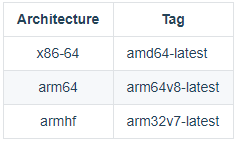
  1. @elcapitano@Nafekhbot@lobo23 I had the same issue! Everything was working as it should and then my server updated the container automatically and I had the issue. I solved it by using an older version. (v21.0-ls70) Here is how to use an older version: - Save the configuration file from nzbget (settings->system->backup) - Remove the container (also remove image) - Install the container from CA but you have to make an adjustment in the template: (Set the Repository to: "linuxserver/nzbget:amd64-v21.0-ls70") If you need another architecture here is the list - BOOM! Hopefully it works. If the container does not start try another architecture. - Restore your settings (settings->system->restore)

Account

Navigation

Search

Search

Configure browser push notifications

Chrome (Android)
  1. Tap the lock icon next to the address bar.
  2. Tap Permissions → Notifications.
  3. Adjust your preference.
Chrome (Desktop)
  1. Click the padlock icon in the address bar.
  2. Select Site settings.
  3. Find Notifications and adjust your preference.