





62165
Members
-
Joined
-
Last visited
-
I think I’ve gotten to the bottom of this. I was going to try safe mode, but I needed my plugin to pass through USB devices (didn’t want to reinvent the wheel). I booted in GUI mode and logged in. When the issue started happening, I was able to get the terminal up after many attempts and it took about 5 mins to load…then I was able to run HTOP. Ultimately, I built a new VM the other day and allocated it 16GB RAM and have 32GB in the system. Docker was using 18.6GB, ZFS was using 4GB, then my VMs were using 25GB more. Ultimately, I over-allocated memory. I was thinking it would share memory like CPU but I guess that’s not the case. Lowered RAM allocations and it has been stable without the php-fpm errors for several hours.
-
Another crash. Another set of logs/diagnostic... syslog-previous dundermifflin-diagnostics-20241231-1651.zip
-
Crashing again, no GUI open. Can’t get in to see logs, but assuming the same thing.
-
It booted fine after rebooting, but eventually happens again. I’ll try to keep the browser closed, but I forget often. Happen to know if there’s an actual bug for this or a fix in the works?
-
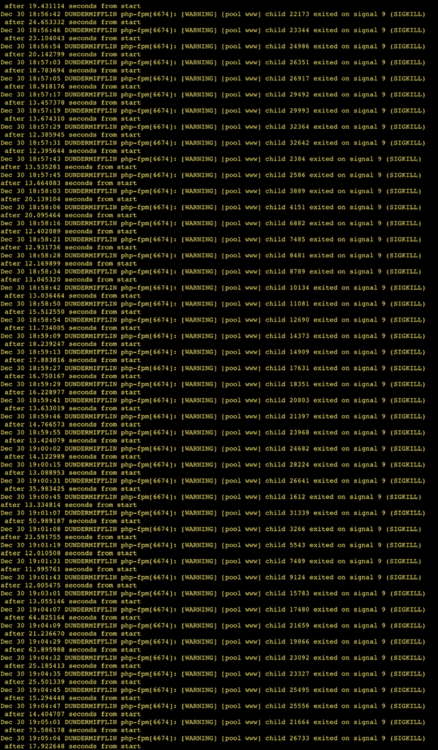
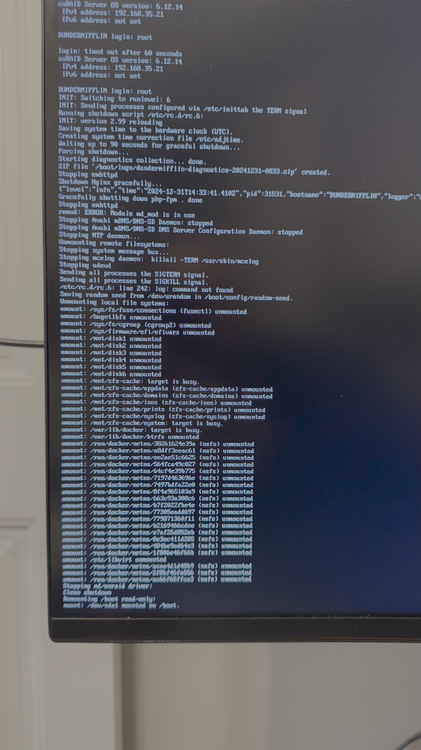
My server keeps having bouts of unresponsiveness. When it is unresponsive 50% of the time, it's just the GUI/SSH/Console that are unresponsive. VMs and containers keep working. Other times my containers are unresponsive also (Plex and others). When I say console, I mean directly connected to the server with KVM. When I try to login via KVM I enter the username and it hangs for 60 seconds and then says the login timed out. I finally hit "control alt delete" and the server started to reboot, and did a forced shutdown. Screenshot of those attached as well. I do know that I left a GUI link up to my Unraid server on my "sleeping" MacBook. The logs that I see when I'm able to get into the GUI are just generic php-fhm and www pool logs, that I find very little about other than "don't keep a GUI open" (which blows my mind that is still an issue). Please help. This diagnostic was generated automatically when doing the forced shutdown. dundermifflin-diagnostics-20241231-0833.zip syslog-previous
-
My Unraid server is crashing multiple times per week, as reported by Plex users. At least two times I've seen it happen personally I was watching a Plex LiveTV from my HDHomeRun. When it becomes unresponsive, all my containers and VMs stop "working". Adguard DNS is unresponsive and Plex stops. I can't HTTPS or SSH to Unraid, but I can ping the server. My HomeAssistant VM is also unresponsive. Both times the logs have php-fpm errors for pool www, which appears to be the web server or reverse proxy for Unraid (NGINX). I also see in my logs a couple I/O errors for /dev/sda...which is my flash drive. looking into those now, but they're not at the same time as the issue. They seem to happen during the flash drive backup. Could it be related? Oct 10 05:06:31 DUNDERMIFFLIN kernel: I/O error, dev sda, sector 9940182 op 0x0:(READ) flags 0x80700 phys_seg 1 prio class 2 Oct 7 20:10:00 DUNDERMIFFLIN rsyslogd: [origin software="rsyslogd" swVersion="8.2102.0" x-pid="9531" x-info="https://www.rsyslog.com"] rsyslogd was HUPed Oct 7 21:07:11 DUNDERMIFFLIN php-fpm[8156]: [WARNING] [pool www] child 525 exited on signal 9 (SIGKILL) after 15.221162 seconds from start Oct 7 21:07:25 DUNDERMIFFLIN php-fpm[8156]: [WARNING] [pool www] child 557 exited on signal 9 (SIGKILL) after 12.457896 seconds from start Oct 7 21:07:38 DUNDERMIFFLIN php-fpm[8156]: [WARNING] [pool www] child 585 exited on signal 9 (SIGKILL) after 13.360187 seconds from start Oct 7 21:12:43 DUNDERMIFFLIN php-fpm[8156]: [WARNING] [pool www] child 624 exited on signal 9 (SIGKILL) after 302.225506 seconds from start Oct 7 21:13:51 DUNDERMIFFLIN webGUI: Successful login user root from 192.168.34.7 Oct 7 21:23:21 DUNDERMIFFLIN webGUI: Unsuccessful login user root from 192.168.34.7 Oct 7 21:23:25 DUNDERMIFFLIN webGUI: Successful login user root from 192.168.34.7 Oct 14 20:52:05 DUNDERMIFFLIN php-fpm[8156]: [WARNING] [pool www] child 22752 exited on signal 9 (SIGKILL) after 12.648918 seconds from start Oct 14 20:52:17 DUNDERMIFFLIN php-fpm[8156]: [WARNING] [pool www] child 22914 exited on signal 9 (SIGKILL) after 11.826932 seconds from start Oct 14 20:52:29 DUNDERMIFFLIN php-fpm[8156]: [WARNING] [pool www] child 23117 exited on signal 9 (SIGKILL) after 12.055986 seconds from start Oct 14 20:52:29 DUNDERMIFFLIN emhttpd: read SMART /dev/sdf Oct 14 20:52:41 DUNDERMIFFLIN php-fpm[8156]: [WARNING] [pool www] child 23272 exited on signal 9 (SIGKILL) after 12.191249 seconds from start Oct 14 20:52:54 DUNDERMIFFLIN php-fpm[8156]: [WARNING] [pool www] child 23398 exited on signal 9 (SIGKILL) after 12.778874 seconds from start Oct 14 20:53:08 DUNDERMIFFLIN php-fpm[8156]: [WARNING] [pool www] child 23444 exited on signal 9 (SIGKILL) after 13.847954 seconds from start Oct 14 20:55:30 DUNDERMIFFLIN nginx: 2024/10/14 20:55:30 [error] 9738#9738: *1201487 recv() failed (104: Connection reset by peer) while reading response header from upstream, client: 172.17.0.11, server: , request: "GET /Main HTTP/1.1", subrequest: "/auth-request.php", upstream: "fastcgi://unix:/var/run/php5-fpm.sock:", host: "dundermifflin.domain.us" Oct 14 20:55:30 DUNDERMIFFLIN nginx: 2024/10/14 20:55:30 [error] 9738#9738: *1201487 auth request unexpected status: 502 while sending to client, client: 172.17.0.11, server: , request: "GET /Main HTTP/1.1", host: "dundermifflin.domain.us" Oct 14 20:57:14 DUNDERMIFFLIN php-fpm[8156]: [WARNING] [pool www] child 24010 exited on signal 9 (SIGKILL) after 196.943122 seconds from start dundermifflin-diagnostics-20241014-2121.zip
-
Dashboard page is intermittently not loading. The top bar shown below would load, but everything else under would be blank. I did restart nginx to see if that fixed it, and it didn't seem to...but as I came here to write this bug report, it's working again. Not sure if the nginx restart "fixed" it or not. dundermifflin-diagnostics-20230630-2231.zip
-
I did 4 passes of all tests, memory passed… I have another issue and I don’t know if it’s relevant, but may be worth mentioning as it started at the same time. Plex videos all have blocky artifacts at times, regardless if they’re direct play or transcode. Regardless of the player type or if they’re local or remote viewers. It happens every 30 seconds or so in the videos.
-
I'm hoping someone can assist. I understand that doing an xfs_repair fixes, but I keep having to do this on several disks. Just had to do on md2...
-
Hello, First time poster...I have an Unraid setup running on an HP EliteDesk 800 G3 Tower. I know this is a no no...but my array disks are connected via a USB 3.0 shelf. Cache is an M.2 and the dual parity are onboard SATA. I keep having issues where my file syncing program stops being able to access directories. When I go look via CLI, I get errors that the structure needs cleaned. I took a look at the logs and it reports that I need to run xfs_repair on md4, which is the disk having issues. The biggest concern is I just had this issue happen the other day in a different directory and with disk 3. I'm wondering if you all can help figure out what exactly is happening. root@DUNDERMIFFLIN:/mnt/user/videos/hdmovies/local# ls /bin/ls: reading directory '.': Structure needs cleaning root@DUNDERMIFFLIN:/mnt/disk4/videos/hdmovies/local# ls -l | grep ?? /bin/ls: cannot access 'Short Cuts (1993)': Structure needs cleaning d????????? ? ? ? ? ? Short\ Cuts\ (1993)/ Nov 12 13:12:17 DUNDERMIFFLIN kernel: XFS (md4): Metadata corruption detected at xfs_dinode_verify+0xa3/0x581 [xfs], inode 0x101648118 dinode Nov 12 13:12:17 DUNDERMIFFLIN kernel: XFS (md4): Unmount and run xfs_repair dundermifflin-diagnostics-20211112-1930.zip



