



Skip to content
View in the app

A better way to browse. Learn more.

Unraid

A full-screen app on your home screen with push notifications, badges and more.

To install this app on iOS and iPadOS
  1. Tap the Share icon in Safari
  2. Scroll the menu and tap Add to Home Screen.
  3. Tap Add in the top-right corner.
To install this app on Android
  1. Tap the 3-dot menu (⋮) in the top-right corner of the browser.
  2. Tap Add to Home screen or Install app.
  3. Confirm by tapping Install.

Quibz

Members
  • Joined

  • Last visited

  1. Thank you so much! Everything is working as expected.
  2. When I run that command that share (l-----y) is capitalized even though in the unRAID gui it is lowercase.
  3. I noticed that new shares work as expected with the mover.
  4. I also removed the plugin and rebooted as you recommended.
  5. I recently added a file to test the mover for the share (p-----k) and the mover successfully moved that file. However, the files within the share l-----y were still not moved. Is my configuration wrong for this share? server-diagnostics-20250930-1340.zip
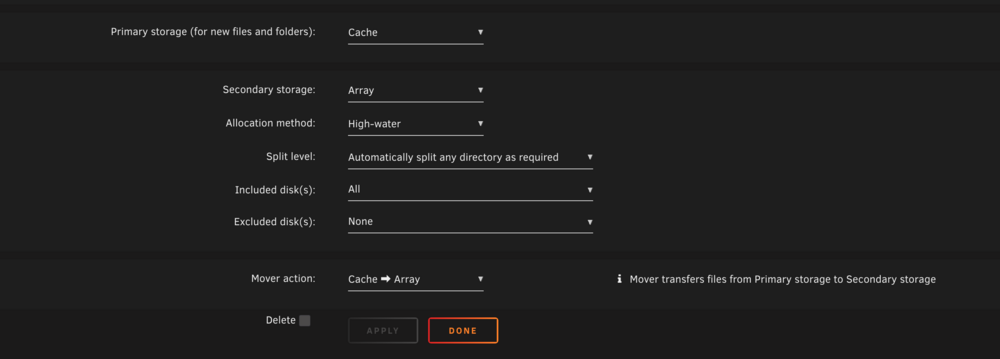
  6. I have tried everything but the mover button does not seem to move any files from my cache pool to my disks. Could someone please help me out? server-diagnostics-20250930-1259.zip

Account

Navigation

Search

Search

Configure browser push notifications

Chrome (Android)
  1. Tap the lock icon next to the address bar.
  2. Tap Permissions → Notifications.
  3. Adjust your preference.
Chrome (Desktop)
  1. Click the padlock icon in the address bar.
  2. Select Site settings.
  3. Find Notifications and adjust your preference.