





daniels89
Members
-
Joined
-
Last visited
-
It took a little tinkering but I got back into Unraid! All my dockers are working except Plex, so I'm restoring to a backup from last week. Hoping that repairs that! Thanks again for all your help on this! Saved me some headaches!
-
Alright, I will give this the college try after work. Thanks for the help! By copying the /config folder will it be like nothing ever happened?
-
So to make sure I'm on the same page... Back up the current USB. (Can I just copy the files off the current USB to my desktop to make a backup?) Use the USB Tool to make a fresh install of Unraid. I wasn't on the newest version. Should I use the previous OS that I was on or the newest? If it boots with the fresh Unraid. Copy/paste to replace the /config from my back up to the USB I tried downloading a backup of the config from Unraid Connect but when I installed it to a brand new different USB drive with the USB Tool the server wouldn't boot to it.
-
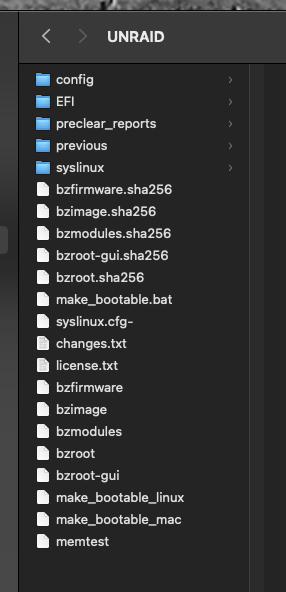
This is all I have when I open the USB. P.S. Happy F1 season! So excited for the race this weekend!
-
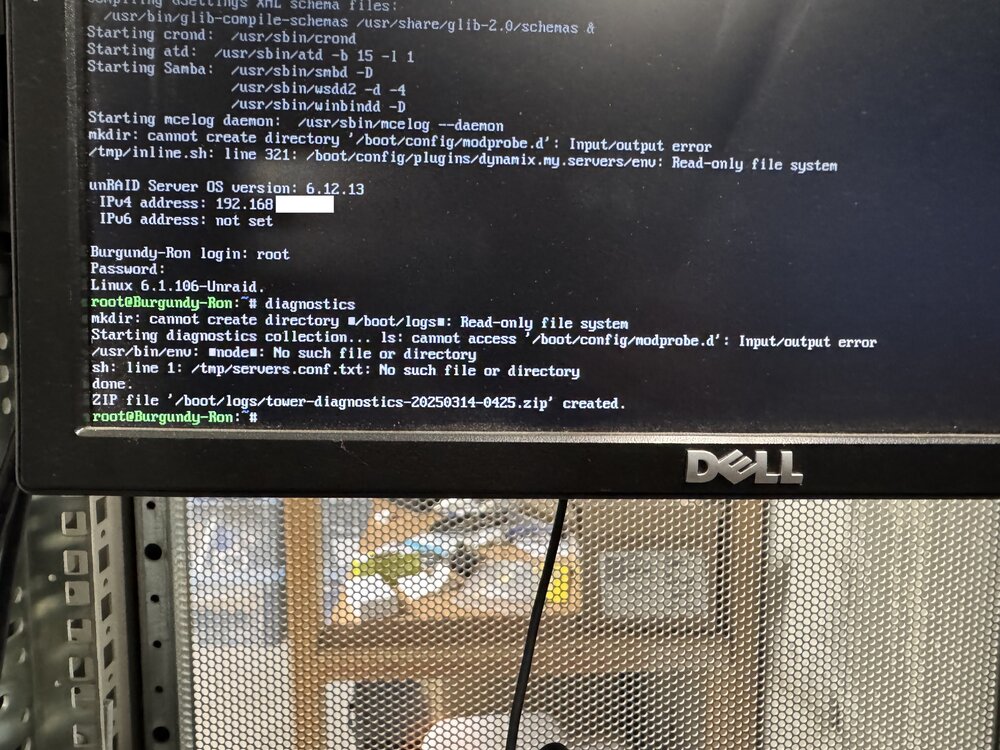
I jumped into the USB and I don't see a /boot/logs folder or a diagnostics.zip file but I took this picture off the screen. I had a EFI/boot/ but there were no zip in it. I look through the USB on both a mac and pc and didn't see the folders.
-
Hi All! yesterday Plex wasn't loading. I tried restarting the docker and it still didn't run. I rebooted the server and since then I can't access it via the IP Unraid provides on the screen. I can log into the server directly with root but nothing accessible via the IP. My dockers and network shares are not loading either. I tried booting into the GUI and safe more with gui and it isn't accessible there even though it accepts my root user and pass. Any suggestions? I have a new USB on the way to try that but I feel like if I can log into the GUI it isn't the USB. I read a few posts that said to run the "Slim" command so I'll try that tonight. I can ping the server and it is showing up in my Unifi Controller. Any suggestions would be appreciated.

