





supacupa
Members
-
Joined
-
Last visited
Everything posted by supacupa
-
Agreed, it doesn't make sense. It's not the drives since this problem shows itself on other SAS drives. It's also not likely to be the controller as the problems showed itself on two separate controllers and I've not seen others report this problem on either of them. After a lot of testing and changing things out it's clear the problem is following the server and the UNRAID install. The server has not changed, but the UNRAID install has, so that is the most likely culprit. This same drive and controller setup works find on my EndeavourOS PC which is currently using 6.10.4-zen2-1-zen kernel, and my Debian server which is currently using the 6.9.7+bpo-amd64 kernel. If the 6.8.12-Unraid kernel is to blame there's not much I can do about that other than rollback and stick with slowly aging software with the hope some future update fixes it. I do firmware development so I'm familiar with figuring this kind of problem on bare metal, but I don't really know where to start with Linux unless I can find information online on what component to debug, something I've had some trouble with doing on UNRAID. If something isn't doing what it should be doing it should be possible to trace it. Any ideas on where I can start? Any advice will be appreciated. I need to have somewhat reliable speed which I did have before all this started. It was working perfectly fine on the previous UNRAID version and had been for many years. I was using these exact same drives with this exact same controller about three years ago. I switched to the older LSI card since I had an expander and could run more HDDs, but as I no longer have a need for hundreds of TBs of storage I simplified it to 4 primary 12 TB disks using the rest as cold storage. I primarily use UNRAID for VMs and Dockers. The UNRAID method of data storage and backup was nice back when I had an assortment of disks, but now that I have dozens of the same types of disks with many spares, it may not be the best method of data storage for me now, at least not when its this inconsistent. My current options seem to be as follows: 1. Find and solve the problem so I can continue using UNRAID as I do. That may involve rolling back to an older UNRAID version, which may mean I no longer can update UNRAID which may or may not be a problem. 2. Perhaps attempt to pass the HBA through to a VM and use RAIDZ pools for data storage and let UNRAID focus on only VMs and Dockers. This is a somewhat silly option, but I could see it working. Probably not worth the headache, though. 3. Install another OS that works correctly and run Dockers and VMs the old fashioned way. When I started using UNRAID something like 4 or 5 years ago I didn't have the time to do that, but I've now have other servers I manage and have figured out better ways to do so, so this might be the best option. I've already spent way too much time on this problem and am worried more compatibility issues may crop up in future UNRAID builds.
-
How do I go about finding out where the bottleneck is? There has to be some method of debugging this.
-
Might not be the right setting, but it made a difference. Going through FUSE is now fast and going directly is slow, which is very strange to me. Any tips on what I should set the tunables to? Perhaps I need to write a script to try out several settings to get optimal performance for both use cases. Edit: Actually, cancel that. After trying again through FUSE it's back to running slow. This isn't making any sense at all. It was just writing at acceptable speeds.




-
Now we're gettin' somewhere!!


-
This seems wrong. I'm going to try setting it to 8 in the GUI. root@Blade:~# cat /sys/block/sdl/queue/nr_requests 256
-
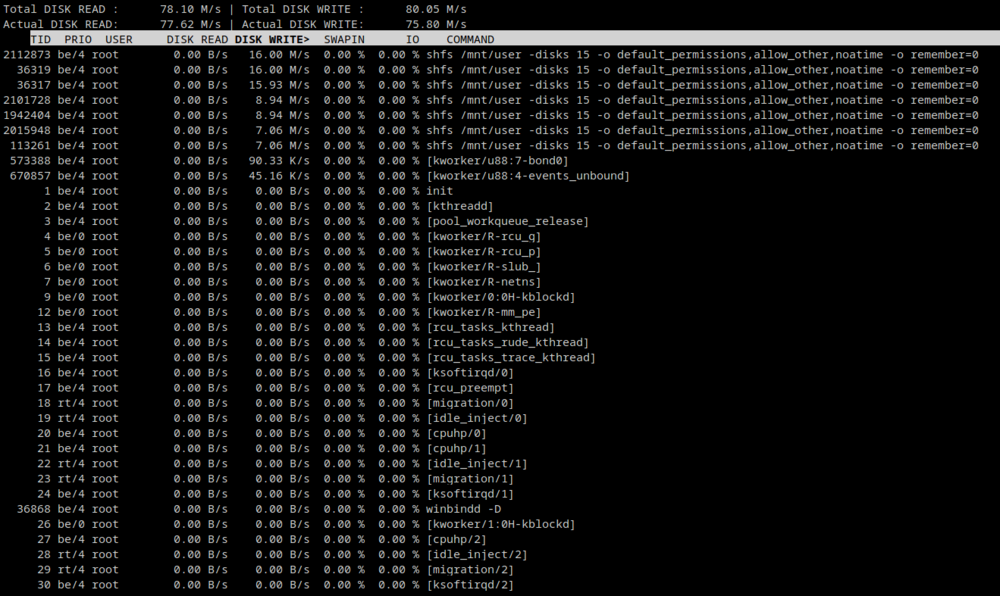
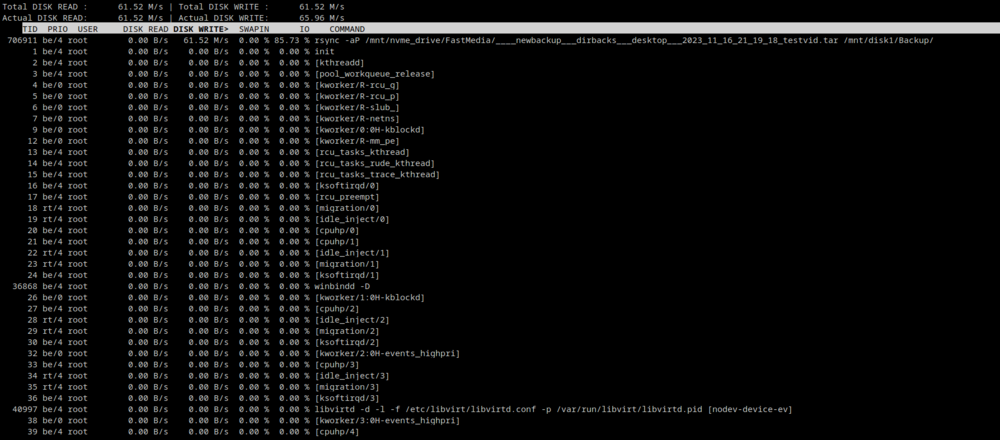
Is this normal for a disk write? Seeing several shfs commands when using rsync from the NVME to one of the disks on the array through FUSE. I'm guessing it is, but I'm not sure where to look for the problem at this point. When not going through FUSE: iowait% is fairly high considering this is a 22 core hyperthread machine. avg-cpu: %user %nice %system %iowait %steal %idle 0.4% 0.0% 1.0% 2.9% 0.0% 95.6% Device r/s rkB/s rrqm/s %rrqm r_await rareq-sz w/s wkB/s wrqm/s %wrqm w_await wareq-sz d/s dkB/s drqm/s %drqm d_await dareq-sz f/s f_await aqu-sz %util loop0 0.00 0.0k 0.00 0.0% 0.00 0.0k 0.00 0.0k 0.00 0.0% 0.00 0.0k 0.00 0.0k 0.00 0.0% 0.00 0.0k 0.00 0.00 0.00 0.0% loop1 0.60 12.0k 0.00 0.0% 0.00 20.0k 0.00 0.0k 0.00 0.0% 0.00 0.0k 0.00 0.0k 0.00 0.0% 0.00 0.0k 0.00 0.00 0.00 0.0% loop2 0.00 0.0k 0.00 0.0% 0.00 0.0k 0.80 4.0k 0.00 0.0% 0.00 5.0k 0.00 0.0k 0.00 0.0% 0.00 0.0k 0.00 0.00 0.00 0.0% loop3 0.00 0.0k 0.00 0.0% 0.00 0.0k 0.00 0.0k 0.00 0.0% 0.00 0.0k 0.00 0.0k 0.00 0.0% 0.00 0.0k 0.00 0.00 0.00 0.0% nvme0n1 276.00 46.0M 0.00 0.0% 0.35 170.7k 0.00 0.0k 0.00 0.0% 0.00 0.0k 0.00 0.0k 0.00 0.0% 0.00 0.0k 0.00 0.00 0.10 6.6% sda 0.00 0.0k 0.00 0.0% 0.00 0.0k 0.00 0.0k 0.00 0.0% 0.00 0.0k 0.00 0.0k 0.00 0.0% 0.00 0.0k 0.00 0.00 0.00 0.0% sdb 0.00 0.0k 0.00 0.0% 0.00 0.0k 0.00 0.0k 0.00 0.0% 0.00 0.0k 0.00 0.0k 0.00 0.0% 0.00 0.0k 0.00 0.00 0.00 0.0% sdc 0.00 0.0k 0.00 0.0% 0.00 0.0k 0.00 0.0k 0.00 0.0% 0.00 0.0k 0.00 0.0k 0.00 0.0% 0.00 0.0k 0.00 0.00 0.00 0.0% sdd 0.00 0.0k 0.00 0.0% 0.00 0.0k 0.00 0.0k 0.00 0.0% 0.00 0.0k 0.00 0.0k 0.00 0.0% 0.00 0.0k 0.00 0.00 0.00 0.0% sde 0.00 0.0k 0.00 0.0% 0.00 0.0k 0.00 0.0k 0.00 0.0% 0.00 0.0k 0.00 0.0k 0.00 0.0% 0.00 0.0k 0.00 0.00 0.00 0.0% sdf 0.00 0.0k 0.00 0.0% 0.00 0.0k 0.00 0.0k 0.00 0.0% 0.00 0.0k 0.00 0.0k 0.00 0.0% 0.00 0.0k 0.00 0.00 0.00 0.0% sdg 947.80 60.4M 14481.40 93.9% 17.96 65.2k 785.20 60.4M 14632.40 94.9% 21.34 78.8k 0.00 0.0k 0.00 0.0% 0.00 0.0k 0.20 40.00 33.79 96.0% sdh 0.00 0.0k 0.00 0.0% 0.00 0.0k 0.00 0.0k 0.00 0.0% 0.00 0.0k 0.00 0.0k 0.00 0.0% 0.00 0.0k 0.00 0.00 0.00 0.0% sdi 0.00 0.0k 0.00 0.0% 0.00 0.0k 0.00 0.0k 0.00 0.0% 0.00 0.0k 0.00 0.0k 0.00 0.0% 0.00 0.0k 0.00 0.00 0.00 0.0% sdj 0.00 0.0k 0.00 0.0% 0.00 0.0k 0.00 0.0k 0.00 0.0% 0.00 0.0k 0.00 0.0k 0.00 0.0% 0.00 0.0k 0.00 0.00 0.00 0.0% sdk 0.00 0.0k 0.00 0.0% 0.00 0.0k 0.00 0.0k 0.00 0.0% 0.00 0.0k 0.00 0.0k 0.00 0.0% 0.00 0.0k 0.00 0.00 0.00 0.0% sdl 944.00 60.3M 14484.20 93.9% 17.66 65.4k 784.60 60.2M 14626.20 94.9% 22.82 78.6k 0.00 0.0k 0.00 0.0% 0.00 0.0k 0.20 49.00 34.58 97.1% sdm 0.00 0.0k 0.00 0.0% 0.00 0.0k 0.00 0.0k 0.00 0.0% 0.00 0.0k 0.00 0.0k 0.00 0.0% 0.00 0.0k 0.00 0.00 0.00 0.0% sdn 0.00 0.0k 0.00 0.0% 0.00 0.0k 0.60 2.4k 0.00 0.0% 0.00 4.0k 0.00 0.0k 0.00 0.0% 0.00 0.0k 0.00 0.00 0.00 0.0% sdo 0.00 0.0k 0.00 0.0% 0.00 0.0k 1.00 4.8k 0.00 0.0% 0.20 4.8k 0.00 0.0k 0.00 0.0% 0.00 0.0k 0.00 0.00 0.00 0.0% sdp 0.00 0.0k 0.00 0.0% 0.00 0.0k 0.60 3.2k 0.20 25.0% 4.67 5.3k 0.00 0.0k 0.00 0.0% 0.00 0.0k 0.00 0.00 0.00 0.1% sdq 0.00 0.0k 0.00 0.0% 0.00 0.0k 0.00 0.0k 0.00 0.0% 0.00 0.0k 0.00 0.0k 0.00 0.0% 0.00 0.0k 0.00 0.00 0.00 0.0% sdr 0.00 0.0k 0.00 0.0% 0.00 0.0k 0.00 0.0k 0.00 0.0% 0.00 0.0k 0.00 0.0k 0.00 0.0% 0.00 0.0k 0.00 0.00 0.00 0.0% sds 0.00 0.0k 0.00 0.0% 0.00 0.0k 0.80 4.0k 0.00 0.0% 4.75 5.0k 0.00 0.0k 0.00 0.0% 0.00 0.0k 0.00 0.00 0.00 0.2% sdt 0.00 0.0k 0.00 0.0% 0.00 0.0k 0.00 0.0k 0.00 0.0% 0.00 0.0k 0.00 0.0k 0.00 0.0% 0.00 0.0k 0.00 0.00 0.00 0.0%
-
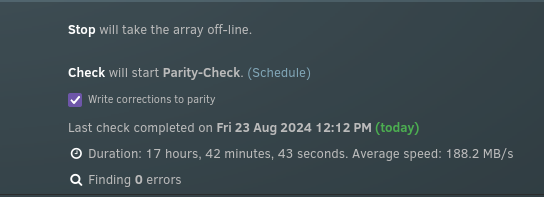
Same problem with BTRFS. These drives worked perfectly well before. They work perfectly fine outside of the array. I transferred from the XFS array to these three new disks and then let the parity sync which took a normal amount of time. Something is wrong when it comes to writing with parity enabled. What other things can I check, is reinstalling UNRAID the next step? Maybe the problem is with the beta. Maybe downgrading is what's needed.


-
They were working fine before, and the problem also showed itself on the XFS array, but I'm copying the entire array to the old XFS drives which have been reformatted to BTRFS to see if that helps now. It'll take a while before I'll know if that makes a difference.
-
OK, so removing the USB drives did nothing, but making a new array without parity on one of the 2.5 inch HDDs is running at its full speed, something it was not able to do in its own pool when the old array was in. RSYNC from NVME drive to SAS array through FUSE after removing USB pool (Average was around 90 MB/s, under half what the drive is capable of at its current fill level): root@Blade:/mnt# rsync -aP /mnt/user/FastMedia/____newbackup___dirbacks___desktop___2023_11_16_21_19_18_testvid.tar /mnt/user/Backup/ sending incremental file list ____newbackup___dirbacks___desktop___2023_11_16_21_19_18_testvid.tar 13,288,439,808 4% 90.00MB/s 0:51:57 ^C RSYNC from NVME to SAS array direct after removing USB pool (Average was around 90 MB/s, under half what the drive is capable of at its current fill level): root@Blade:/mnt# rsync -aP /mnt/nvme_drive/FastMedia/____newbackup___dirbacks___desktop___2023_11_16_21_19_18_testvid.tar /mnt/disk1/Backup/ sending incremental file list ____newbackup___dirbacks___desktop___2023_11_16_21_19_18_testvid.tar 13,893,992,448 4% 85.04MB/s 0:54:52 ^C RSYNC from NVME to new single SATA disk (XFS) parityless array through FUSE (100 MB/s is pretty close to the maximum speed of this disk at this fill level, empty): root@Blade:~# rsync -aP /mnt/user/FastMedia/____newbackup___dirbacks___desktop___2023_11_16_21_19_18_testvid.tar /mnt/user/test/ sending incremental file list ____newbackup___dirbacks___desktop___2023_11_16_21_19_18_testvid.tar 17,351,933,952 5% 100.75MB/s 0:45:45 ^C RSYNC from NVME to new single SATA disk (ZFS compressed) parityless array through FUSE (Less than half the speed of XFS): rsync -aP /mnt/user/FastMedia/____newbackup___dirbacks___desktop___2023_11_16_21_19_18_testvid.tar /mnt/user/test/ sending incremental file list ____newbackup___dirbacks___desktop___2023_11_16_21_19_18_testvid.tar 9,871,884,288 3% 41.85MB/s 1:53:05 ^C RSYNC from NVME to new single SATA disk (ZFS) parityless array through FUSE (Less than half the speed of XFS, about the same with ZFS compression on): rsync -aP /mnt/user/FastMedia/____newbackup___dirbacks___desktop___2023_11_16_21_19_18_testvid.tar /mnt/user/test/ sending incremental file list ____newbackup___dirbacks___desktop___2023_11_16_21_19_18_testvid.tar 9,905,471,488 3% 42.94MB/s 1:50:11 ^C RSYNC from NVME to new single SATA disk (BTRFS compressed) parityless array through FUSE (Near maximum speed of this HDD at this fill level, empty): rsync -aP /mnt/user/FastMedia/____newbackup___dirbacks___desktop___2023_11_16_21_19_18_testvid.tar /mnt/user/test/ sending incremental file list ____newbackup___dirbacks___desktop___2023_11_16_21_19_18_testvid.tar 19,727,220,736 6% 104.44MB/s 0:43:46 ^C RSYNC from NVME to new single SATA disk (BTRFS) parityless array through FUSE (About the same as with BTRFS with compression on): rsync -aP /mnt/user/FastMedia/____newbackup___dirbacks___desktop___2023_11_16_21_19_18_testvid.tar /mnt/user/test/ sending incremental file list ____newbackup___dirbacks___desktop___2023_11_16_21_19_18_testvid.tar 17,185,210,368 5% 106.21MB/s 0:43:26 ^C RSYNC from NVME drive to SAS array through FUSE after doing above tests. Originally I was getting 90 MB/s, now it's down to 22 MB/s. Same disk, but different directory. This doesn't make any sense at all!: rsync -aP /mnt/user/FastMedia/____newbackup___dirbacks___desktop___2023_11_16_21_19_18_testvid.tar /mnt/user/test/ sending incremental file list ____newbackup___dirbacks___desktop___2023_11_16_21_19_18_testvid.tar 5,268,406,272 1% 22.12MB/s 3:37:20 ^C RSYNC from NVME drive to SAS array direct to disk 3, which is at about the same fill level as disk1, about the same as above: rsync -aP /mnt/nvme_drive/FastMedia/____newbackup___dirbacks___desktop___2023_11_16_21_19_18_testvid.tar /mnt/disk3/test/ sending incremental file list created directory /mnt/disk3/test ____newbackup___dirbacks___desktop___2023_11_16_21_19_18_testvid.tar 5,454,987,264 1% 22.78MB/s 3:30:53 ^C
-
Alrighty, I'll use one of the laptop HDDs I have loaded in the front of the server later today. In the pool it was acting similarly, but I'll test as the only array device. I'm getting the feeling something got changed in some setting when the large pool was attached, or maybe a bad shutdown changed something, although that doesn't make a lot of sense since everything should be in RAM and the system resides in flash. Is there some way to verify the files on the flash? My next major step is to just redo the entire install. I've done it before in the past and it's not too hard to do. UNRAID makes managing the array, dockers, and VMs quite easy. I'll also try removing my backup USB drive pool. Maybe it's causing some oddity.
-
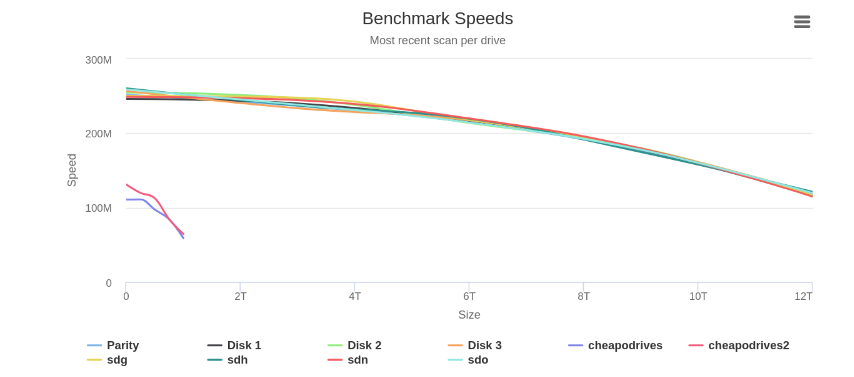
All 8 drives, the 3 XFS + parity and the 3 ZFS + parity all perform well in that test.
-
For clarification, I recently changed from XFS to ZFS, which is why I still had the old array on hand to test. Originally, RSYNCing from the XFS drives to the ZFS drives were at normal speeds. Around 250 MB/s down to about 200 MB/s as the disks became more full for large files. The array was writing about just as fast with the ZFS drives, actually, slightly faster for non compressed files. The problem didn't start until I added the 16 drive pool, not even attached to the array. I used that pool as a backup and wrote about 14 TB to it. That was at the slower speeds so it took quite a while. Since that pool is only meant as a cold backup I disconnected them but was surprised to see the low speeds continued to affect the array which was originally quite fast.
-
Yup, agreed. I am in the process of doing that as well.

-
This seems to have about doubled the speed, but it's still far lower than it should be.
-
No real change in speed using XFS I'm afraid. root@Blade:~# dd if=/dev/zero of=/mnt/disk1/Backup/testdel444.img bs=10G count=1 oflag=dsync 0+1 records in 0+1 records out 2147479552 bytes (2.1 GB, 2.0 GiB) copied, 27.0612 s, 79.4 MB/s root@Blade:~# dd if=/dev/zero of=/mnt/user/Backup/testdel4444.img bs=10G count=1 oflag=dsync 0+1 records in 0+1 records out 2147479552 bytes (2.1 GB, 2.0 GiB) copied, 118.373 s, 18.1 MB/s

-
Alrighty, I'll try out XFS, I have three XFS disks with a fourth parity drive standing by I can try later.
-
Better. I didn't think /dev/random would have slowed down an HDD test. Hitting some kind of cache on this one despite the dsync flag, I get about 1 GB/s for the first hundreds of MB over Samba: dd if=/dev/zero of=/mnt/disk1/Backup/testdel333.img bs=10G count=1 oflag=dsync 0+1 records in 0+1 records out 2147479552 bytes (2.1 GB, 2.0 GiB) copied, 1.37206 s, 1.6 GB/s This should be closer to 200 MB/s, still 106 MB/s is quite a bit better than I'm getting over Samba: dd if=/dev/zero of=/mnt/user/Backup/testdel444.img bs=10G count=1 oflag=dsync 0+1 records in 0+1 records out 2147479552 bytes (2.1 GB, 2.0 GiB) copied, 20.3244 s, 106 MB/s This is about the expected speed, maybe lower: dd if=/dev/zero of=/mnt/cheapodrives/Cheapo/testdel111.img bs=10G count=1 oflag=dsync 0+1 records in 0+1 records out 2147479552 bytes (2.1 GB, 2.0 GiB) copied, 24.5406 s, 87.5 MB/s This is far too low: dd if=/dev/zero of=/mnt/user/Cheapo/testdel222.img bs=10G count=1 oflag=dsync 0+1 records in 0+1 records out 2147479552 bytes (2.1 GB, 2.0 GiB) copied, 161.719 s, 13.3 MB/s I think the caching is making this pretty unreliable, here are some local rsync transfers of a single test file that I canceled once the transfer write was stabilized to show the actual transfer speed: Read: root@Blade:~# rsync -a -P /mnt/user/Backup/_newbackup/dirbacks/desktop/test.tar /mnt/user/FastMedia/ sending incremental file list test.tar 4,964,319,232 3% 217.49MB/s 0:11:59 Write FUSE: root@Blade:~# rsync -a -P /mnt/user/FastMedia/test.tar /mnt/user/Backup/ sending incremental file list test.tar 1,210,679,296 23% 20.76MB/s 0:03:01 Write: root@Blade:~# rsync -a -P /mnt/user/FastMedia/test.tar /mnt/disk1/Backup/ sending incremental file list test.tar 4,974,280,704 98% 20.55MB/s 0:00:04 Interestingly, bypassing FUSE made no difference here which makes me think the speedup we saw earlier was simply due to some kind of caching. These are segments of the same file which is why the file sizes don't match. It's just from cutting the rsync off early.
-
Whelp, I think my system's haunted. All my writes to any spinning disk is far lower than it should be. Anything going through /mnt/user/* is affected even more so than direct writes. I know FUSE is always going to be slower than direct, but it's never been this bad. Perhaps this is due to being on the new beta software? DiskSpeed is still showing high speeds, but writing to the filesystem is painfully slow. Reading is unaffected. I'm getting normal speeds while reading. First two dd runs are onto the cheap laptop HDDs, the second two are onto the SAS drives which are far more effected for some reason: root@Blade:/mnt/user# dd if=/dev/random of=/mnt/cheapodrives/Cheapo/testdel22.img bs=1000M count=1 oflag=dsync 1+0 records in 1+0 records out 1048576000 bytes (1.0 GB, 1000 MiB) copied, 20.9069 s, 50.2 MB/s root@Blade:/mnt/user# dd if=/dev/random of=/mnt/user/Cheapo/testdel22.img bs=1000M count=1 oflag=dsync 1+0 records in 1+0 records out 1048576000 bytes (1.0 GB, 1000 MiB) copied, 85.6297 s, 12.2 MB/s root@Blade:/mnt/user# dd if=/dev/random of=/mnt/disk1/Backup/testdel22.img bs=1000M count=1 oflag=dsync 1+0 records in 1+0 records out 1048576000 bytes (1.0 GB, 1000 MiB) copied, 71.0426 s, 14.8 MB/s root@Blade:/mnt/user# dd if=/dev/random of=/mnt/user/Backup/testdel22.img bs=1000M count=1 oflag=dsync 1+0 records in 1+0 records out 1048576000 bytes (1.0 GB, 1000 MiB) copied, 180.373 s, 5.8 MB/s Also, the speeds seem to be getting slower over time. The writes were fine at startup, then quickly reduced to about 30 MB/s. Now it's down to 5.8 MB/s. A reboot got the speeds up to about 30 MB/s again. Here's what a write looks like after restarting:

-
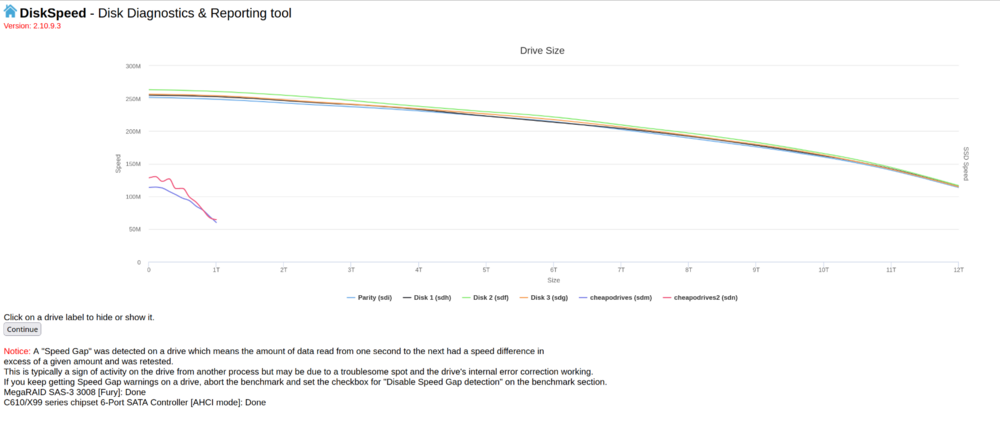
I have as well without any issue before. This is the first time I've ever had an issue like this. Swapping the HBA worked, but what's weird is I put the "bad" HBA into my desktop and had troubles at first, then it just started working normally again. Mounting it took over half a minute: ┌15:20:09 supacupa@supacupa-desktop[~] └$ sudo mkdir /mnt/sdd ┌15:21:00 supacupa@supacupa-desktop[~] └$ sudo mount /dev/sdd1 /mnt/sdd/ ┌15:21:49 supacupa@supacupa-desktop[~] └$ ls /mnt/sdd/ The first speed test was slow: ┌15:24:47 supacupa@supacupa-desktop[~] └$ dd if=/dev/zero of=/mnt/sdd/test.img bs=1G count=1 oflag=dsync 1+0 records in 1+0 records out 1073741824 bytes (1.1 GB, 1.0 GiB) copied, 29.0417 s, 37.0 MB/s But then it started working as expected: ┌15:28:03 supacupa@supacupa-desktop[~] └$ dd if=/dev/zero of=/mnt/sdd/test5.img bs=10G count=1 oflag=dsync 0+1 records in 0+1 records out 2147479552 bytes (2.1 GB, 2.0 GiB) copied, 10.1897 s, 211 MB/s ┌15:30:00 supacupa@supacupa-desktop[~] └$ dd if=/mnt/sdd/randomfile.tar.lzo of=/dev/zero bs=10G count=1 oflag=dsync 0+1 records in 0+1 records out 2147479552 bytes (2.1 GB, 2.0 GiB) copied, 11.5131 s, 187 MB/s I can't say I've ever seen anything like this before. Something was weird with the card but using it in another computer somehow fixed it after it showed the same problem. Any idea what could possibly cause that? Here's the speed test with the new controller:
-
Done, and no change. SAS drives are still limited to about 54ish MB/s.
-
Alrighty, will do right now. I was just looking through the SAS-2308-2's config utility to look for anything wrong in there, and can't find anything abnormal. I'm pretty limited on PCIe ports. I have three I can use. One has the SAS card, one has an NVME adapter, and one has a 40Gbit NIC. I'll swap the NVME adapter and SAS card as I know the NVME adapter is working at a much higher rate.
-
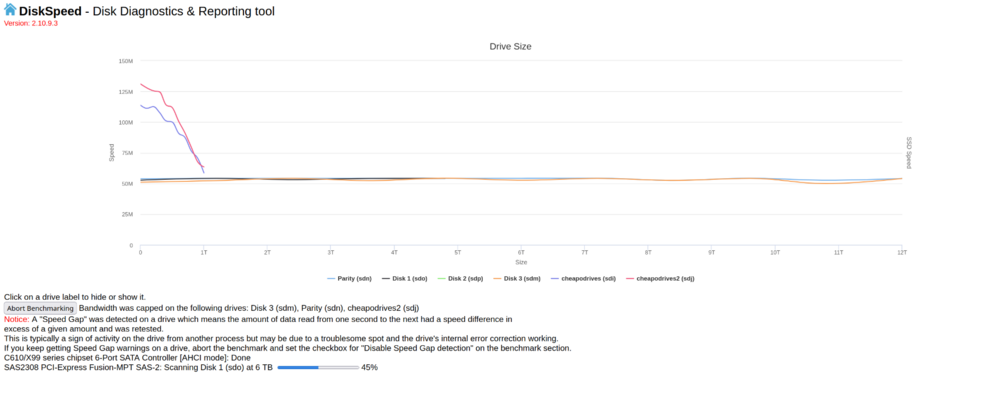
Disabling the dockers and VMs show a pretty consistent 54ish MB/s limit on the SAS drives. The other drives are now benchmarking. It's really sad to see cheap 2.5" laptop HDDs beating the pants off of 12 TB SAS drives. 😅 The benchmark is still finishing up on the SAS drives, but I suspect them all to bench similarly. I didn't check the SSDs or NVMEs in this test, but I'm not having any issues with them. The issue seems to only be affecting the SAS drives, so it must be the controller or some setting that affects it.
-
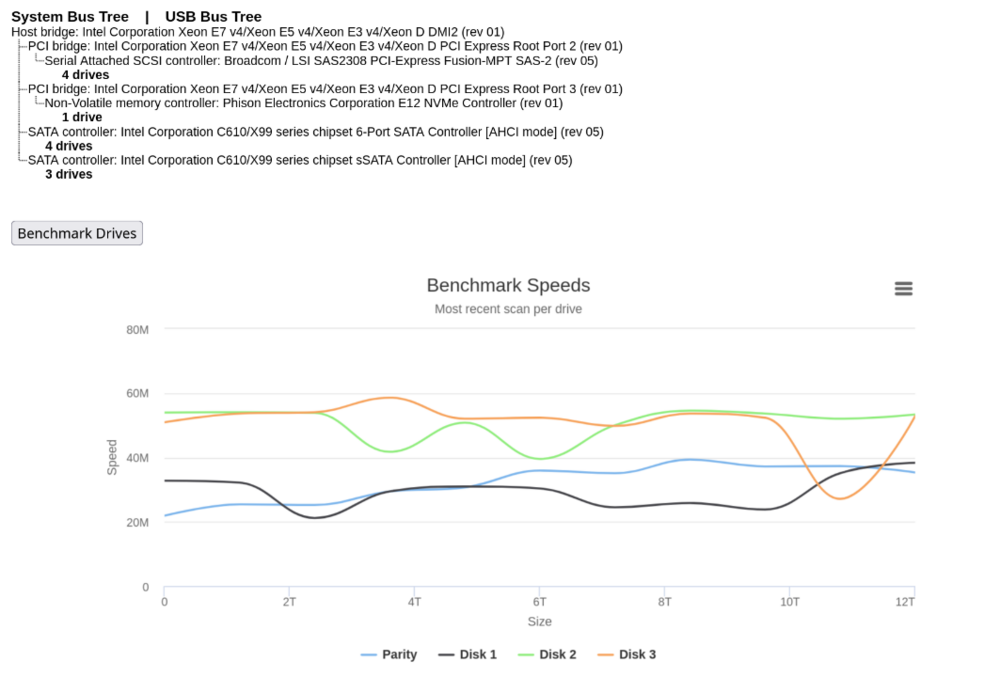
The four SAS drives benchmarked at a pretty pathetic rate, then I got "waiting" for about an hour and nothing else was getting done. I just attempted the benchmark without disabling any of the dockers or VMs (which likely caused the speed gap). I'll do that now to see if anything changes. I have a newer SAS controller I plan on putting in in place of the Broadcom as a general next step. I also plan on testing the drives and controller on another PC, and if I need to, will just wipe and redo the whole UNRAID install. Something is very wrong. While transferring files via RSYNC last night from another computer to the server I had a systemd-coredump after RSYNC hung. Unmounting and remounting the samba shares fixed it. Could the problem be too many samba shares? I have 14 samba shares and am using the host file to higher transfer rates when sending multiple files. This is a recent change and did show an improvement in speed. Although the problem didn't start until I added the large ZFS pool which was done days afterwards. I'll post the relevant parts of my Desktop's /etc/hosts and /etc/fstab just in case that's part of the problem. Benchmark: My hosts file on my desktop looks like this: 192.168.1.176 blade0 192.168.1.176 blade1 192.168.1.176 blade2 192.168.1.176 blade3 192.168.1.176 blade4 192.168.1.176 blade5 192.168.1.176 blade6 192.168.1.176 blade7 192.168.1.176 blade8 192.168.1.176 blade9 192.168.1.176 blade10 192.168.1.176 blade11 192.168.1.176 blade12 192.168.1.176 blade13 192.168.1.176 blade14 192.168.1.176 blade15 My /etc/fstab looks like this: //blade0/Backup /mnt/blade/Backup cifs vers=3.0,rw,_netdev,credentials=/root/.servcreds,noperm,dir_mode=0777,file_mode=0777 0 0 //blade1/Main /mnt/blade/Main cifs vers=3.0,rw,_netdev,credentials=/root/.servcreds,noperm,dir_mode=0777,file_mode=0777 0 0 //blade2/Media /mnt/blade/Media cifs vers=3.0,rw,_netdev,credentials=/root/.servcreds,noperm,dir_mode=0777,file_mode=0777 0 0 //blade3/Cheapo /mnt/blade/Cheapo cifs vers=3.0,rw,_netdev,credentials=/root/.servcreds,noperm,dir_mode=0777,file_mode=0777 0 0 //blade4/FastMedia /mnt/blade/FastMedia cifs vers=3.0,rw,_netdev,credentials=/root/.servcreds,noperm,dir_mode=0777,file_mode=0777 0 0 //blade5/Phoneback /mnt/blade/Phoneback cifs vers=3.0,rw,_netdev,credentials=/root/.servcreds,noperm,dir_mode=0777,file_mode=0777 0 0 //blade6/Speedy /mnt/blade/Speedy cifs vers=3.0,rw,_netdev,credentials=/root/.servcreds,noperm,dir_mode=0777,file_mode=0777 0 0 //blade7/appdata /mnt/blade/appdata cifs vers=3.0,rw,_netdev,credentials=/root/.servcreds,noperm,dir_mode=0777,file_mode=0777 0 0 //blade8/domains /mnt/blade/domains cifs vers=3.0,rw,_netdev,credentials=/root/.servcreds,noperm,dir_mode=0777,file_mode=0777 0 0 //blade9/isos /mnt/blade/isos cifs vers=3.0,rw,_netdev,credentials=/root/.servcreds,noperm,dir_mode=0777,file_mode=0777 0 0 //blade10/porp /mnt/blade/porp cifs vers=3.0,rw,_netdev,credentials=/root/.servcreds,noperm,dir_mode=0777,file_mode=0777 0 0 //blade12/Quad /mnt/blade/Quad cifs vers=3.0,rw,_netdev,credentials=/root/.servcreds,noperm,dir_mode=0777,file_mode=0777 0 0 //blade13/bindata /mnt/blade/bindata cifs vers=3.0,rw,_netdev,credentials=/root/.servcreds,noperm,dir_mode=0777,file_mode=0777 0 0 //blade14/binbak /mnt/blade/binbak cifs vers=3.0,rw,_netdev,credentials=/root/.servcreds,noperm,dir_mode=0777,file_mode=0777 0 0
-
Oops, sorry, I thought I attached that, but must not have done it right. blade-diagnostics-20240813-2122.zip
-
UNRAID version is currently 7.0.0-beta.2 since I attempted an upgrade to see if it would make a difference. I was using 6.12.10 when this started. It's been ongoing for a few weeks now and so far I can't figure out what's causing it. I have four 12 TB SAS2 drives in my data array. I was getting pretty consistent file transfer speeds between 200 and 250 MB/s transfer speeds before I added a 16 disk ZFS pool of 2TB SAS1 drives and after adding it my transfer speeds on the data array slowed to between 15 and 60 MB/s. After completely removing both the pool in UNRAID and the physicals disks from the LBA card, my transfer speeds are still very slow. File transfers between disks on the server itself are just as slow as network transfers, also a parity rebuild used to take about 24 hours to complete, but the last one took nearly three days. I've tried both the mq-deadline and bfq schedulers with pretty much no difference. Something has changed that has slowed my SAS drives considerably, but I have no idea what it could be or how I can find the bottleneck. Any help at all would be appreciated. `iostat --human -x 1` output looks like this during a transfer of a single 200ish GB file: avg-cpu: %user %nice %system %iowait %steal %idle 0.2% 0.0% 0.6% 2.3% 0.0% 96.9% Device r/s rkB/s rrqm/s %rrqm r_await rareq-sz w/s wkB/s wrqm/s %wrqm w_await wareq-sz d/s dkB/s drqm/s %drqm d_await dareq-sz f/s f_await aqu-sz %util loop0 0.00 0.0k 0.00 0.0% 0.00 0.0k 0.00 0.0k 0.00 0.0% 0.00 0.0k 0.00 0.0k 0.00 0.0% 0.00 0.0k 0.00 0.00 0.00 0.0% loop1 0.00 0.0k 0.00 0.0% 0.00 0.0k 0.00 0.0k 0.00 0.0% 0.00 0.0k 0.00 0.0k 0.00 0.0% 0.00 0.0k 0.00 0.00 0.00 0.0% loop2 0.00 0.0k 0.00 0.0% 0.00 0.0k 0.00 0.0k 0.00 0.0% 0.00 0.0k 0.00 0.0k 0.00 0.0% 0.00 0.0k 0.00 0.00 0.00 0.0% loop3 0.00 0.0k 0.00 0.0% 0.00 0.0k 0.00 0.0k 0.00 0.0% 0.00 0.0k 0.00 0.0k 0.00 0.0% 0.00 0.0k 0.00 0.00 0.00 0.0% nvme0n1 0.00 0.0k 0.00 0.0% 0.00 0.0k 0.00 0.0k 0.00 0.0% 0.00 0.0k 0.00 0.0k 0.00 0.0% 0.00 0.0k 0.00 0.00 0.00 0.0% sda 0.00 0.0k 0.00 0.0% 0.00 0.0k 0.00 0.0k 0.00 0.0% 0.00 0.0k 0.00 0.0k 0.00 0.0% 0.00 0.0k 0.00 0.00 0.00 0.0% sdb 0.00 0.0k 0.00 0.0% 0.00 0.0k 0.00 0.0k 0.00 0.0% 0.00 0.0k 0.00 0.0k 0.00 0.0% 0.00 0.0k 0.00 0.00 0.00 0.0% sdc 0.00 0.0k 0.00 0.0% 0.00 0.0k 0.00 0.0k 0.00 0.0% 0.00 0.0k 0.00 0.0k 0.00 0.0% 0.00 0.0k 0.00 0.00 0.00 0.0% sdd 0.00 0.0k 0.00 0.0% 0.00 0.0k 0.00 0.0k 0.00 0.0% 0.00 0.0k 0.00 0.0k 0.00 0.0% 0.00 0.0k 0.00 0.00 0.00 0.0% sde 0.00 0.0k 0.00 0.0% 0.00 0.0k 0.00 0.0k 0.00 0.0% 0.00 0.0k 0.00 0.0k 0.00 0.0% 0.00 0.0k 0.00 0.00 0.00 0.0% sdf 0.00 0.0k 0.00 0.0% 0.00 0.0k 23.00 136.0k 5.00 17.9% 0.96 5.9k 0.00 0.0k 0.00 0.0% 0.00 0.0k 0.00 0.00 0.02 0.6% sdg 0.00 0.0k 0.00 0.0% 0.00 0.0k 21.00 108.0k 3.00 12.5% 0.86 5.1k 0.00 0.0k 0.00 0.0% 0.00 0.0k 0.00 0.00 0.02 0.6% sdh 0.00 0.0k 0.00 0.0% 0.00 0.0k 13.00 52.0k 0.00 0.0% 1.62 4.0k 0.00 0.0k 0.00 0.0% 0.00 0.0k 0.00 0.00 0.02 0.6% sdi 0.00 0.0k 0.00 0.0% 0.00 0.0k 0.00 0.0k 0.00 0.0% 0.00 0.0k 0.00 0.0k 0.00 0.0% 0.00 0.0k 0.00 0.00 0.00 0.0% sdj 0.00 0.0k 0.00 0.0% 0.00 0.0k 0.00 0.0k 0.00 0.0% 0.00 0.0k 0.00 0.0k 0.00 0.0% 0.00 0.0k 0.00 0.00 0.00 0.0% sdk 0.00 0.0k 0.00 0.0% 0.00 0.0k 24.00 116.0k 4.00 14.3% 0.92 4.8k 0.00 0.0k 0.00 0.0% 0.00 0.0k 0.00 0.00 0.02 0.5% sdl 0.00 0.0k 0.00 0.0% 0.00 0.0k 0.00 0.0k 0.00 0.0% 0.00 0.0k 0.00 0.0k 0.00 0.0% 0.00 0.0k 0.00 0.00 0.00 0.0% sdm 0.00 0.0k 0.00 0.0% 0.00 0.0k 0.00 0.0k 0.00 0.0% 0.00 0.0k 0.00 0.0k 0.00 0.0% 0.00 0.0k 0.00 0.00 0.00 0.0% sdn 360.00 18.9M 4126.00 92.0% 145.92 53.7k 179.00 16.9M 4436.00 96.1% 40.61 96.6k 0.00 0.0k 0.00 0.0% 0.00 0.0k 0.00 0.00 59.80 100.0% sdo 336.00 18.0M 4126.00 92.5% 93.39 54.7k 194.00 18.5M 4436.00 95.8% 31.19 97.5k 0.00 0.0k 0.00 0.0% 0.00 0.0k 0.00 0.00 37.43 100.0% sdp 0.00 0.0k 0.00 0.0% 0.00 0.0k 0.00 0.0k 0.00 0.0% 0.00 0.0k 0.00 0.0k 0.00 0.0% 0.00 0.0k 0.00 0.00 0.00 0.0% progress -m of the transfer looks about like this, this is over a 40 gbit connection, I get around 600 MB/s to an NVME over the same connection to this same server: [2001723] cp /home/supacupa/Desktop/_newbackup/dirbacks/desktop/2021_07_09_12_36_51_Games_from_desktop.tar.lzo 19.0% (47.9 GiB / 252.0 GiB) 29.5 MiB/s remaining 1:58:07 `lspci -vv` output for the SAS controller: 04:00.0 Serial Attached SCSI controller: Broadcom / LSI SAS2308 PCI-Express Fusion-MPT SAS-2 (rev 05) Subsystem: Broadcom / LSI 9207-8i SAS2.1 HBA Control: I/O+ Mem+ BusMaster+ SpecCycle- MemWINV- VGASnoop- ParErr- Stepping- SERR- FastB2B- DisINTx+ Status: Cap+ 66MHz- UDF- FastB2B- ParErr- DEVSEL=fast >TAbort- <TAbort- <MAbort- >SERR- <PERR- INTx- Latency: 0 Interrupt: pin A routed to IRQ 60 NUMA node: 0 IOMMU group: 32 Region 0: I/O ports at 2000 [size=256] Region 1: Memory at 92240000 (64-bit, non-prefetchable) [size=64K] Region 3: Memory at 92200000 (64-bit, non-prefetchable) [size=256K] Expansion ROM at <ignored> [disabled] Capabilities: [50] Power Management version 3 Flags: PMEClk- DSI- D1+ D2+ AuxCurrent=0mA PME(D0-,D1-,D2-,D3hot-,D3cold-) Status: D0 NoSoftRst+ PME-Enable- DSel=0 DScale=0 PME- Capabilities: [68] Express (v2) Endpoint, MSI 00 DevCap: MaxPayload 4096 bytes, PhantFunc 0, Latency L0s <64ns, L1 <1us ExtTag+ AttnBtn- AttnInd- PwrInd- RBE+ FLReset+ SlotPowerLimit 0W DevCtl: CorrErr+ NonFatalErr+ FatalErr+ UnsupReq+ RlxdOrd+ ExtTag+ PhantFunc- AuxPwr- NoSnoop+ FLReset- MaxPayload 256 bytes, MaxReadReq 4096 bytes DevSta: CorrErr+ NonFatalErr- FatalErr- UnsupReq+ AuxPwr- TransPend- LnkCap: Port #0, Speed 8GT/s, Width x8, ASPM L0s, Exit Latency L0s <64ns ClockPM- Surprise- LLActRep- BwNot- ASPMOptComp+ LnkCtl: ASPM Disabled; RCB 64 bytes, Disabled- CommClk+ ExtSynch- ClockPM- AutWidDis- BWInt- AutBWInt- LnkSta: Speed 8GT/s, Width x8 TrErr- Train- SlotClk+ DLActive- BWMgmt- ABWMgmt- DevCap2: Completion Timeout: Range BC, TimeoutDis+ NROPrPrP- LTR- 10BitTagComp- 10BitTagReq- OBFF Not Supported, ExtFmt- EETLPPrefix- EmergencyPowerReduction Not Supported, EmergencyPowerReductionInit- FRS- TPHComp- ExtTPHComp- AtomicOpsCap: 32bit- 64bit- 128bitCAS- DevCtl2: Completion Timeout: 65ms to 210ms, TimeoutDis- LTR- 10BitTagReq- OBFF Disabled, AtomicOpsCtl: ReqEn- LnkCap2: Supported Link Speeds: 2.5-8GT/s, Crosslink- Retimer- 2Retimers- DRS- LnkCtl2: Target Link Speed: 8GT/s, EnterCompliance- SpeedDis- Transmit Margin: Normal Operating Range, EnterModifiedCompliance- ComplianceSOS- Compliance Preset/De-emphasis: -6dB de-emphasis, 0dB preshoot LnkSta2: Current De-emphasis Level: -6dB, EqualizationComplete+ EqualizationPhase1+ EqualizationPhase2+ EqualizationPhase3+ LinkEqualizationRequest+ Retimer- 2Retimers- CrosslinkRes: unsupported Capabilities: [d0] Vital Product Data Not readable Capabilities: [a8] MSI: Enable- Count=1/1 Maskable- 64bit+ Address: 0000000000000000 Data: 0000 Capabilities: [c0] MSI-X: Enable+ Count=16 Masked- Vector table: BAR=1 offset=0000e000 PBA: BAR=1 offset=0000f000 Capabilities: [100 v2] Advanced Error Reporting UESta: DLP- SDES- TLP- FCP- CmpltTO- CmpltAbrt- UnxCmplt- RxOF- MalfTLP- ECRC- UnsupReq- ACSViol- UEMsk: DLP- SDES- TLP- FCP- CmpltTO- CmpltAbrt+ UnxCmplt+ RxOF- MalfTLP- ECRC- UnsupReq- ACSViol- UESvrt: DLP+ SDES+ TLP+ FCP+ CmpltTO+ CmpltAbrt- UnxCmplt- RxOF+ MalfTLP+ ECRC+ UnsupReq- ACSViol- CESta: RxErr- BadTLP- BadDLLP- Rollover- Timeout- AdvNonFatalErr- CEMsk: RxErr+ BadTLP+ BadDLLP+ Rollover+ Timeout+ AdvNonFatalErr+ AERCap: First Error Pointer: 00, ECRCGenCap- ECRCGenEn- ECRCChkCap- ECRCChkEn- MultHdrRecCap- MultHdrRecEn- TLPPfxPres- HdrLogCap- HeaderLog: 04008001 0010000f 04080000 6d664de8 Capabilities: [1e0 v1] Secondary PCI Express LnkCtl3: LnkEquIntrruptEn- PerformEqu- LaneErrStat: 0 Capabilities: [1c0 v1] Power Budgeting <?> Capabilities: [190 v1] Dynamic Power Allocation <?> Capabilities: [148 v1] Alternative Routing-ID Interpretation (ARI) ARICap: MFVC- ACS-, Next Function: 0 ARICtl: MFVC- ACS-, Function Group: 0 Kernel driver in use: mpt3sas Kernel modules: mpt3sas


