





WhiteAls
Members
-
Joined
-
Last visited
-
SimonF has developed a specialized plugin called USB Manager Serial Options. You can install it via the "Community Applications" plugin by searching for it there. Alternatively, you can manually install it using the following link: https://raw.githubusercontent.com/SimonFair/USB_Manager_Serial_Options_addon/main/usb_manager_serial_options_addon.plg.
-
No, I'm running 6.9.1, but I can update it. I will do it a little later at night, I'm in RTZ 2 (UTC+3). You can PM me, i'll try your module after upgrade, thank you!
-
As I understand it, the only way for me now is to compile the required module myself? And will I need to do this every time I update the system?
-
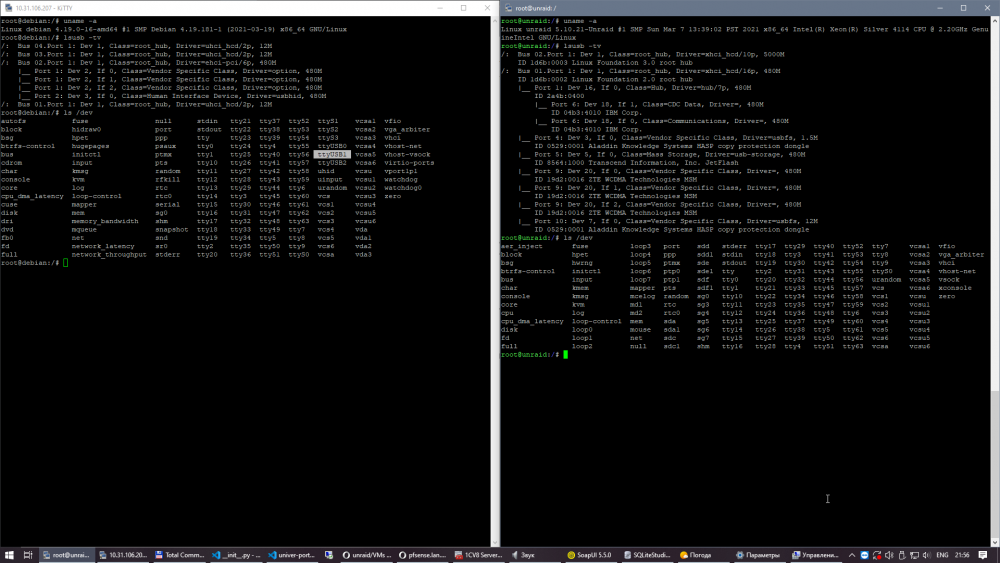
Exactly. Look at the attached screenshot. Left side - fresh install of Debian VM running inside Unraid with forwarded USB modem. Right side - bare Unraid (Debian VM is shutdown). On the left side modem is detected and I can use it with "screen /dev/usbTTY1" ATI Manufacturer: ZTE CORPORATION Model: MF180 Revision: BD_P671A1V1.0.3B12 IMEI: *************** +GCAP: +CGSM,+FCLASS,+DS OK On the right side I do not have any usbTTY, ttyacm0 or anything similar. As you can see it have "Driver=option" on the left and "Driver=" on the right
-
I'm trying to connect ZTE MF180 USB modem to my Unraid server. I need it for sending SMS messages using AT commands. Modem is visible in lsusb but it seems that Unraid kernel lacks "option" module and I can't connect to the modem via COM port - it simply do not exist. Can I add this module somehow or may be Unraid team will add it next release, please?

