





Importimage1
Members
-
Joined
-
Last visited
-
Hello. I'm not to sure why it does not show. But I downloaded the logs right after my server shut down because of the power outage. When I open the app or docker it times out. nothing loads
-
So Plex forum is not really able to see much. Are you able to help? When I open the app or docker it times out. nothing loads
-
The diagnostics did not fully download, not sure if that makes a difference. Just wanted to add it here before I contacted support for Plimportimage-diagnostics-20260722-0757.zipex
-
Sorry about thatimportimage-diagnostics-20260722-0757.zip
-
Hello. Hope I can get some help. I had a power outage at my house and now plex will not open up. Not sure what could be the cause. If someone could please help, that would be great. Thank youUnconfirmed 332971.crdownload
-
Hello. Hope I can get some help. I had a power outage at my house and now plex will not open up. Not sure what could be the cause. If someone could please help, that would be great. Thank you Unconfirmed 737483.crdownload
-
That makes total sense. I appreciate you helping me with that. I will rename it. Thank you!
-
Not sure. I have a TEMP and Downloads shared folder. From there I have a pool named downloads. When I started Unraid, that's how I was told to to create them. I've been running it like this for around 8 years until I had the issue this time. How would you recommend I do this? I have my media download to a pool/cache drive "Downloads" From there it moves the files to the drives. Thank you
-
Thank you very much! That fixed the issue
-
Here is what I got 744G /mnt/downloads/temp 744K /mnt/downloads/Downloads 744G /mnt/downloads
-
This is the space on my Downloads folder.

-
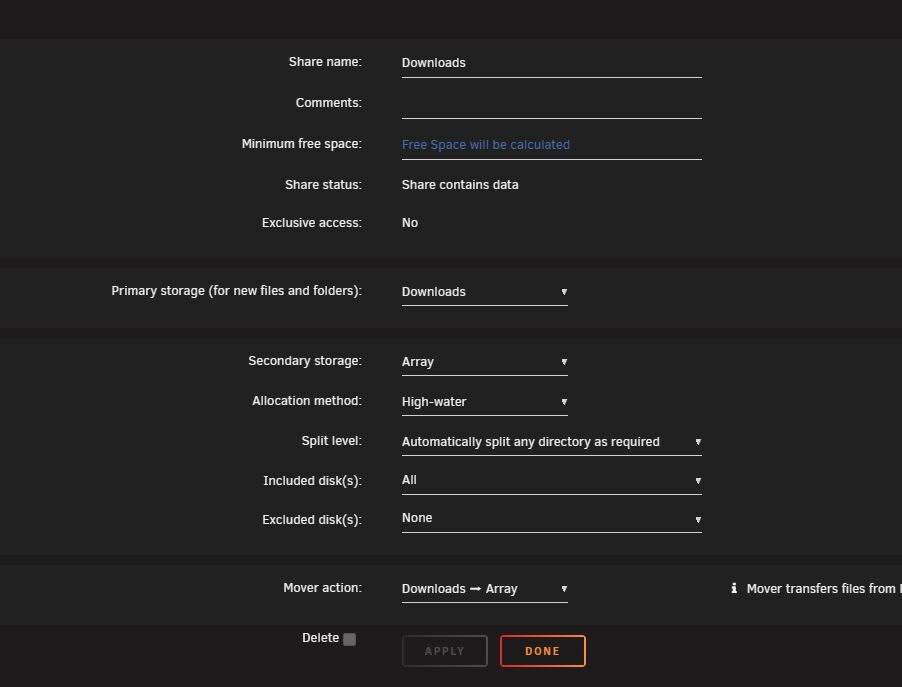
Hello. Yes I guess the TEMP folder is the cache folder "Downloads" In my shared folder folder which is also my cache drive "downloads" that is were my downloads go and then when the mover is active it would move the files over to the drives on my server. I made no changes and It's been working for years and now it just won't transfer or move from my downloads cache drive to my hard drives. My cache drive downloads still has 800GB that need to be moved Here is my settings for my folder "cache" drive Downloads. This is the settings I have had for years and had no issues
-
On my shared folder "donwloads" I use that as cache drive. There's still 800GB in that cache drive. It will not move the files. It just stops as soon as I hit Move.
-
In the log you can see it only runs for a few seconds and then it stops. I have over 800GB to transfer from "downloads" share to my drives.
-
When I press the move button, It just stops moving anything. Mainly I'm trying to move the share "Downloads" That's were my media gets downloaded to and then move to my drives. But it appears to not be working or moving anything. The "Move" button is back to being able to click on vs being grayed out when It's moving. Thank you

