





borange
Members
-
Joined
-
Last visited
Everything posted by borange
-
thanks @JorgeB That was an easy fix. The Array is back up. Think I panicked and overreacted a little.
-
Is it as simple as rebuilding the pools? Adding the drives back into the pools? (not sure how they got bad)
-
Label: none uuid: b6795987-af71-4d92-b324-d156a0d356db Total devices 1 FS bytes used 293.21GiB devid 1 size 953.87GiB used 349.02GiB path /dev/nvme0n1p1 Label: none uuid: 6fa7e030-f531-4670-83df-200d1634b831 Total devices 2 FS bytes used 348.88GiB devid 1 size 931.51GiB used 283.03GiB path /dev/sdb1 devid 2 size 931.51GiB used 283.03GiB path /dev/sdc1
-
root@dump:~# btrfs check /dev/sdc1 Opening filesystem to check... Checking filesystem on /dev/sdc1 UUID: 6fa7e030-f531-4670-83df-200d1634b831 [1/8] checking log skipped (none written) [2/8] checking root items [3/8] checking extents [4/8] checking free space tree [5/8] checking fs roots [6/8] checking only csums items (without verifying data) [7/8] checking root refs [8/8] checking quota groups skipped (not enabled on this FS) found 374607560704 bytes used, no error found total csum bytes: 255225452 total tree bytes: 430784512 total fs tree bytes: 92405760 total extent tree bytes: 56934400 btree space waste bytes: 55895081 file data blocks allocated: 430681206784 referenced 358848393216 root@dump:~# btrfs check /dev/sdb1 Opening filesystem to check... Checking filesystem on /dev/sdb1 UUID: 6fa7e030-f531-4670-83df-200d1634b831 [1/8] checking log skipped (none written) [2/8] checking root items [3/8] checking extents [4/8] checking free space tree [5/8] checking fs roots [6/8] checking only csums items (without verifying data) [7/8] checking root refs [8/8] checking quota groups skipped (not enabled on this FS) found 374607560704 bytes used, no error found total csum bytes: 255225452 total tree bytes: 430784512 total fs tree bytes: 92405760 total extent tree bytes: 56934400 btree space waste bytes: 55895081 file data blocks allocated: 430681206784 referenced 358848393216
-
Btrfs detects metadata inconsistency, often caused by unsafe shutdowns (power loss) or improper write caching. looks like i might need to do a better job of btrfs check
-
found this in dmesg, unsure of its meaning though [ 59.238592] BTRFS: device fsid 6fa7e030-f531-4670-83df-200d1634b831 devid 2 transid 4426877 /dev/sdc1 (8:33) scanned by udevd (2179) [ 59.239050] BTRFS: device fsid 6fa7e030-f531-4670-83df-200d1634b831 devid 1 transid 4426877 /dev/sdb1 (8:17) scanned by udevd (2177) sdb & sdc are the SSD cache drives. I ran a BTRFS check on them aswell.
-
Hi All, Having some trouble starting the Array. Wrong Pool State - (cache - missing devices, nvme_cache - missing devices) I ran a xfs_repair on the nvme drives. I believe they might be bad? Sorry, could not find valid secondary superblock - Would love to be wrong here. I removed one of my nvme cache pools all ready while i was messing around trying to fix. Nvme_cache - nvme0n1 cache - sdb + sdc pcinvme cache - nvme1n1 (the pool i removed) Unsure what is wrong with my SSD cache pool. Whats the best way to go about getting my array back up? Thanks! dump-diagnostics-20260331-2115.zip
-
Started a new config and running a parity-sync atm. Thanks for your help! I need to follow instructions better
-
Hmmm.... Bugger. I'm not able to tell which disk that would be. So, what would be my next step? Is it new config time? Is it possible to do a new config and keep the data I have?
-
The old disk 7 or 10 is currently installed.
-
What do you mean by what disks do I have? I had 3 bad disks. Currently two of the older ones are in the system (old Parity + another old 10TB) I have replacements for these drives.
-
Attempted to put one of the failed disks back in with no luck. Not able to start the array. I tried different combinations of where the drive was assigned. Popped in the old Parity disk as well to try something else. Same deal. Am I out of luck? Think I've molest it too much to get it back to a good state? dump-diagnostics-20240116-1610.zip
-
Correct, cannot replace any disks. Disk7 & 10 did not finish any rebuild. I believe i still have the old parity disk around and maybe one of the others disks (7 or 10).
-
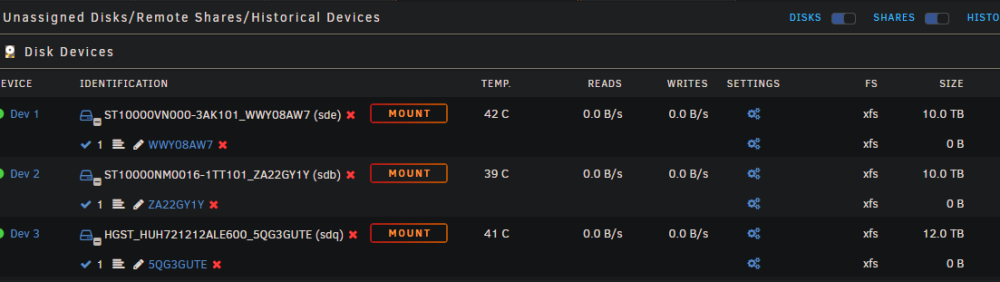
I have 3 unassigned disks I've been trying to add to the array. 12tb to replace the dead parity disk (bringing me back to 2x parity disks) 2x10tb to replace the other to disks
-
Disk7 and 10 got disabled so I replaced them. The original disks are no longer connected. Yea, not a fan - but not alot I can do about it.
-
Let me know if you need anything else.
-
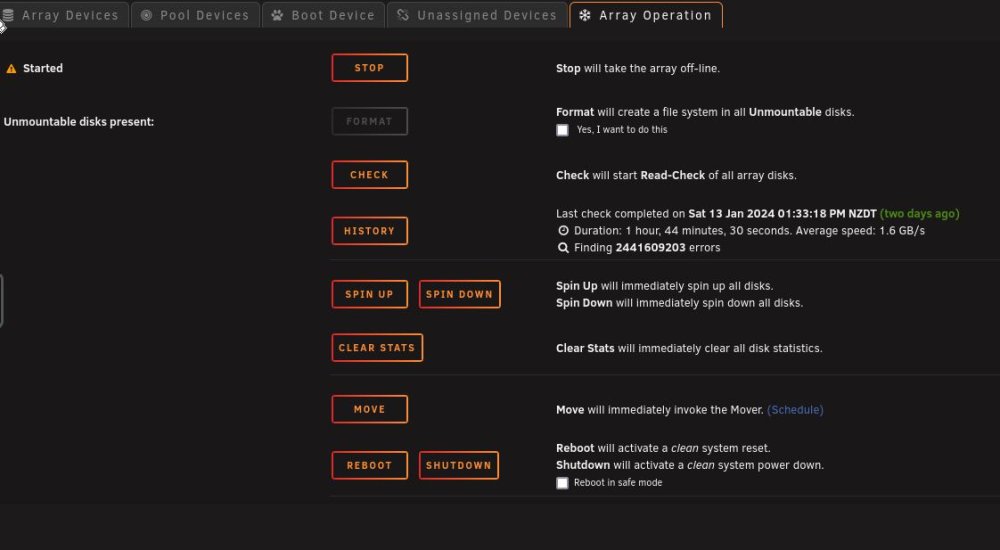
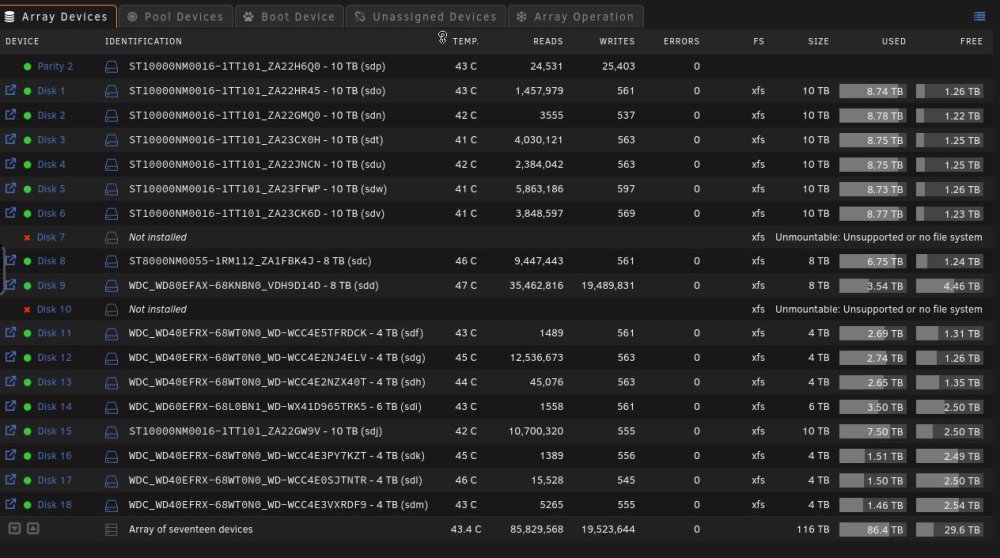
Hi All, I've managed to get my unraid server into a bit of 'funky' state. I'm not able to add new disk to it. The array is currently up and running just not as 'protected' as i'd like and missing a couple of disks. I believe this was caused when i had a few disk die and I didn't follow instructions on how to replace them very well. I'm also aware i have quite a few disk with smart errors. I've swapped out the disks that got disabled. I can't afford to replace all of them, I understand the risks I'm taking. I lost one of my Parity disk. I've been trying to replace it with a new 12tb Drive. When trying to add a a parity disk I get "Too many wrong and/or missing disks!". I'm not able to start the array. I've tried different combinations around adding a drive (or multiple) into the array to try get it started. Am I not able to add disk because of the read errors when running a 'check' - Finding 2441609203 errors. I'm unsure how to fix this. I see a couple of I/O errors in the logs - I had a quick google and found one thing that said this is normal till the disk gets added to the array - unsure if this is true? Jan 13 19:48:52 dump kernel: Buffer I/O error on dev md10p1, logical block 1953506608, async page read Jan 13 19:48:52 dump kernel: Buffer I/O error on dev md7p1, logical block 2441609184, async page read Fixable? Or have I messed around with it too much trying to fix it myself? Thanks. dump-diagnostics-20240114-1626.zip
-
I'm very surprised - Moving slots seems to have worked. parity rebuilt! Total size: 10 TB Elapsed time: 23 hours, 55 minutes Current position: 10.0 TB (100.0 %) Estimated speed: 115.5 MB/sec Estimated finish: completed Thank you all for the help!
-
Will move it to a different spot and see if things are different.
-
I think its via molex - 12 molex connectors on 4 different cables
-
I just ran a small stress test (loading up all 52 cores/thread with prime95) to see if anything happens. Figured this would be a good way to push power limits. No problems with at all. I've got power adapter hooked up it as well and I didn't see that get over 500Watts (not a great measurement but better than nothing) Not sure how else I can push it...
-
I think its good? Is there some form of test I can run? I've got a 1000Watt corsair PSU. it been running fine for days/weeks - just Parity and disk 2 are disabled. Only seem to be running into problems when trying to rebuild the parity. I guess all disks might be spinning during that process?
-
Hi there, I have a bad disks in my setup but I'm having trouble replacing it because one of my parity disks is disabled. I've tried to rebuild it a few times but it always fails. I have 2 'disabled' disks. Parity and Disk 2. I've tried just rebuilding just the parity disk and also tried to bring them back both at the same time. I know have a lot of disks with SMART errors. I'd like to start replacing them (starting with Disk 14) but I'm having trouble doing that. Is there anything I can do to get the Parity back up? Or am I in trouble? (I'm assuming its failing the rebuild because of the bad disks in the array) Specs: Intel Xeon 6230R CPU Supermicro X11SPi-TF 80GB RAM ADAPTEC ASR-72405 (2274900-R) UNRAID 6.9.2 dump-diagnostics-20210914-0753.zip



