





AquaWolf
Members
-
Joined
-
Last visited
Everything posted by AquaWolf
-
Solved it by using OVMF TPU Bios and reinstalling Windows.
-
Ok I tried the GPU Passthrough with a Ubuntu VM and there is everything working the difference between the Ubuntu and Windows is that im using in Ubuntu OVMF and for Windows SeaBios. I tried to recreate the Windows VM with a OVMF but im only getting a shell console when starting with only VNC graphics to test if the VM is booting.
-
Hey there, i tried the upgrade form 6.9 to 6.11 today hoping everything will go right. Actually i have now the Problem my GPU passthrough is not working anymore with my Windows VM. I had the same issue with 6.10.RC4 I think. When I'm starting the Windows VM with VNC the vm starts and boots into windows. Does anybody has an idea what could be wrong after upgrade? tower-diagnostics-20221017-1316.zip windowsvm.txt
-
Ok I tried to restore from the backup before Unraid upgrade to rc2. I was not able to start there the VM in beginning, but after deleting the libvirt.img repasting the xml for the vm the passthrough worked. I noticed that I don't had all thes option in the syslinux settings. Then I rerolled the backup of the rc2 and tried there also with and without all these syslinux settings but the gpu passthrough won't work. I also did a delete of libvirt img on rc2 but no success. I'm a bit out of options... perhaps i have to rollback the unraid version and try to fix the mac vlan issue of docker another way
-
I have a complete backup of the usb boot device, should I restore it? I'm having then again the problem with the docker net.
-
no sadfully it does not change it.
-
I have system diagnostics from before, but honestly after the VMs did not started I tried many combinations to try fixing the passthrough problem. Here is an old diagnostics file where the VMs worked with passthrough but there was an issue with docker mac-vlan what has been solved now by ip-vlan implementation. I also tried rollback to the old Unraid version but there the passthrough is also not working anymore. tower-diagnostics-20220206-2004.zip
-
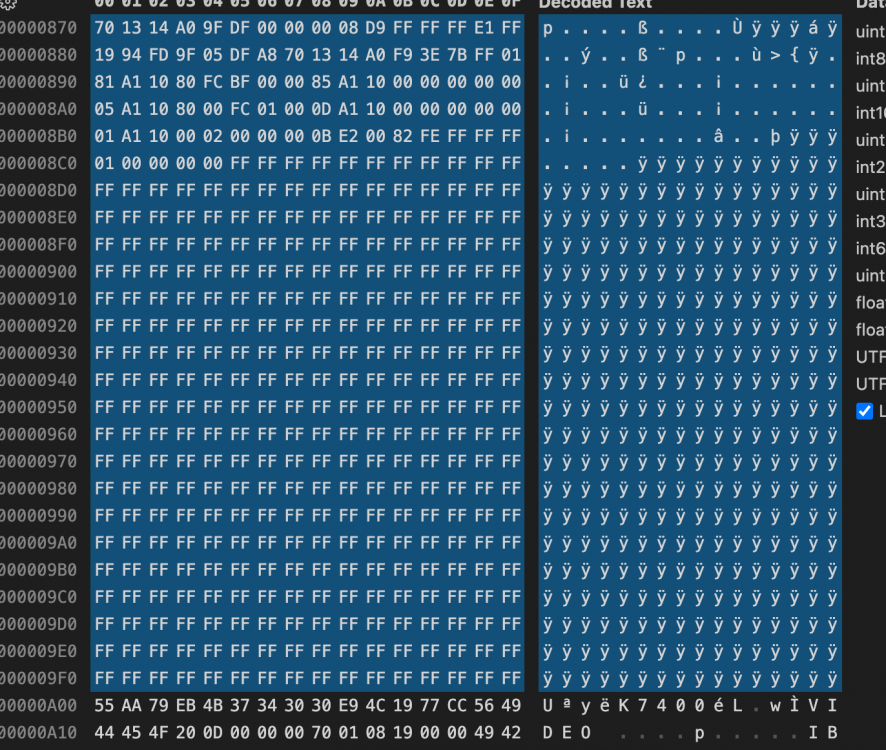
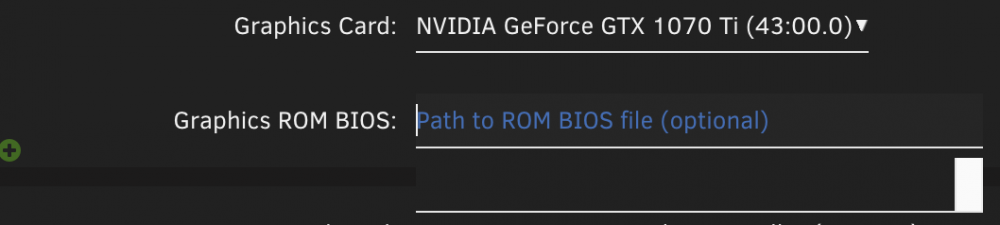
Regarding driver I installed the most current livirt driver. (removed it before) I did this with the build-in vnc client from unraid. Regarding correctness of the bios rom file I really don't understand why it worked before on lower unraid version, there i had no problem with Error 43 or booting. yeha I extracted with a windows (dual) boot and gpuz and removed all the lines before U� until the start of the rom file the selected is removed in the fixed rom file. I did extracted the rom yesterday. Edit: On addition, when selecting the bios from config gui there is a empty block so no access to the filesystem via gui i have to paste the path manually:
-
yep did this already this BAR error is gone now. My Syslinux config looks actually like this: default menu.c32 menu title Lime Technology, Inc. prompt 0 timeout 50 label Unraid OS menu default kernel /bzimage append iommu=pt pci=noaer video=vesafb:off video=efifb:off pcie_acs_override=downstream initrd=/bzroot label Unraid OS GUI Mode kernel /bzimage append pcie_acs_override=downstream initrd=/bzroot,/bzroot-gui label Unraid OS Safe Mode (no plugins, no GUI) kernel /bzimage append initrd=/bzroot unraidsafemode label Unraid OS GUI Safe Mode (no plugins) kernel /bzimage append initrd=/bzroot,/bzroot-gui unraidsafemode label Memtest86+ kernel /memtest tower-diagnostics-20220222-0933.zip
-
Hey there on 6.9.2 Unraid my both windows 10 VMs worked like they should both were working with GPU passthrough with a gtx 1070 ti. After upgrade the gpu passthrough is not working anymore. I tried it with several boot settings found here in the forum but no luck yet. When have a rom selected for the GPU the machine gets somehow a ip address from my router, but when I try to connect via rdp I get a timeout error. I also cannot ping the machine. When I remove the line of the rom the machine boots up correctly I can rdp then on it, but the graphics card has a 43 error. Actually I'm a bit lost of option what I could to to get these machines working again. Does anybody got an advice? Kind regards tower-diagnostics-20220221-2155.zip
-
Regarding GPU Passthrough I noticed that after removing the Graphics ROM BIOS the VM is booting correctly. When I try to pick the BIOS file from the GUI it only shows a blank selection could this be somehow related?
-
Yep 👍 Does anybody got an idea why the gpu passthrough VMs not working anymore?
-
yep recreated docker image, now it's working (have to restore all my containers from Apps Tab now) Here the diagnostics. tower-diagnostics-20220216-1401.zip
-
I Upgrade to rc2 Docker is not working starting anymore seems to be a Problem with the docker image Feb 16 13:32:59 Tower emhttpd: shcmd (68): /usr/local/sbin/mount_image '/mnt/user/system/docker/docker.img' /var/lib/docker 100 Feb 16 13:32:59 Tower kernel: loop2: detected capacity change from 0 to 209715200 Feb 16 13:32:59 Tower kernel: BTRFS: device fsid b7558f03-4ad1-4884-b9b7-9fe63d3900b9 devid 1 transid 2830106 /dev/loop2 scanned by mount (4507) Feb 16 13:32:59 Tower kernel: BTRFS info (device loop2): flagging fs with big metadata feature Feb 16 13:32:59 Tower kernel: BTRFS info (device loop2): using free space tree Feb 16 13:32:59 Tower kernel: BTRFS info (device loop2): has skinny extents Feb 16 13:32:59 Tower kernel: BTRFS info (device loop2): bdev /dev/loop2 errs: wr 0, rd 0, flush 0, corrupt 4, gen 0 Feb 16 13:32:59 Tower kernel: BTRFS info (device loop2): enabling ssd optimizations Feb 16 13:32:59 Tower kernel: BTRFS info (device loop2): cleaning free space cache v1 Feb 16 13:32:59 Tower kernel: BTRFS warning (device loop2): checksum verify failed on 28567109632 wanted 0x92b333b4 found 0x5563533e level 0 Feb 16 13:32:59 Tower kernel: BTRFS warning (device loop2): checksum verify failed on 28567109632 wanted 0x92b333b4 found 0x5563533e level 0 Feb 16 13:32:59 Tower kernel: BTRFS: error (device loop2) in btrfs_set_free_space_cache_v1_active:3992: errno=-5 IO failure Feb 16 13:32:59 Tower kernel: BTRFS error (device loop2): commit super ret -30 Feb 16 13:32:59 Tower root: mount: /var/lib/docker: can't read superblock on /dev/loop2. Feb 16 13:32:59 Tower kernel: BTRFS error (device loop2): open_ctree failed Feb 16 13:32:59 Tower root: mount error And my VMs with GPU Passthrough are not working anymore I'm getting just a few lines in syslog: Feb 16 13:38:13 Tower kernel: br0: port 2(vnet1) entered blocking state Feb 16 13:38:13 Tower kernel: br0: port 2(vnet1) entered disabled state Feb 16 13:38:13 Tower kernel: device vnet1 entered promiscuous mode Feb 16 13:38:13 Tower kernel: br0: port 2(vnet1) entered blocking state Feb 16 13:38:13 Tower kernel: br0: port 2(vnet1) entered forwarding state Feb 16 13:38:15 Tower avahi-daemon[4465]: Joining mDNS multicast group on interface vnet1.IPv6 with address fe80::fc54:ff:fe30:3c6e. Feb 16 13:38:15 Tower avahi-daemon[4465]: New relevant interface vnet1.IPv6 for mDNS. Feb 16 13:38:15 Tower avahi-daemon[4465]: Registering new address record for fe80::fc54:ff:fe30:3c6e on vnet1.*. Feb 16 13:38:19 Tower kernel: vfio-pci 0000:43:00.0: vfio_ecap_init: hiding ecap 0x19@0x900 Feb 16 13:38:19 Tower kernel: vfio-pci 0000:43:00.0: No more image in the PCI ROM Feb 16 13:38:19 Tower kernel: vfio-pci 0000:41:00.0: vfio_ecap_init: hiding ecap 0x1e@0x110 Feb 16 13:38:19 Tower kernel: vfio-pci 0000:41:00.0: vfio_ecap_init: hiding ecap 0x19@0x300
-
Ok I'll give that a try this applies to me I'll report back this weekend.
-
Hello there I had before some issues with Docker, these are now solved but my Unraid is still unstable after one or two days usage. My System Log shortly before last logline is full of: Tower rsyslogd: action 'action-0-builtin:omfile' (module 'builtin:omfile') message lost, could not be processed. Check for additional error messages before this one. [v8.2002.0 try https://www.rsyslog.com/e/2027 ] an these: Feb 4 04:36:34 Tower kernel: rcu: INFO: rcu_sched detected stalls on CPUs/tasks: Feb 4 04:36:34 Tower kernel: rcu: #01112-....: (8 GPs behind) idle=1f6/1/0x4000000000000002 softirq=17084346/17084346 fqs=6963800 Feb 4 04:36:34 Tower kernel: #011(detected by 0, t=29760827 jiffies, g=60378281, q=18075856) Feb 4 04:36:34 Tower kernel: Sending NMI from CPU 0 to CPUs 12: Feb 4 04:36:34 Tower kernel: NMI backtrace for cpu 12 Feb 4 04:36:34 Tower kernel: CPU: 12 PID: 0 Comm: swapper/12 Tainted: G W 5.10.28-Unraid #1 Feb 4 04:36:34 Tower kernel: Hardware name: Micro-Star International Co., Ltd. MS-7B09/X399 SLI PLUS (MS-7B09), BIOS A.70 11/14/2018 Feb 4 04:36:34 Tower kernel: RIP: 0010:nf_ct_key_equal+0x4/0x5d [nf_conntrack] Feb 4 04:36:34 Tower kernel: Code: 48 33 56 1c 48 09 d1 75 19 8b 57 24 8b 46 24 81 e2 ff ff ff 00 25 ff ff ff 00 39 c2 0f 94 c0 0f b6 c0 83 e0 01 c3 49 89 f9 55 <48> 89 f7 48 89 d5 49 8d 71 10 49 89 cb e8 9b ff ff ff 45 31 d2 84 Feb 4 04:36:34 Tower kernel: RSP: 0018:ffffc900069f4978 EFLAGS: 00000206 Feb 4 04:36:34 Tower kernel: RAX: 00000001119963e5 RBX: ffff888a12629448 RCX: ffffffff8210b440 Feb 4 04:36:34 Tower kernel: RDX: ffff888a1262a6cc RSI: ffffc900069f49e8 RDI: ffff888a12629448 Feb 4 04:36:34 Tower kernel: RBP: ffff888a1262a6c0 R08: ffff888a12629400 R09: ffff888a12629448 Feb 4 04:36:34 Tower kernel: R10: 0000000000000001 R11: ffffffff8210b440 R12: ffffffff8210b440 Feb 4 04:36:34 Tower kernel: R13: ffffc900069f49e8 R14: ffff888a1262a6cc R15: ffff888a12629400 Feb 4 04:36:34 Tower kernel: FS: 0000000000000000(0000) GS:ffff888c66d00000(0000) knlGS:0000000000000000 Feb 4 04:36:34 Tower kernel: CS: 0010 DS: 0000 ES: 0000 CR0: 0000000080050033 Feb 4 04:36:34 Tower kernel: CR2: 000000c000867000 CR3: 000000012ca00000 CR4: 00000000003506e0 Feb 4 04:36:34 Tower kernel: Call Trace: Feb 4 04:36:34 Tower kernel: <IRQ> Feb 4 04:36:34 Tower kernel: nf_conntrack_tuple_taken+0xb9/0x144 [nf_conntrack] Feb 4 04:36:34 Tower kernel: nf_nat_used_tuple+0x2e/0x49 [nf_nat] Feb 4 04:36:34 Tower kernel: nf_nat_setup_info+0x332/0x6aa [nf_nat] Feb 4 04:36:34 Tower kernel: ? ipt_do_table+0x4bb/0x5c0 [ip_tables] Feb 4 04:36:34 Tower kernel: ? ipt_do_table+0x570/0x5c0 [ip_tables] Feb 4 04:36:34 Tower kernel: __nf_nat_alloc_null_binding+0x5f/0x76 [nf_nat] Feb 4 04:36:34 Tower kernel: nf_nat_inet_fn+0x91/0x183 [nf_nat] Feb 4 04:36:34 Tower kernel: ? br_handle_frame_finish+0x351/0x351 Feb 4 04:36:34 Tower kernel: nf_nat_ipv4_pre_routing+0x1e/0x4a [nf_nat] Feb 4 04:36:34 Tower kernel: nf_hook_slow+0x39/0x8e Feb 4 04:36:34 Tower kernel: ? br_nf_forward_finish+0xd0/0xd0 [br_netfilter] Feb 4 04:36:34 Tower kernel: NF_HOOK+0xb7/0xf7 [br_netfilter] Feb 4 04:36:34 Tower kernel: ? br_nf_forward_finish+0xd0/0xd0 [br_netfilter] Feb 4 04:36:34 Tower kernel: br_nf_pre_routing+0x229/0x239 [br_netfilter] Feb 4 04:36:34 Tower kernel: ? br_nf_forward_finish+0xd0/0xd0 [br_netfilter] Feb 4 04:36:34 Tower kernel: br_handle_frame+0x25e/0x2a6 Feb 4 04:36:34 Tower kernel: ? br_pass_frame_up+0xda/0xda Feb 4 04:36:34 Tower kernel: __netif_receive_skb_core+0x335/0x4e7 Feb 4 04:36:34 Tower kernel: __netif_receive_skb_list_core+0x78/0x104 Feb 4 04:36:34 Tower kernel: netif_receive_skb_list_internal+0x1bf/0x1f2 Feb 4 04:36:34 Tower kernel: ? dev_gro_receive+0x55d/0x578 Feb 4 04:36:34 Tower kernel: gro_normal_list+0x1d/0x39 Feb 4 04:36:34 Tower kernel: napi_complete_done+0x79/0x104 Feb 4 04:36:34 Tower kernel: bnx2x_poll+0x100c/0x1285 [bnx2x] Feb 4 04:36:34 Tower kernel: ? resched_cpu+0x14/0x58 Feb 4 04:36:34 Tower kernel: ? enqueue_task_fair+0x101/0x156 Feb 4 04:36:34 Tower kernel: net_rx_action+0xf4/0x29d Feb 4 04:36:34 Tower kernel: __do_softirq+0xc4/0x1c2 Feb 4 04:36:34 Tower kernel: asm_call_irq_on_stack+0x12/0x20 Feb 4 04:36:34 Tower kernel: </IRQ> Feb 4 04:36:34 Tower kernel: do_softirq_own_stack+0x2c/0x39 Feb 4 04:36:34 Tower kernel: __irq_exit_rcu+0x45/0x80 Feb 4 04:36:34 Tower kernel: common_interrupt+0x119/0x12e Feb 4 04:36:34 Tower kernel: asm_common_interrupt+0x1e/0x40 Feb 4 04:36:34 Tower kernel: RIP: 0010:arch_local_irq_enable+0x7/0x8 Feb 4 04:36:34 Tower kernel: Code: 00 48 83 c4 28 4c 89 e0 5b 5d 41 5c 41 5d 41 5e 41 5f c3 9c 58 0f 1f 44 00 00 c3 fa 66 0f 1f 44 00 00 c3 fb 66 0f 1f 44 00 00 <c3> 55 8b af 28 04 00 00 b8 01 00 00 00 45 31 c9 53 45 31 d2 39 c5 Feb 4 04:36:34 Tower kernel: RSP: 0018:ffffc90006443ea0 EFLAGS: 00000246 Feb 4 04:36:34 Tower kernel: RAX: ffff888c66d22380 RBX: 0000000000000002 RCX: 000000000000001f Feb 4 04:36:34 Tower kernel: RDX: 0000000000000000 RSI: 0000000021af2900 RDI: 0000000000000000 Feb 4 04:36:34 Tower kernel: RBP: ffff88869fa0dc00 R08: 0000f1be712f7038 R09: 0000000000000000 Feb 4 04:36:34 Tower kernel: R10: 0000000000002e7b R11: 071c71c71c71c71c R12: 0000f1be712f7038 Feb 4 04:36:34 Tower kernel: R13: ffffffff820c8c40 R14: 0000000000000002 R15: 0000000000000000 Feb 4 04:36:34 Tower kernel: cpuidle_enter_state+0x101/0x1c4 Feb 4 04:36:34 Tower kernel: cpuidle_enter+0x25/0x31 Feb 4 04:36:34 Tower kernel: do_idle+0x1a6/0x214 Feb 4 04:36:34 Tower kernel: cpu_startup_entry+0x18/0x1a Feb 4 04:36:34 Tower kernel: secondary_startup_64_no_verify+0xb0/0xbb Feb 4 04:36:34 Tower rsyslogd: file '/var/log/syslog'[9] write error - see https://www.rsyslog.com/solving-rsyslog-write-errors/ for help OS error: No space left on device [v8.2002.0 try https://www.rsyslog.com/e/2027 ] Feb 4 04:36:34 Tower rsyslogd: action 'action-0-builtin:omfile' (module 'builtin:omfile') message lost, could not be processed. Check for additional error messages before this one. [v8.2002.0 try https://www.rsyslog.com/e/2027 ] Feb 4 04:36:34 Tower rsyslogd: file '/var/log/syslog'[9] write error - see https://www.rsyslog.com/solving-rsyslog-write-errors/ for help OS error: No space left on device [v8.2002.0 try https://www.rsyslog.com/e/2027 ] Feb 4 04:36:34 Tower rsyslogd: action 'action-0-builtin:omfile' (module 'builtin:omfile') message lost, could not be processed. Check for additional error messages before this one. [v8.2002.0 try https://www.rsyslog.com/e/2027 ] Feb 4 04:36:34 Tower rsyslogd: file '/var/log/syslog'[9] write error - see https://www.rsyslog.com/solving-rsyslog-write-errors/ for help OS error: No space left on device [v8.2002.0 try https://www.rsyslog.com/e/2027 ] Feb 4 04:36:34 Tower rsyslogd: action 'action-0-builtin:omfile' (module 'builtin:omfile') message lost, could not be processed. Check for additional error messages before this one. [v8.2002.0 try https://www.rsyslog.com/e/2027 ] Feb 4 04:36:34 Tower rsyslogd: rsyslogd[internal_messages]: 560 messages lost due to rate-limiting (500 allowed within 5 seconds) Feb 7 06:17:29 Tower nginx: 2022/02/07 06:17:29 [error] 7456#7456: MEMSTORE:00: can't create shared message for channel /disks Feb 7 06:17:30 Tower nginx: 2022/02/07 06:17:30 [crit] 7456#7456: ngx_slab_alloc() failed: no memory Feb 7 06:17:30 Tower nginx: 2022/02/07 06:17:30 [error] 7456#7456: shpool alloc failed Feb 7 06:17:30 Tower nginx: 2022/02/07 06:17:30 [error] 7456#7456: nchan: Out of shared memory while allocating message of size 7386. Increase nchan_max_reserved_memory. Feb 7 06:17:30 Tower nginx: 2022/02/07 06:17:30 [error] 7456#7456: *135964 nchan: error publishing message (HTTP status code 500), client: unix:, server: , request: "POST /pub/disks?buffer_length=1 HTTP/1.1", host: "localhost" Feb 7 06:17:30 Tower nginx: 2022/02/07 06:17:30 [error] 7456#7456: MEMSTORE:00: can't create shared message for channel /disks I rebooted now. In the attachment are the diagnostics after reboot. I would be really thankfull for some help Kind regards tower-diagnostics-20220216-0730.zip
-
Ok i found the Problem, could be helpfull also for others that are not receiving stats from containers. Here is the Github Issue: https://github.com/docker/for-linux/issues/219 I put these two lines in go file sudo mkdir /sys/fs/cgroup/systemd sudo mount -t cgroup -o none,name=systemd cgroup /sys/fs/cgroup/systemd I came to this issue by this lines right after starting the authelia container: level=error msg="loading cgroup for 55949" error="cgroups: cannot find cgroup mount destination" So after doing this manual fix on the console it was able for me to get the stats for the authelia container so i added those two commands to go file, let's see if this was the cause of my freezing server but I thinks that's the temporary fix. Thanks @Squid for giving me some troubleshooting hints 😃
-
thanks a lot, seems to that the docker log is less spammed. I'll look into it tomorrow and see if something is still going on in the log Edit: Logs are still spammed full with also after disabling healthcheck for those containers time="2022-02-05T22:02:30.828492862+01:00" level=error msg="collecting stats for 12a3c7b35713a9562b74d2ed3b7cbadfee5143f299a082759f5a9d50edda5521: no metrics received" time="2022-02-05T22:02:30.834479553+01:00" level=error msg="collecting stats for 0de4d7d5a567b9bc4de167f048bba62e2d79c55856209db598a74db0e3638e84: no metrics received" time="2022-02-05T22:02:30.835612282+01:00" level=error msg="collecting stats for 62cd22a03f1764c2d67e9d5c0179f462ed942d388ba2c21598fde8ad32154a2c: no metrics received" After a reboot only authelia container is spamming the logs.
-
here are the docker logs after some time 98f9df2c32a12084a9cd3a5c550446335282d4448621ca2aa4324dea5ff179ac container is authelia docker.txt
-
Here is a diagnostic file after reboot tower-diagnostics-20220205-1625.zip
-
Ok I think again the docker log is missing... I extracted here on the phone but I can't see a docker log tower-diagnostics-20220205-1538.zip I will reboot when I'm back home.
-
Ok I'll send when I'm back home.
-
Hey there my unraid server hangs up randomly after about 2 or 3 days. I saved now also old syslog files to troubleshoot but I'm a bit lost. I see many lines of this in the logs Feb 4 04:34:14 Tower rsyslogd: file '/var/log/syslog'[9] write error - see https://www.rsyslog.com/solving-rsyslog-write-errors/ for help OS error: No space left on device [v8.2002.0 try https://www.rsyslog.com/e/2027 ] Feb 4 04:34:14 Tower rsyslogd: action 'action-0-builtin:omfile' (module 'builtin:omfile') message lost, could not be processed. Check for additional error messages before this one. [v8.2002.0 try https://www.rsyslog.com/e/2027 ] I'm not sure from where this problem comes because its not possible to use the unraid in this state at all (reboot is also not working just a hardware reset is working then. Normally there should be enough space. I attached syslog and diagnostics. Syslog is a bit too big for a attachment: https://drive.google.com/file/d/14N8SRlCZ6ZLJpD9ExvXU_mThHAaw_Pmc/view?usp=sharing The diagnostics are from the current session. I would be really thankfull for some help troubleshoot this problem. Kind Regards tower-diagnostics-20220205-1422.zip

