





Professor Oak
Members
-
Joined
-
Last visited
Everything posted by Professor Oak
-
Were you abe to resolve this? This just happened to me today and I had to disable my local NPM and point my URLs to my external NPM for traffic to start working again.
-
My nextcloud server has been having a lot of issues lately. My unraid server had all of its cores pegged to 100% from the nextcloud container and I saw this in the error.log file. What would be causing this and how can I get my server back to functioning properly?
-
Is P2P any better than a dedicated server if it's just the two of us playing? I even threw 6 cores and 16G on memory at it, and the latency is still almost unplayable.
-
I'm getting very high latency on my enshrouded server. I've tried both docker images, and even with me as the only one on my server, it fluctuates between 60ms - 100+ms even though the server is in the same room as my computer, there's only a single switch between them, and I get <1ms when pinging it. This has caused several character deaths due to lag and rubber banding, and it's just my wife and I that play on it. Is there any optimization that can be done to resolve that?
-
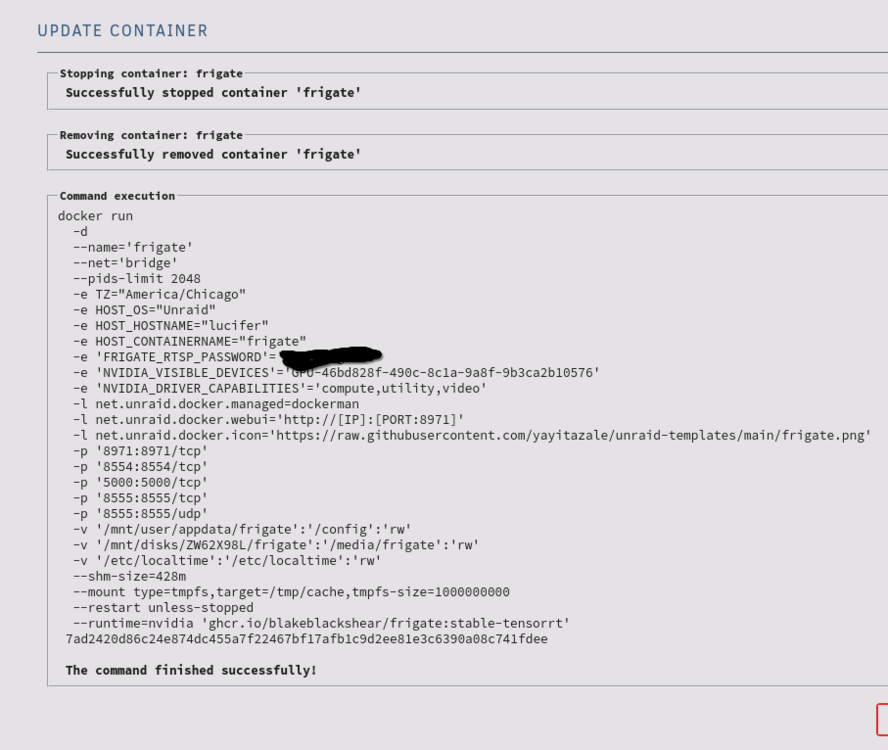
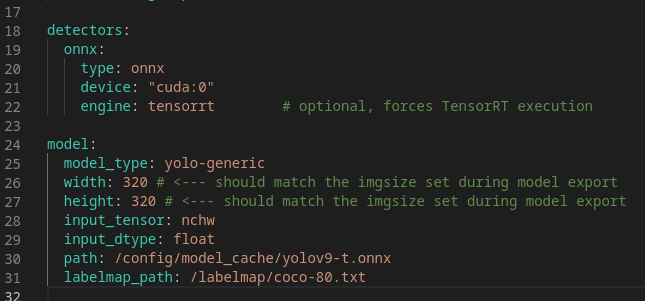
I removed the entries from the unraid config, finally got the onnx file created and loading, switched to onnx for the dector, but it's still using CPU for detection. From System Logs: "INFO: Created TensorFlow Lite XNNPACK delegate for CPU." Unraid Docker Run Command: Config YML settings: ^I tried the detector with, and without, the device and engine listed.
-
That's what I was afraid of. I tried downloading/creating YOLO 3, 4, 7 and 9 models, but kept running into many issues. I'll see if I can take my time with it now since my deployment is currently stable. When switching to ONNX, do I need to remove all the attributes that are listed in the unraid config that pertain to TensorRT?
-
Unable to get GPU detector working on v16. I just upgrade to v16 and I can no longer get my NVIDIA GPU to work as a detector. I tried keeping the tensorrt settings, but that just throws an error stating it's no longer support and causes the docker container to endlessly restart. I also tried changing it to onnx, but that also causes it to endlessly loop, and I have no idea how to get any models to work with it. The only way for me to keep the container up and running is by using a CPU detector, so I know the rest of the config should be good. GPU: Nvidia RTX 2060 Docker Image: ghcr.io/blakeblackshear/frigate:stable-tensorrt YOLO_MODELS: yolov7-320,yolov7x-640
-
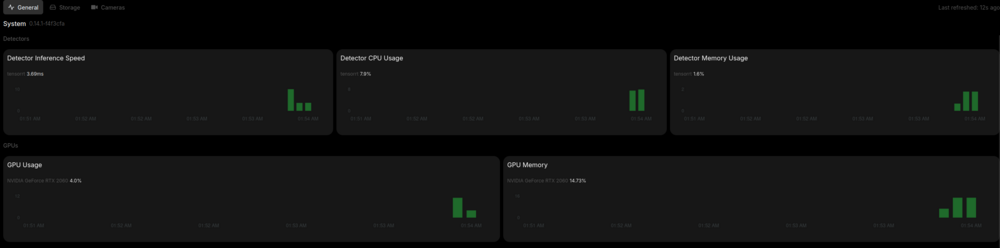
I think I finally got it! There were some additional configuration settings that I added in to set the detector type in the configuration file.
-
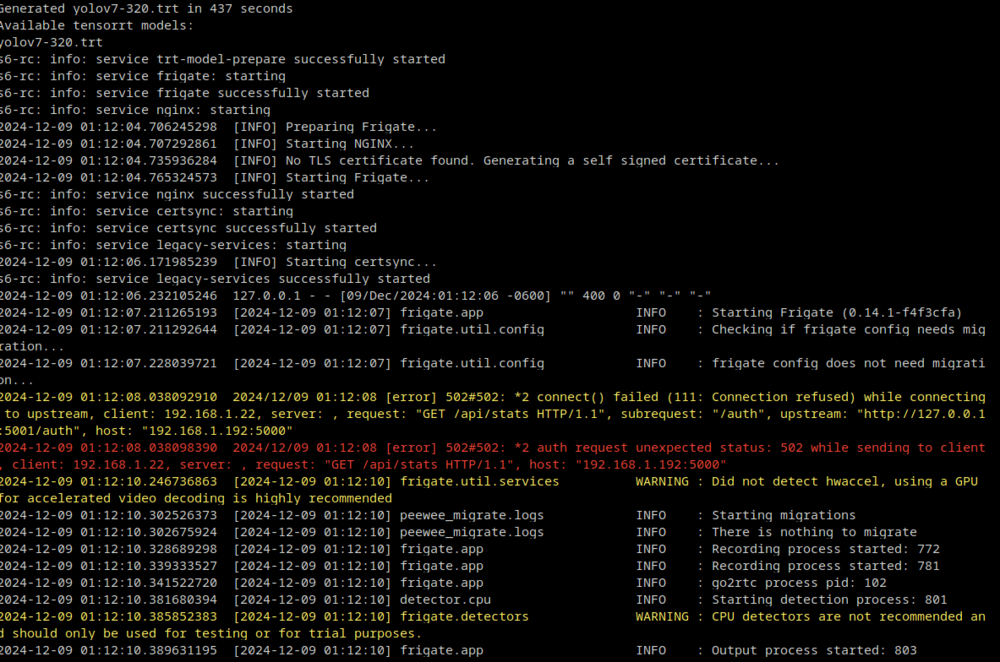
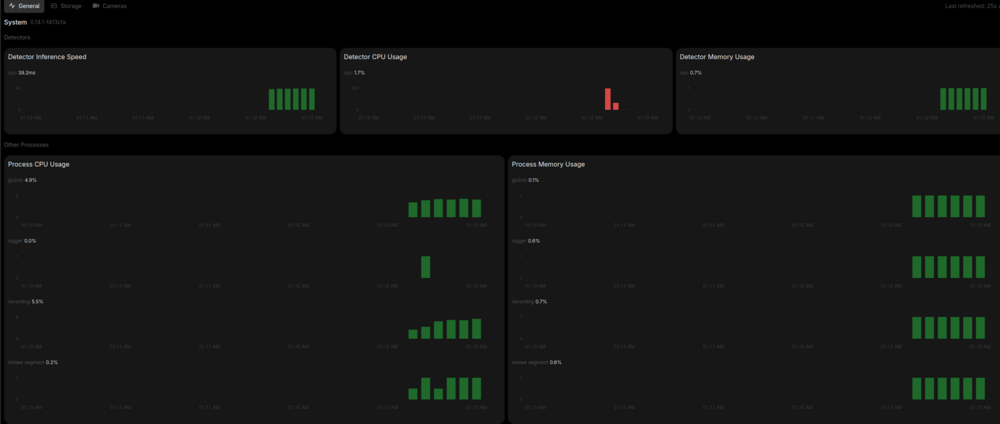
So it's now using the correct branch and shows the available tensorrt model in the startup logs, but it's still using CPU for object detection. Before I upgraded Unraid, the GPU would show up for HW acceleration in the system metrics, but it does not even appear there anymore after upgrading.
-
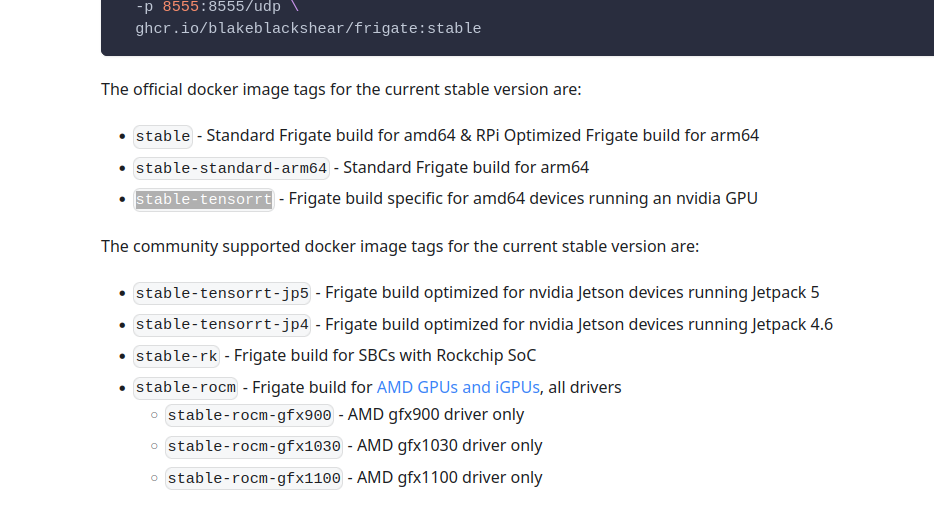
That would be this one?
-
Hi, I just updated from v29 to v30 and now I can't open documents with collabora. I receive the following error message when I try to view one: Failed to establish socket connection or socket connection closed unexpectedly. The reverse proxy might be misconfigured, please contact the administrator. For more info on proxy configuration please checkout https://sdk.collaboraonline.com/docs/installation/Proxy_settings.html
-
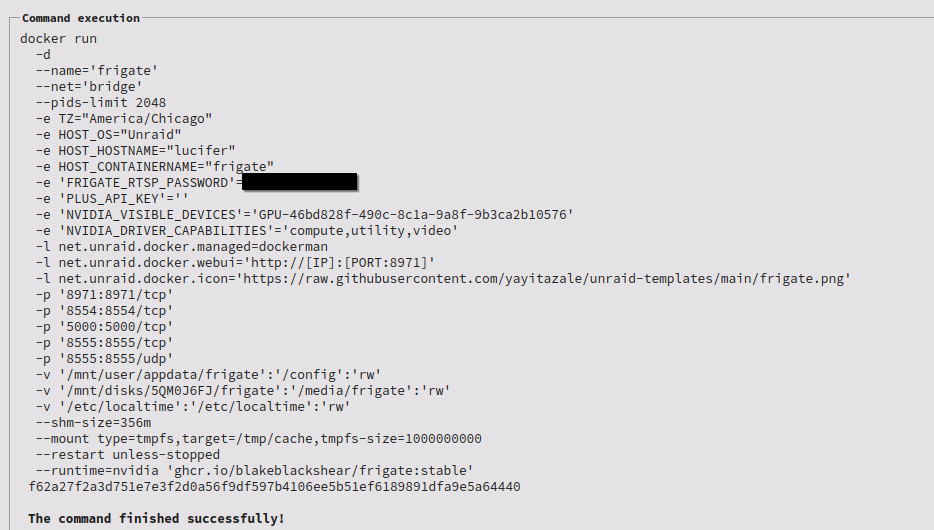
I just updated my Unraid from 6.9.2 to 6.12.4 and my Nvidia driver is now updated to 565.57.01. Below is my Docker Run command to build the container. What is missing, or do I need to change, in order for my card to show up and to be used for GPU object detection?
-
I'm on Unraid version 6.9.2 and the latest available driver version is v515.43.04. I'm using my RTX2060 with my Frigate docker container, but it needs at least v530 in order to use TensorRT for object detection.
-
I managed to hook both Reolink Cameras in to Frigate via the Reolink hub and can view them in the dashboard. One of the cameras is battery powered and will auto-sleep after 5 minutes and kill the RTSP stream. The Reolink documentation (here) states that the RTSP stream will need to be re-requested and may need to have a longer timeout set. Here is my current config: mqtt: enabled: true host: 192.168.1.192 port: 1883 detect: width: 896 height: 672 fps: 5 record: enabled: True retain: days: 3 mode: all events: retain: default: 30 mode: motion cameras: reolink_hub_front_door: ffmpeg: inputs: - path: rtsp://admin:<password>@192.168.1.209/Preview_01_main roles: - record - path: rtsp://admin:<password>@192.168.1.209/Preview_01_sub roles: - detect motion: mask: 0.32,0.012,0.319,0.063,0.665,0.063,0.666,0.004 zones: Front_Door: coordinates: 0.169,0.523,0.176,0.694,0.003,0.791,0.007,0.986,0.99,0.993,0.729,0.733,0.725,0.525 loitering_time: 0 objects: person review: alerts: required_zones: Front_Door reolink_hub_carport: ffmpeg: inputs: - path: rtsp://admin:<password>@192.168.1.209/Preview_02_main roles: - record - path: rtsp://admin:<password>@192.168.1.209/Preview_02_sub roles: - detect motion: mask: 0.24,0.013,0.232,0.099,0.766,0.097,0.748,0.011 zones: Carport: coordinates: 0.014,0.267,0.016,0.991,0.981,0.979,0.937,0.231,0.854,0.149,0.628,0.133,0.227,0.138 loitering_time: 0 review: alerts: required_zones: Carport version: 0.14
-
Thanks! So, if I have all of my cameras going through the hub, I'd treat it like the NVR config in the example config?
-
I have two reolink cameras, a doorbell camera and the Argus PT, connected to my Reolink Hub. The Hub is hooked in to HA directly and I can see and control both cameras from HA. I've also written some automations to notify me when motion is detected on either camera as well as send a screen shot. I want to set up Frigate but I'm unable to determine how that integrates properly with the home hub and how it would all ultimately integrate with HA.
-
I'm unable to set the Tailscale-Docker container as an exit node. I've added --advertise-exit-node as an extra argument in the config, but it doesn't show up as being allowed to be enabled in the Tailscale admin page.
-
Okay, I think I hit a wall here.. I've got the tailscale plugin installed and managed to configure it to route subnets (192.168.1.0/24) and act as an exit node. I've also got the newer Tailscale-Docker container installed and on the bridge network, but I couldn't get it to act as an exit node even when setting the correct flag. I've tried several different configurations for the NPM container, but still can't figure out how to hit it externally.
-
Thanks, I'll look into that.
-
I've recently moved and switched to using Starlink for my internet. I'd prefer to stay on the Residential plan which gives me unlimited data, but has the downside to being behind a GNAT. Luckily, I'm using a Unifi Ultra gateway, so I can use ipv6 to access my internal devices from outside the network. I've managed to give my unraid server an ipv6 address and confirmed it works. I've also managed to set up my NPM container with an ipv6 address and can hit it publicly as well. I updated my public DNS records for my domains to point to my NPM address, but it's not forwarding the traffic to my backend devices, which are only running on ipv4. I've configured my NPM container to use the proxynet and br0 networks, while all of my backend containers are using just proxynet. I'm at a loss on how to get that traffic to forward properly and would love any help. I'm currently running on Unraid 6.9.2.
-
I've recently moved and switched to using Starlink for my internet. I'd prefer to stay on the Residential plan which gives me unlimited data, but has the downside to being behind a GNAT. Luckily, I'm using a Unifi Ultra gateway, so I can use ipv6 to access my internal devices from outside the network. I've managed to give my unraid server an ipv6 address and confirmed it works. I've also managed to set up my NPM container with an ipv6 address and can hit it publicly as well. I updated my public DNS records for my domains to point to my NPM address, but it's not forwarding the traffic to my backend devices, which are only running on ipv4. I've configured my NPM container to use the proxynet and br0 networks, while all of my backend containers are using just proxynet. I'm at a loss on how to get that traffic to forward properly and would love any help. I'm currently running on Unraid 6.9.2.
-
I'm having difficulties with my wordpress container connecting to my mariadb database. I've create the database and can connect to it using the account I created for it from the mariadb container. My nextcloud container is on a different network and has no issues connecting to the same container. I've tried multiple combinations of usernames (wpuser vs wpuser@localhost) and database host ip addresses yet I still get the following page when trying to go to /wp-admin. Error establishing a database connection This either means that the username and password information in your wp-config.php file is incorrect or we can’t contact the database server at 192.168.1.192:3306. This could mean your host’s database server is down. Are you sure you have the correct username and password? Are you sure you have typed the correct hostname? Are you sure the database server is running? If you’re unsure what these terms mean you should probably contact your host. If you still need help you can always visit the WordPress Support Forums. Update: Nevermind. My wpuser mariadb user was created with only local access. I deleted it, recreated it and now it can connect just fine.





