




Skip to content
View in the app

A better way to browse. Learn more.

Unraid

A full-screen app on your home screen with push notifications, badges and more.

To install this app on iOS and iPadOS
  1. Tap the Share icon in Safari
  2. Scroll the menu and tap Add to Home Screen.
  3. Tap Add in the top-right corner.
To install this app on Android
  1. Tap the 3-dot menu (⋮) in the top-right corner of the browser.
  2. Tap Add to Home screen or Install app.
  3. Confirm by tapping Install.

Squalli

Members
  • Joined

  • Last visited

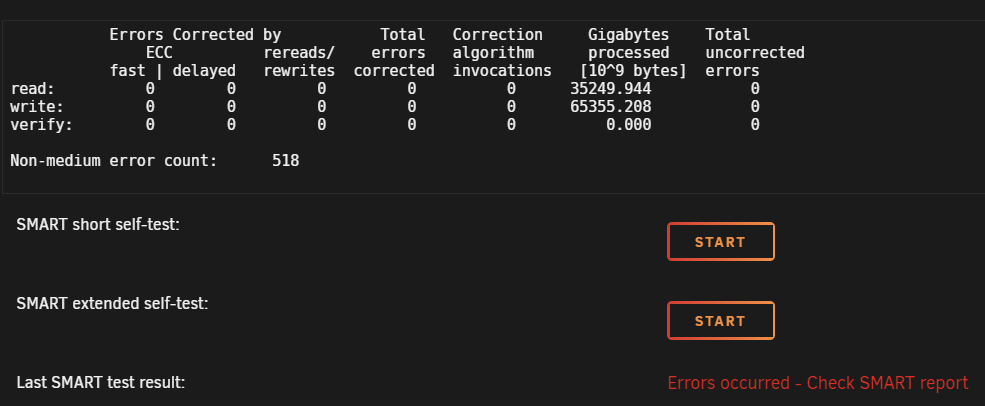
  1. So i am running an HP HBA 222 on my DL380P G8 with 3,5" HP SAS Disks attached. They show up just fine on unraid, smart is partial readable compared to my Crucial MX500s - on the HP Disks, i am getting the following error: Non-medium error count: 518. The numbers seem to be not increasing, only when booting up, it adds like one counter to it. Should i be worried or is it possible to get rid of those errors?
Account

Navigation

Search

Search

Configure browser push notifications

Chrome (Android)
  1. Tap the lock icon next to the address bar.
  2. Tap Permissions → Notifications.
  3. Adjust your preference.
Chrome (Desktop)
  1. Click the padlock icon in the address bar.
  2. Select Site settings.
  3. Find Notifications and adjust your preference.