





darkranex
Members
-
Joined
-
Last visited
-
Thanks. You know, I pretty much gloss over the about section of the tools page.
-
I'm currently running 6.8.2 and I vaguely remember in the Web GUI a notice about updating to a new version would show up somewhere. It used to be in the plugins section long ago, but I feel like I've seen it on the status bar at the bottom of the main page. Anyway, I haven't seen any such notice and I see that we're up to 6.9.X now. So how do we check for updates via the Web GUI? I tried searching the forums for this, but too many unrelated topics kept showing up.
-
That did it. No php errors anymore and I can save the layout properly. Thanks for the help.
-
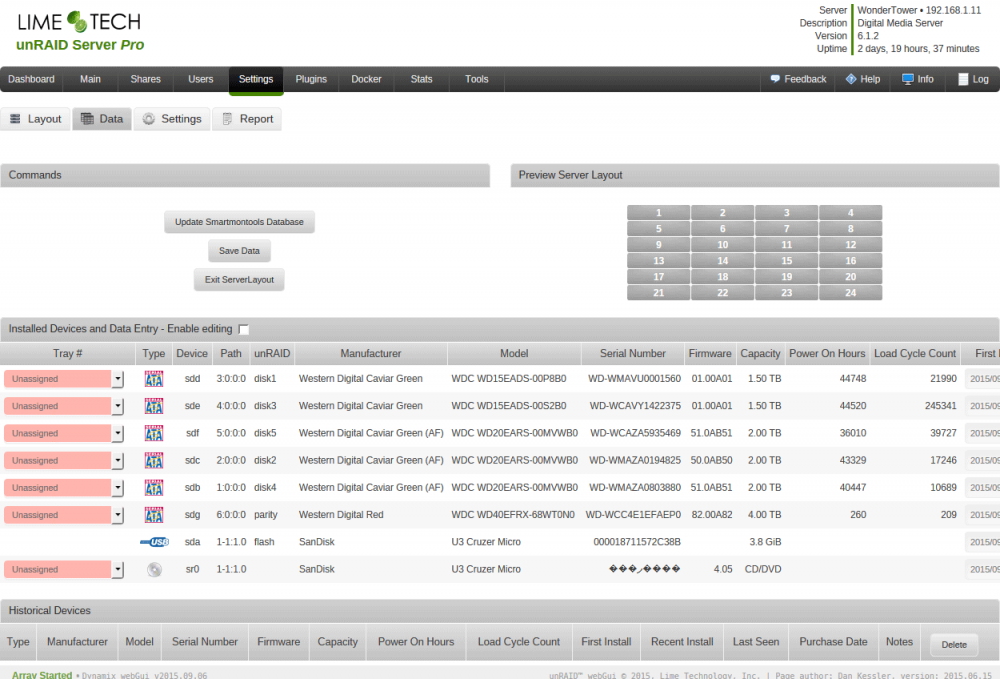
Please post output of "ls -las /dev/disk/by-id". I think that because you are using a U3 USB stick it is showing up as both a USB device and a CD/DVD ROM device with the same serial number. total 0 0 drwxr-xr-x 2 root root 580 Sep 21 16:24 ./ 0 drwxr-xr-x 7 root root 140 Sep 21 16:24 ../ 0 lrwxrwxrwx 1 root root 9 Sep 21 16:24 ata-WDC_WD15EADS-00P8B0_WD-WMAVU0001560 -> ../../sdc 0 lrwxrwxrwx 1 root root 10 Sep 21 16:24 ata-WDC_WD15EADS-00P8B0_WD-WMAVU0001560-part1 -> ../../sdc1 0 lrwxrwxrwx 1 root root 9 Sep 21 16:24 ata-WDC_WD15EADS-00S2B0_WD-WCAVY1422375 -> ../../sdd 0 lrwxrwxrwx 1 root root 10 Sep 21 16:24 ata-WDC_WD15EADS-00S2B0_WD-WCAVY1422375-part1 -> ../../sdd1 0 lrwxrwxrwx 1 root root 9 Sep 21 16:24 ata-WDC_WD20EARS-00MVWB0_WD-WCAZA5935469 -> ../../sde 0 lrwxrwxrwx 1 root root 10 Sep 21 16:24 ata-WDC_WD20EARS-00MVWB0_WD-WCAZA5935469-part1 -> ../../sde1 0 lrwxrwxrwx 1 root root 9 Sep 21 16:24 ata-WDC_WD20EARS-00MVWB0_WD-WMAZA0194825 -> ../../sdb 0 lrwxrwxrwx 1 root root 10 Sep 21 16:24 ata-WDC_WD20EARS-00MVWB0_WD-WMAZA0194825-part1 -> ../../sdb1 0 lrwxrwxrwx 1 root root 9 Sep 21 16:24 ata-WDC_WD20EARS-00MVWB0_WD-WMAZA0803880 -> ../../sda 0 lrwxrwxrwx 1 root root 10 Sep 21 16:24 ata-WDC_WD20EARS-00MVWB0_WD-WMAZA0803880-part1 -> ../../sda1 0 lrwxrwxrwx 1 root root 9 Sep 21 16:24 ata-WDC_WD40EFRX-68WT0N0_WD-WCC4E1EFAEP0 -> ../../sdf 0 lrwxrwxrwx 1 root root 10 Sep 21 16:24 ata-WDC_WD40EFRX-68WT0N0_WD-WCC4E1EFAEP0-part1 -> ../../sdf1 0 lrwxrwxrwx 1 root root 9 Sep 21 16:24 usb-SanDisk_U3_Cruzer_Micro_000018711572C38B-0:0 -> ../../sdg 0 lrwxrwxrwx 1 root root 10 Sep 21 16:24 usb-SanDisk_U3_Cruzer_Micro_000018711572C38B-0:0-part1 -> ../../sdg1 0 lrwxrwxrwx 1 root root 9 Sep 21 16:24 usb-SanDisk_U3_Cruzer_Micro_000018711572C38B-0:1 -> ../../sr0 0 lrwxrwxrwx 1 root root 9 Sep 21 16:24 wwn-0x50014ee0016e5c7d -> ../../sdc 0 lrwxrwxrwx 1 root root 10 Sep 21 16:24 wwn-0x50014ee0016e5c7d-part1 -> ../../sdc1 0 lrwxrwxrwx 1 root root 9 Sep 21 16:24 wwn-0x50014ee203b4f769 -> ../../sdd 0 lrwxrwxrwx 1 root root 10 Sep 21 16:24 wwn-0x50014ee203b4f769-part1 -> ../../sdd1 0 lrwxrwxrwx 1 root root 9 Sep 21 16:24 wwn-0x50014ee205b0e206 -> ../../sde 0 lrwxrwxrwx 1 root root 10 Sep 21 16:24 wwn-0x50014ee205b0e206-part1 -> ../../sde1 0 lrwxrwxrwx 1 root root 9 Sep 21 16:24 wwn-0x50014ee20c3dc367 -> ../../sdf 0 lrwxrwxrwx 1 root root 10 Sep 21 16:24 wwn-0x50014ee20c3dc367-part1 -> ../../sdf1 0 lrwxrwxrwx 1 root root 9 Sep 21 16:24 wwn-0x50014ee6006c3ced -> ../../sda 0 lrwxrwxrwx 1 root root 10 Sep 21 16:24 wwn-0x50014ee6006c3ced-part1 -> ../../sda1 0 lrwxrwxrwx 1 root root 9 Sep 21 16:24 wwn-0x50014ee6aae38270 -> ../../sdb 0 lrwxrwxrwx 1 root root 10 Sep 21 16:24 wwn-0x50014ee6aae38270-part1 -> ../../sdb1
-
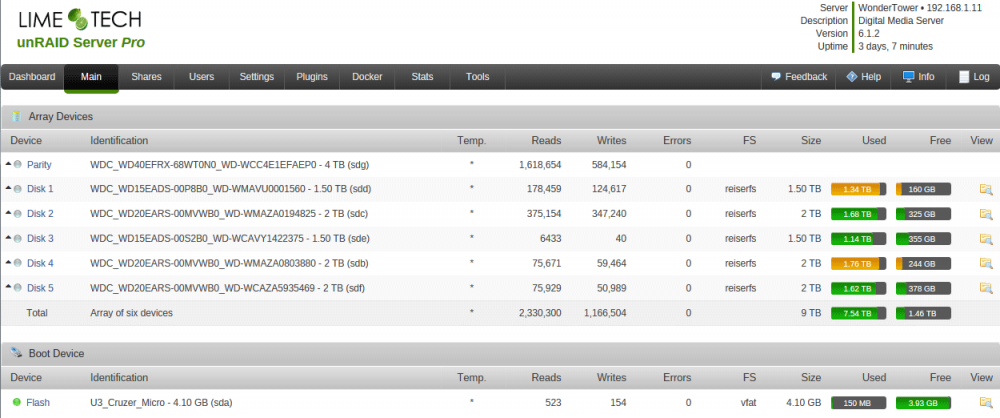
Yeah I don't know why it shows up like that in the server layout, but everywhere else it's fine. serverlayout.json.txt
-
I'm using the latest plugin version: 2015.06.15
-
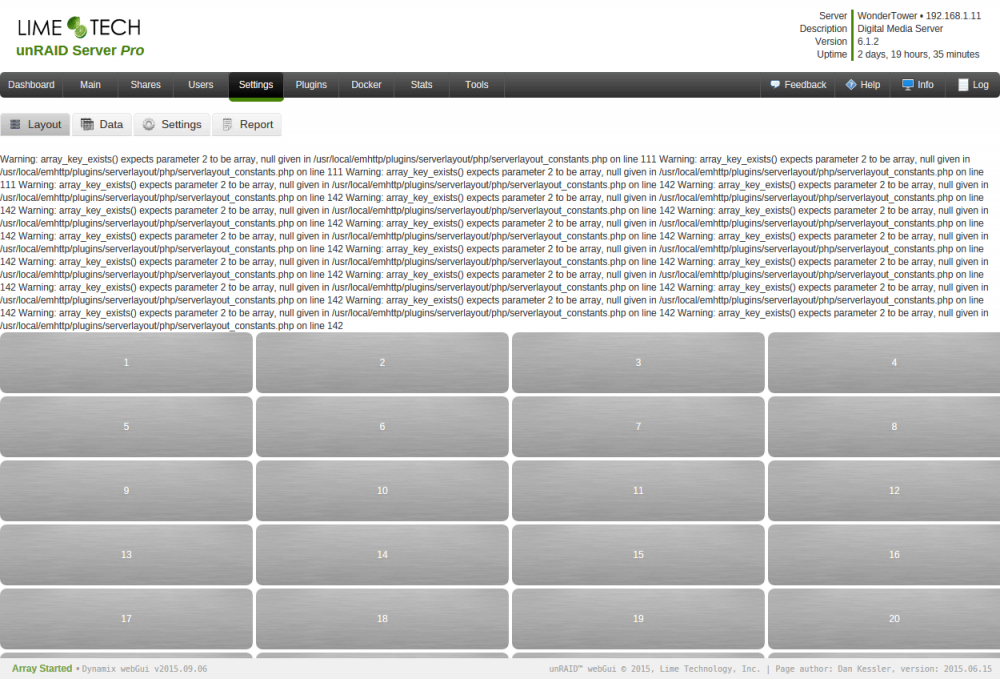
I installed the plugin and tried to use it but it doesn't seem to save the information. There is also a bunch of php errors when the plugin first loads up the layout page: I am using Unraid 6.1.2 and Firefox 40.0.3.
-
Been running the s3 script for several days and these new changes look great. What would make this perfect for me was if, as its final check, it pinged a list of IPs and if it couldn't reach any of them, then it would go to sleep. I don't know enough to do it myself and am looking for a bit of help on this. I believe someone else mentioned this earlier in the thread, but I don't think it got fleshed out far enough.


