





armagedon41
Members
-
Joined
-
Last visited
Everything posted by armagedon41
-
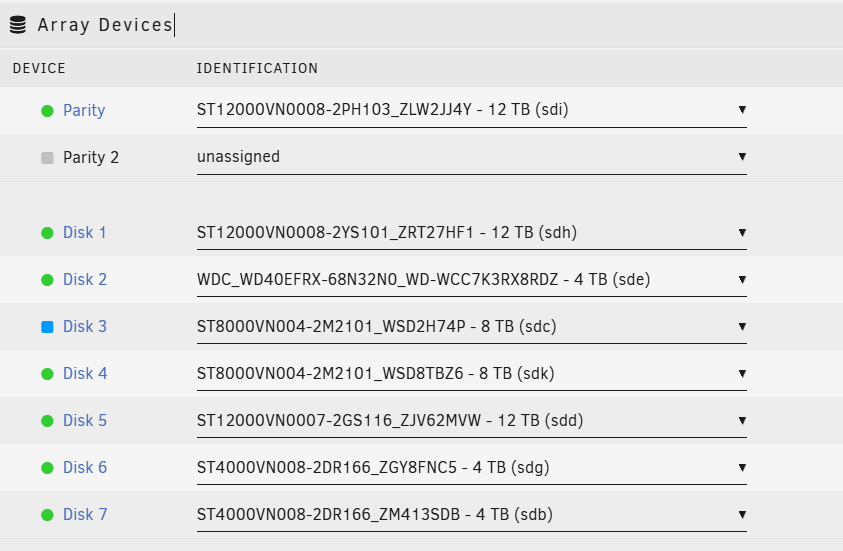
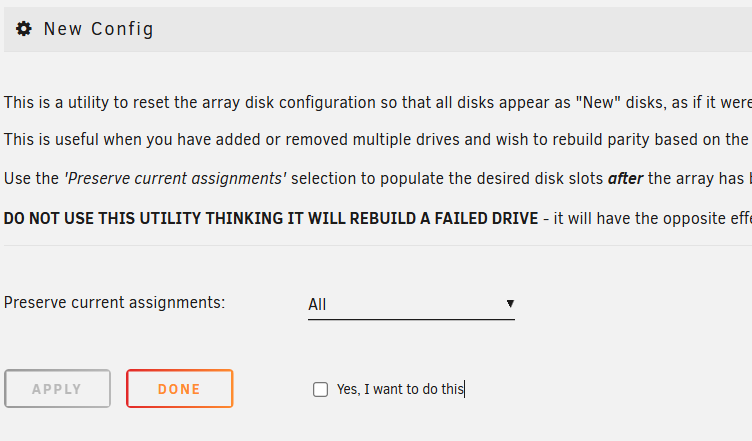
I am assuming that I need to just put back the original disk in to disk 3 (now showing as new) then run the New Config with preserve current assignments set to all? (this is where I an not sure) And then assuming the array does not auto start, start it back up and let parity check run then everything should be back up with all the data in on all the disks.
-
I was able to mount it in unassigned devices. not sure what the next step would be to get it back in to Disk 3 without it clearing it.
-
mc is moving that data over slowly, 75 MB/s so have about a day and a half, might try and stop and unassign before its all done, but I will update either after the copy or if I plan to live on the edge 😃
-
I stopped the copy and did a scan, same result, stuck in "continuing"
-
May have been more power issues, I mounted (read only) my old disk 1 to start to copy the files back to the new disk 1 using mc and it would start to copy then die a few seconds in and the parity would have tens of thousands of errors and the new disk 1 would even unmount on one attempt. So I swapped out the power supply completely and the copy is working this time. Once this copy is complete I will drop to maintenance mode and scan disk 3, in the meantime if any one has any suggestion if the scan does the same thing it would be appreciated.
-
yeah, left it overnight and the "...." just kept getting longer then finally jumped to the next line with "continuing". I had to cancel it. I tried it a couple more times with the same result.
-
That was from the ui, ran it straight with just deleting the -n
-
Scan on disk 3 is showing Phase 1 - find and verify superblock... couldn't verify primary superblock - not enough secondary superblocks with matching geometry !!! attempting to find secondary superblock... .found candidate secondary superblock... unable to verify superblock, continuing... ................................................................ unable to verify superblock, continuing... Disk 1 is looking good, mostly empty but expected. Still just that disk 3 oden-diagnostics-20250202-1138.zip
-
Ok changed the splitters and more or less in the same state At least no parity errors this time oden-diagnostics-20250131-2345.zip
-
Doing Molex to sata splitting, only have 2 2way splitters on different branches so it should be fine but I suspect the one has gotten loose over time so I will try and replace it just in case.
-
Yeah I have power splitters, I think that what was giving me the original intermittent issue with disk 4, so at the start of this I moved the power around to hopefully resolve the issue, which clearly did not work out. I have some new splitters on the way to at least swap out the one that I think was causing the issue.
-
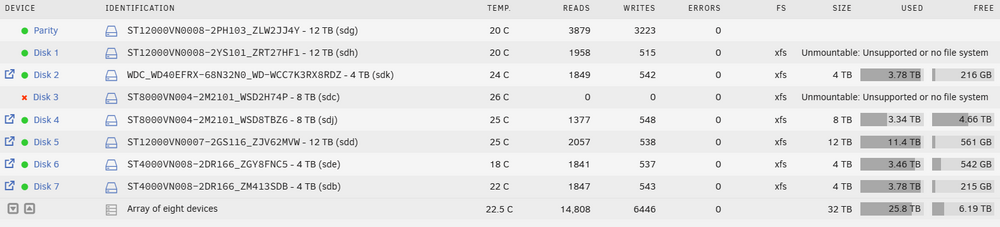
Array is all sorts of unhappy As it sits, Disk 1 should be empty (mostly) as it was the drive I was syncing at the beginning of this but I have the original disk that I hope is readable. and disk 3 was good before all this chaos. If I could get 3 remounted with its content, I could format disk 1 (as since parity is written over there would be no rebuilding that directly) or remount the old disk 1 in the same way (if possible) then get parity up to snuff I would be good (all though I would most likely need some fixing of dockers and internal content but at least I would have the contents back). oden-diagnostics-20250131-0933.zip

-
I've been having on and off issues with my array for some time and things kinda came to a head today. I have been trying to get a parity check to complete so that I can do some playing with my disks and get things fixed but my disk 4 kept hard resetting causing the parity check to take forever. Then for whatever reason my disk 1 threw an error and went emulated so I ended up pulling the drive and replacing it, during the sync the disk 4 was causing the same issues and the sync was going to take several years. So I stopped the sync and the array, messed with the power cables of the drives as that is what I think was causing the issue, when I brought up the array multiple drives failed to mount, ironically not drive 4 but rather drive 1 (the one that was emulated) 3 and 5. Went to maintenance mode and scanned them, when the drives went back up 1 and 3 remained unmountable but 5 returned good. Unraid then decided to run the parity check and quickly disk 3 thew an error and went emulated as well.... I only have one parity drive so this is obviously not good. So now I have disk 1 and 3 unmountable, but the parity check ran and completed (quite quickly). I am currently assuming disk 3 is actually ok just with a read error during all the chaos, I also have the original disk 1 (currently not connected) which I believe is more or less correct but I haven't mounted it anywhere to check. At the exact second I have the array mounted in maintenance mode. Any clue on what my next steps should be to try to get these drives back up with the least amount of missing data. oden-diagnostics-20250131-0019.zip
-
For anyone that lands on my unfiltered stream of consciousness here is the official docs on redoing the docker image. https://docs.unraid.net/unraid-os/manual/docker-management/#re-create-the-docker-image-file
-
I'm an Idiot, after the mover finished ran the scrub again from the cache disk and saw there were no errors.... then I realised the first run was ran on the docker vdisk, reran that and yeah same errors. So switching appdata back to the cache share and moving, once that is all done I guess I am going to delete and recreate the docker image. Is there a definitive procedure for this? there a lots of posts and such on it but they are all slightly different.
-
Ran in to the unraid legacy docs that say: So I am currently using the mover to pull everything off the cache drive and going to try that. I will probably leave the cache as btrfs as I think the xfs recommendation is old... but honestly don't know.
-
I have a post ready to go in that thread but I was doing a bit more poking around my system first and it looks like some other system errors have popped up, perhaps related. I am getting loops of: Jan 4 13:35:17 Oden kernel: BTRFS error (device loop2): bdev /dev/loop2 errs: wr 105847, rd 0, flush 0, corrupt 295556, gen 0 Jan 4 13:35:17 Oden kernel: BTRFS warning (device loop2): csum failed root 4937 ino 3058 off 0 csum 0x4bd21a61 expected csum 0x6a90ced5 mirror 1 Jan 4 13:35:17 Oden kernel: BTRFS error (device loop2): bdev /dev/loop2 errs: wr 105847, rd 0, flush 0, corrupt 295557, gen 0 Jan 4 13:35:17 Oden kernel: BTRFS warning (device loop2): csum failed root 4937 ino 3058 off 0 csum 0x4bd21a61 expected csum 0x6a90ced5 mirror 1 Jan 4 13:35:17 Oden kernel: BTRFS error (device loop2): bdev /dev/loop2 errs: wr 105847, rd 0, flush 0, corrupt 295558, gen 0 Jan 4 13:35:17 Oden kernel: BTRFS warning (device loop2): csum failed root 4937 ino 3058 off 0 csum 0x4bd21a61 expected csum 0x6a90ced5 mirror 1 Jan 4 13:35:17 Oden kernel: BTRFS error (device loop2): bdev /dev/loop2 errs: wr 105847, rd 0, flush 0, corrupt 295559, gen 0 Jan 4 13:35:19 Oden kernel: BTRFS warning (device loop2): csum failed root 4937 ino 3058 off 0 csum 0x4bd21a61 expected csum 0x6a90ced5 mirror 1 Jan 4 13:35:19 Oden kernel: BTRFS error (device loop2): bdev /dev/loop2 errs: wr 105847, rd 0, flush 0, corrupt 295560, gen 0 Jan 4 13:35:19 Oden kernel: BTRFS warning (device loop2): csum failed root 4937 ino 3058 off 0 csum 0x4bd21a61 expected csum 0x6a90ced5 mirror 1 Jan 4 13:35:19 Oden kernel: BTRFS error (device loop2): bdev /dev/loop2 errs: wr 105847, rd 0, flush 0, corrupt 295561, gen 0 Jan 4 13:35:19 Oden kernel: BTRFS warning (device loop2): csum failed root 4937 ino 3058 off 0 csum 0x4bd21a61 expected csum 0x6a90ced5 mirror 1 Jan 4 13:35:19 Oden kernel: BTRFS error (device loop2): bdev /dev/loop2 errs: wr 105847, rd 0, flush 0, corrupt 295562, gen 0 Jan 4 13:35:19 Oden kernel: BTRFS warning (device loop2): csum failed root 4937 ino 3058 off 0 csum 0x4bd21a61 expected csum 0x6a90ced5 mirror 1 Jan 4 13:35:19 Oden kernel: BTRFS error (device loop2): bdev /dev/loop2 errs: wr 105847, rd 0, flush 0, corrupt 295563, gen 0 Jan 4 13:35:20 Oden kernel: BTRFS warning (device loop2): csum failed root 4937 ino 3058 off 0 csum 0x4bd21a61 expected csum 0x6a90ced5 mirror 1 Jan 4 13:35:20 Oden kernel: BTRFS error (device loop2): bdev /dev/loop2 errs: wr 105847, rd 0, flush 0, corrupt 295564, gen 0 Jan 4 13:35:20 Oden kernel: BTRFS warning (device loop2): csum failed root 4937 ino 3058 off 0 csum 0x4bd21a61 expected csum 0x6a90ced5 mirror 1 Jan 4 13:35:20 Oden kernel: BTRFS error (device loop2): bdev /dev/loop2 errs: wr 105847, rd 0, flush 0, corrupt 295565, gen 0 Jan 4 13:35:23 Oden kernel: btrfs_print_data_csum_error: 6 callbacks suppressed Jan 4 13:35:23 Oden kernel: BTRFS warning (device loop2): csum failed root 4937 ino 3058 off 0 csum 0x4bd21a61 expected csum 0x6a90ced5 mirror 1 Jan 4 13:35:23 Oden kernel: btrfs_dev_stat_inc_and_print: 6 callbacks suppressed I ran a scrub as well to see what it came back with and it is getting errors: UUID: fc15cfc2-ec67-4d86-aff7-d7520b77b9ac Scrub started: Sat Jan 4 13:29:08 2025 Status: finished Duration: 0:06:21 Total to scrub: 35.53GiB Rate: 95.48MiB/s Error summary: csum=466 Corrected: 0 Uncorrectable: 466 Unverified: 0 That disk is my cache drive and only contains appdata at the moment.
-
I ended up waiting on the rebuild, disk 4 threw a few errors but once it got passed that things sped up and finished in a reasonable time. Once the disks were back up I dealt with the other disk errors on disk 1, ran xfs_repair and it eventually cleaned up the errors and the log is clean now. But now it looks like some of all that caused some issues with a couple of containers, (so far just looks like only 2), starting with sonarr its throwing errors I cant find being mentioned online: 2025-01-04 01:14:14,465 DEBG 'radarr' stderr output: /home/nobody/start.sh: line 10: 12047 Bus error /usr/lib/radarr/bin/Radarr -nobrowser -data=/config 2025-01-04 01:14:14,465 DEBG fd 8 closed, stopped monitoring <POutputDispatcher at 22662150226240 for <Subprocess at 22662137429600 with name radarr in state RUNNING> (stdout)> 2025-01-04 01:14:14,465 DEBG fd 10 closed, stopped monitoring <POutputDispatcher at 22662138116720 for <Subprocess at 22662137429600 with name radarr in state RUNNING> (stderr)> and it just loops and restarts. I've tried to restore just sonarr from more then one appdata backup (with and without templates) and the same errors keep occuring. Not sure what should be done next.
-
Took a bit to get things up and going again but array is back up, looks like parity is good but obviously the emulated disk 1 is still down but it is trying to rebuild again and files are accessible again but looking in to the the logs looks like that disk 4 is causing issues again as the rebuild speed is very slow and the logs are showing ata buss errors on ata9 which I think is disk 4. Last time this happened disk 4 eventually went unmountable then emulated which would be rather catastrophic now that I have another disk currently emulated. I'm guessing my best course of action is to stop the rebuild, stop the array then swap cables again, then bring everything back up hoping it is still cable/port issues. the last time disk 4 had issues I did swap cables but I used the same port so perhaps its a port issue. oden-diagnostics-20250102-1242.zip
-
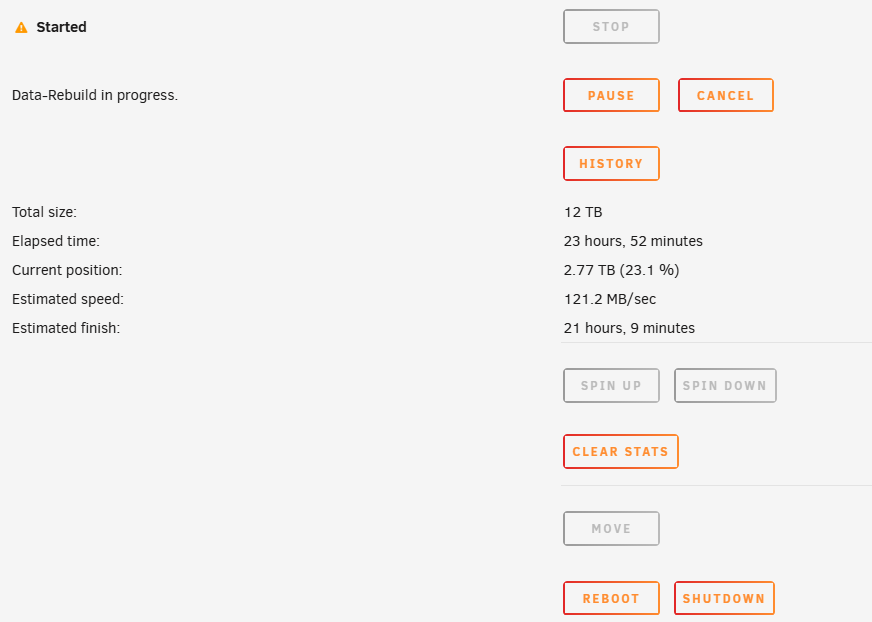
Should I shutdown and turn back on? the UI wont let me change anything in the state its in, and canceling the rebuild does not change anything.
-
I've been having some random issues lately with one drive (disk 4), it went unmountable then I had severally days of messing around to get it resolved but eventually the array recovered. However a day ago a different disk dropped (disk 1) and went to emulated so I started a rebuild, the disk dropped right when many automated processes all started at the same time (parity check, appdata backup, mover) so I hoped it was just a random error so I got the disk rebuilding. The rebuild was going, it was slow but doable so I was going to let the rebuild complete then figure out what might have been going on perhaps physically, (I'm thinking maybe power supply as the power supply is fairly old and the first issue happened after the server power cord got accidently pulled) but partly through the rebuild the parity drive threw a bunch of errors and now I have a feeling I just lost that drive. I'm not sure what I can do to recover, everything is still running right now but obviously nothing on that drive that was rebuilding is accessible, and the parity drive is showing up in unassigned devices. oden-diagnostics-20250102-0914.zip
-
I did end up swapping cables and rebuilt once again with the untrusted drive which failed at the same % so fairly sure that drive is just toast. I then swapped out the drive back to the original drive (with the new cable and port) and rebuilt, it succeeded and only took 14 hours so I think I am all up and running again. Thanks again for the help, there was not any one smoking gun on this one so I'll just mark the last comment as the solution.
-
Alright still on this journey, the disk unmounted again and I was able to scan and get it up again. So I started to play with the drive and things were still going slow until it went to emulated, I took this opportunity to move everything off the drive so it is now empty. Once the drive was empty and everything was still emulated I dropped the disk and re-added, the build ran for a bit but ran a bit slower then I would expected (estimated about 32-48 hours for a 12 tb array) and when it was 80% complete it failed with read errors and when back to emulated. I then pulled the drive and tried to rebuild with a different drive (I don't 100% trust this this new drive but it was the only other drive I have on hand) and this one was rebuilding faster (about 24-28 hours) but at only 15% it failed with read errors as well. Bellow is a chunk of the disk log that is sitting on that drive now. I'm just trying to confirm what might be the best course of action, does the read errors look like a failing drive, this would be 2 drives both showing up as faulty on the same area, not fully unexpected on the second drive since that was an untrusted disk but still odd. If I have to pick up another drive then so be it, but rather not have to throw cash at it right now if it could be likely resolved with existing hardware. Right now I am thinking of just swapping out the cable and port on the mobo and trying to rebuild once more (remove and re-add). ... Dec 17 09:26:02 Oden kernel: ata4.00: exception Emask 0x10 SAct 0x780 SErr 0x90200 action 0xe frozen Dec 17 09:26:02 Oden kernel: ata4.00: irq_stat 0x00400000, PHY RDY changed Dec 17 09:26:02 Oden kernel: ata4: SError: { Persist PHYRdyChg 10B8B } Dec 17 09:26:02 Oden kernel: ata4.00: failed command: READ FPDMA QUEUED Dec 17 09:26:02 Oden kernel: ata4.00: cmd 60/10:38:68:00:00/00:00:00:00:00/40 tag 7 ncq dma 8192 in Dec 17 09:26:02 Oden kernel: ata4.00: status: { DRDY } Dec 17 09:26:02 Oden kernel: ata4.00: failed command: READ FPDMA QUEUED Dec 17 09:26:02 Oden kernel: ata4.00: cmd 60/30:40:88:00:00/00:00:00:00:00/40 tag 8 ncq dma 24576 in Dec 17 09:26:02 Oden kernel: ata4.00: status: { DRDY } Dec 17 09:26:02 Oden kernel: ata4.00: failed command: READ FPDMA QUEUED Dec 17 09:26:02 Oden kernel: ata4.00: cmd 60/78:48:c8:00:00/00:00:00:00:00/40 tag 9 ncq dma 61440 in Dec 17 09:26:02 Oden kernel: ata4.00: status: { DRDY } Dec 17 09:26:02 Oden kernel: ata4.00: failed command: READ FPDMA QUEUED Dec 17 09:26:02 Oden kernel: ata4.00: cmd 60/f8:50:48:01:00/00:00:00:00:00/40 tag 10 ncq dma 126976 in Dec 17 09:26:02 Oden kernel: ata4.00: status: { DRDY } Dec 17 09:26:02 Oden kernel: ata4: hard resetting link Dec 17 09:26:08 Oden kernel: ata4: link is slow to respond, please be patient (ready=0) Dec 17 09:26:12 Oden kernel: ata4: found unknown device (class 0) Dec 17 09:26:12 Oden kernel: ata4: found unknown device (class 0) Dec 17 09:26:12 Oden kernel: ata4: SATA link up 1.5 Gbps (SStatus 113 SControl 310) Dec 17 09:26:15 Oden kernel: ata4.00: configured for UDMA/33 Dec 17 09:26:15 Oden kernel: sd 4:0:0:0: [sdg] tag#7 UNKNOWN(0x2003) Result: hostbyte=0x00 driverbyte=DRIVER_OK cmd_age=12s Dec 17 09:26:15 Oden kernel: sd 4:0:0:0: [sdg] tag#7 Sense Key : 0x5 [current] Dec 17 09:26:15 Oden kernel: sd 4:0:0:0: [sdg] tag#7 ASC=0x21 ASCQ=0x4 Dec 17 09:26:15 Oden kernel: sd 4:0:0:0: [sdg] tag#7 CDB: opcode=0x88 88 00 00 00 00 00 00 00 00 68 00 00 00 10 00 00 Dec 17 09:26:15 Oden kernel: I/O error, dev sdg, sector 104 op 0x0:(READ) flags 0x80700 phys_seg 2 prio class 2 Dec 17 09:26:15 Oden kernel: sd 4:0:0:0: [sdg] tag#8 UNKNOWN(0x2003) Result: hostbyte=0x00 driverbyte=DRIVER_OK cmd_age=12s Dec 17 09:26:15 Oden kernel: sd 4:0:0:0: [sdg] tag#8 Sense Key : 0x5 [current] Dec 17 09:26:15 Oden kernel: sd 4:0:0:0: [sdg] tag#8 ASC=0x21 ASCQ=0x4 Dec 17 09:26:15 Oden kernel: sd 4:0:0:0: [sdg] tag#8 CDB: opcode=0x88 88 00 00 00 00 00 00 00 00 88 00 00 00 30 00 00 Dec 17 09:26:15 Oden kernel: I/O error, dev sdg, sector 136 op 0x0:(READ) flags 0x80700 phys_seg 6 prio class 2 Dec 17 09:26:15 Oden kernel: sd 4:0:0:0: [sdg] tag#9 UNKNOWN(0x2003) Result: hostbyte=0x00 driverbyte=DRIVER_OK cmd_age=12s Dec 17 09:26:15 Oden kernel: sd 4:0:0:0: [sdg] tag#9 Sense Key : 0x5 [current] Dec 17 09:26:15 Oden kernel: sd 4:0:0:0: [sdg] tag#9 ASC=0x21 ASCQ=0x4 Dec 17 09:26:15 Oden kernel: sd 4:0:0:0: [sdg] tag#9 CDB: opcode=0x88 88 00 00 00 00 00 00 00 00 c8 00 00 00 78 00 00 Dec 17 09:26:15 Oden kernel: I/O error, dev sdg, sector 200 op 0x0:(READ) flags 0x80700 phys_seg 15 prio class 2 Dec 17 09:26:15 Oden kernel: sd 4:0:0:0: [sdg] tag#10 UNKNOWN(0x2003) Result: hostbyte=0x00 driverbyte=DRIVER_OK cmd_age=12s Dec 17 09:26:15 Oden kernel: sd 4:0:0:0: [sdg] tag#10 Sense Key : 0x5 [current] Dec 17 09:26:15 Oden kernel: sd 4:0:0:0: [sdg] tag#10 ASC=0x21 ASCQ=0x4 Dec 17 09:26:15 Oden kernel: sd 4:0:0:0: [sdg] tag#10 CDB: opcode=0x88 88 00 00 00 00 00 00 00 01 48 00 00 00 f8 00 00 Dec 17 09:26:15 Oden kernel: I/O error, dev sdg, sector 328 op 0x0:(READ) flags 0x80700 phys_seg 30 prio class 2 Dec 17 09:26:15 Oden kernel: ata4: EH complete Dec 17 09:26:15 Oden kernel: ata4.00: exception Emask 0x10 SAct 0x2000 SErr 0x90200 action 0xe frozen Dec 17 09:26:15 Oden kernel: ata4.00: irq_stat 0x00400000, PHY RDY changed Dec 17 09:26:15 Oden kernel: ata4: SError: { Persist PHYRdyChg 10B8B } Dec 17 09:26:15 Oden kernel: ata4.00: failed command: READ FPDMA QUEUED Dec 17 09:26:15 Oden kernel: ata4.00: cmd 60/00:68:40:26:81/02:00:a3:03:00/40 tag 13 ncq dma 262144 in Dec 17 09:26:15 Oden kernel: ata4.00: status: { DRDY } Dec 17 09:26:15 Oden kernel: ata4: hard resetting link Dec 17 09:26:21 Oden kernel: ata4: link is slow to respond, please be patient (ready=0) Dec 17 09:26:25 Oden kernel: ata4: found unknown device (class 0) Dec 17 09:26:25 Oden kernel: ata4: found unknown device (class 0) Dec 17 09:26:25 Oden kernel: ata4: SATA link up 1.5 Gbps (SStatus 113 SControl 310) Dec 17 09:26:28 Oden kernel: ata4.00: configured for UDMA/33 Dec 17 09:26:28 Oden kernel: sd 4:0:0:0: [sdg] tag#13 UNKNOWN(0x2003) Result: hostbyte=0x00 driverbyte=DRIVER_OK cmd_age=12s Dec 17 09:26:28 Oden kernel: sd 4:0:0:0: [sdg] tag#13 Sense Key : 0x5 [current] Dec 17 09:26:28 Oden kernel: sd 4:0:0:0: [sdg] tag#13 ASC=0x21 ASCQ=0x4 Dec 17 09:26:28 Oden kernel: sd 4:0:0:0: [sdg] tag#13 CDB: opcode=0x88 88 00 00 00 00 03 a3 81 26 40 00 00 02 00 00 00 Dec 17 09:26:28 Oden kernel: I/O error, dev sdg, sector 15628052032 op 0x0:(READ) flags 0x80700 phys_seg 64 prio class 2 Dec 17 09:26:28 Oden kernel: ata4: EH complete Dec 17 09:40:02 Oden kernel: ata4.00: exception Emask 0x10 SAct 0x8000000 SErr 0x90200 action 0xe frozen Dec 17 09:40:02 Oden kernel: ata4.00: irq_stat 0x00400000, PHY RDY changed Dec 17 09:40:02 Oden kernel: ata4: SError: { Persist PHYRdyChg 10B8B } Dec 17 09:40:02 Oden kernel: ata4.00: failed command: READ FPDMA QUEUED Dec 17 09:40:02 Oden kernel: ata4.00: cmd 60/08:d8:80:00:00/00:00:00:00:00/40 tag 27 ncq dma 4096 in Dec 17 09:40:02 Oden kernel: ata4.00: status: { DRDY } Dec 17 09:40:02 Oden kernel: ata4: hard resetting link Dec 17 09:40:08 Oden kernel: ata4: link is slow to respond, please be patient (ready=0) Dec 17 09:40:12 Oden kernel: ata4: found unknown device (class 0) Dec 17 09:40:12 Oden kernel: ata4: found unknown device (class 0) Dec 17 09:40:12 Oden kernel: ata4: SATA link up 1.5 Gbps (SStatus 113 SControl 310) Dec 17 09:40:14 Oden kernel: ata4.00: configured for UDMA/33 Dec 17 09:40:14 Oden kernel: sd 4:0:0:0: [sdg] tag#27 UNKNOWN(0x2003) Result: hostbyte=0x00 driverbyte=DRIVER_OK cmd_age=12s Dec 17 09:40:14 Oden kernel: sd 4:0:0:0: [sdg] tag#27 Sense Key : 0x5 [current] Dec 17 09:40:14 Oden kernel: sd 4:0:0:0: [sdg] tag#27 ASC=0x21 ASCQ=0x4 Dec 17 09:40:14 Oden kernel: sd 4:0:0:0: [sdg] tag#27 CDB: opcode=0x88 88 00 00 00 00 00 00 00 00 80 00 00 00 08 00 00 Dec 17 09:40:14 Oden kernel: I/O error, dev sdg, sector 128 op 0x0:(READ) flags 0x80700 phys_seg 1 prio class 2 Dec 17 09:40:14 Oden kernel: ata4: EH complete Dec 17 09:40:15 Oden kernel: ata4.00: exception Emask 0x10 SAct 0x10000 SErr 0x90200 action 0xe frozen Dec 17 09:40:15 Oden kernel: ata4.00: irq_stat 0x00400000, PHY RDY changed Dec 17 09:40:15 Oden kernel: ata4: SError: { Persist PHYRdyChg 10B8B } Dec 17 09:40:15 Oden kernel: ata4.00: failed command: READ FPDMA QUEUED Dec 17 09:40:15 Oden kernel: ata4.00: cmd 60/00:80:40:26:81/02:00:a3:03:00/40 tag 16 ncq dma 262144 in Dec 17 09:40:15 Oden kernel: ata4.00: status: { DRDY } Dec 17 09:40:15 Oden kernel: ata4: hard resetting link Dec 17 09:40:21 Oden kernel: ata4: link is slow to respond, please be patient (ready=0) Dec 17 09:40:25 Oden kernel: ata4: found unknown device (class 0) Dec 17 09:40:25 Oden kernel: ata4: found unknown device (class 0) Dec 17 09:40:25 Oden kernel: ata4: SATA link up 1.5 Gbps (SStatus 113 SControl 310) Dec 17 09:40:28 Oden kernel: ata4.00: configured for UDMA/33 Dec 17 09:40:28 Oden kernel: sd 4:0:0:0: [sdg] tag#16 UNKNOWN(0x2003) Result: hostbyte=0x00 driverbyte=DRIVER_OK cmd_age=13s Dec 17 09:40:28 Oden kernel: sd 4:0:0:0: [sdg] tag#16 Sense Key : 0x5 [current] Dec 17 09:40:28 Oden kernel: sd 4:0:0:0: [sdg] tag#16 ASC=0x21 ASCQ=0x4 Dec 17 09:40:28 Oden kernel: sd 4:0:0:0: [sdg] tag#16 CDB: opcode=0x88 88 00 00 00 00 03 a3 81 26 40 00 00 02 00 00 00 Dec 17 09:40:28 Oden kernel: I/O error, dev sdg, sector 15628052032 op 0x0:(READ) flags 0x80700 phys_seg 64 prio class 2 Dec 17 09:40:28 Oden kernel: ata4: EH complete Dec 17 09:45:02 Oden kernel: ata4.00: exception Emask 0x10 SAct 0x400000 SErr 0x40d0202 action 0xe frozen Dec 17 09:45:02 Oden kernel: ata4.00: irq_stat 0x00400000, PHY RDY changed Dec 17 09:45:02 Oden kernel: ata4: SError: { RecovComm Persist PHYRdyChg CommWake 10B8B DevExch } Dec 17 09:45:02 Oden kernel: ata4.00: failed command: READ FPDMA QUEUED Dec 17 09:45:02 Oden kernel: ata4.00: cmd 60/08:b0:78:00:00/00:00:00:00:00/40 tag 22 ncq dma 4096 in Dec 17 09:45:02 Oden kernel: ata4.00: status: { DRDY } Dec 17 09:45:02 Oden kernel: ata4: hard resetting link Dec 17 09:45:08 Oden kernel: ata4: link is slow to respond, please be patient (ready=0) Dec 17 09:45:12 Oden kernel: ata4: found unknown device (class 0) Dec 17 09:45:12 Oden kernel: ata4: found unknown device (class 0) Dec 17 09:45:12 Oden kernel: ata4: SATA link up 1.5 Gbps (SStatus 113 SControl 310) Dec 17 09:45:14 Oden kernel: ata4.00: configured for UDMA/33 Dec 17 09:45:14 Oden kernel: sd 4:0:0:0: [sdg] tag#22 UNKNOWN(0x2003) Result: hostbyte=0x00 driverbyte=DRIVER_OK cmd_age=12s Dec 17 09:45:14 Oden kernel: sd 4:0:0:0: [sdg] tag#22 Sense Key : 0x5 [current] Dec 17 09:45:14 Oden kernel: sd 4:0:0:0: [sdg] tag#22 ASC=0x21 ASCQ=0x4 Dec 17 09:45:14 Oden kernel: sd 4:0:0:0: [sdg] tag#22 CDB: opcode=0x88 88 00 00 00 00 00 00 00 00 78 00 00 00 08 00 00 Dec 17 09:45:14 Oden kernel: I/O error, dev sdg, sector 120 op 0x0:(READ) flags 0x80700 phys_seg 1 prio class 2 Dec 17 09:45:14 Oden kernel: ata4: EH complete Dec 17 09:45:15 Oden kernel: ata4.00: exception Emask 0x10 SAct 0x1000 SErr 0x90200 action 0xe frozen Dec 17 09:45:15 Oden kernel: ata4.00: irq_stat 0x00400000, PHY RDY changed Dec 17 09:45:15 Oden kernel: ata4: SError: { Persist PHYRdyChg 10B8B } Dec 17 09:45:15 Oden kernel: ata4.00: failed command: READ FPDMA QUEUED Dec 17 09:45:15 Oden kernel: ata4.00: cmd 60/00:60:40:26:81/02:00:a3:03:00/40 tag 12 ncq dma 262144 in Dec 17 09:45:15 Oden kernel: ata4.00: status: { DRDY } Dec 17 09:45:15 Oden kernel: ata4: hard resetting link Dec 17 09:45:21 Oden kernel: ata4: link is slow to respond, please be patient (ready=0) Dec 17 09:45:25 Oden kernel: ata4: found unknown device (class 0) Dec 17 09:45:25 Oden kernel: ata4: found unknown device (class 0) Dec 17 09:45:25 Oden kernel: ata4: SATA link up 1.5 Gbps (SStatus 113 SControl 310) Dec 17 09:45:28 Oden kernel: ata4.00: configured for UDMA/33 Dec 17 09:45:28 Oden kernel: sd 4:0:0:0: [sdg] tag#12 UNKNOWN(0x2003) Result: hostbyte=0x00 driverbyte=DRIVER_OK cmd_age=13s Dec 17 09:45:28 Oden kernel: sd 4:0:0:0: [sdg] tag#12 Sense Key : 0x5 [current] Dec 17 09:45:28 Oden kernel: sd 4:0:0:0: [sdg] tag#12 ASC=0x21 ASCQ=0x4 Dec 17 09:45:28 Oden kernel: sd 4:0:0:0: [sdg] tag#12 CDB: opcode=0x88 88 00 00 00 00 03 a3 81 26 40 00 00 02 00 00 00 Dec 17 09:45:28 Oden kernel: I/O error, dev sdg, sector 15628052032 op 0x0:(READ) flags 0x80700 phys_seg 64 prio class 2 Dec 17 09:45:28 Oden kernel: ata4: EH complete Dec 17 10:35:02 Oden kernel: ata4.00: exception Emask 0x10 SAct 0x2000 SErr 0x90200 action 0xe frozen Dec 17 10:35:02 Oden kernel: ata4.00: irq_stat 0x00400000, PHY RDY changed Dec 17 10:35:02 Oden kernel: ata4: SError: { Persist PHYRdyChg 10B8B } Dec 17 10:35:02 Oden kernel: ata4.00: failed command: READ FPDMA QUEUED Dec 17 10:35:02 Oden kernel: ata4.00: cmd 60/00:68:40:26:81/02:00:a3:03:00/40 tag 13 ncq dma 262144 in Dec 17 10:35:02 Oden kernel: ata4.00: status: { DRDY } Dec 17 10:35:02 Oden kernel: ata4: hard resetting link Dec 17 10:35:08 Oden kernel: ata4: link is slow to respond, please be patient (ready=0) Dec 17 10:35:13 Oden kernel: ata4: found unknown device (class 0) Dec 17 10:35:13 Oden kernel: ata4: found unknown device (class 0) Dec 17 10:35:13 Oden kernel: ata4: SATA link up 1.5 Gbps (SStatus 113 SControl 310) Dec 17 10:35:15 Oden kernel: ata4.00: configured for UDMA/33 Dec 17 10:35:15 Oden kernel: sd 4:0:0:0: [sdg] tag#13 UNKNOWN(0x2003) Result: hostbyte=0x00 driverbyte=DRIVER_OK cmd_age=12s Dec 17 10:35:15 Oden kernel: sd 4:0:0:0: [sdg] tag#13 Sense Key : 0x5 [current] Dec 17 10:35:15 Oden kernel: sd 4:0:0:0: [sdg] tag#13 ASC=0x21 ASCQ=0x4 Dec 17 10:35:15 Oden kernel: sd 4:0:0:0: [sdg] tag#13 CDB: opcode=0x88 88 00 00 00 00 03 a3 81 26 40 00 00 02 00 00 00 Dec 17 10:35:15 Oden kernel: I/O error, dev sdg, sector 15628052032 op 0x0:(READ) flags 0x80700 phys_seg 64 prio class 2 Dec 17 10:35:15 Oden kernel: ata4: EH complete
-
There does seem to be an issue with this drive/file system, I tried to get a parity check going but it ended up running just as slow as before, running in the KB/s range. I paused it and I have been using unbalance to move things off of the drive but it to is transferring very slow, I have managed to get everything that I was worried about (things that didn't have proper backups or would be hard to replace), There is still a lot of data and would be annoying to recover from but not devastating. By reformatting the disk are you referring to pulling the drive, then clearing it outside of the array, then popping it back in to rebuild? I was hoping to be able to recover without degrading the array while things rebuild but if that is what it will take....
-
That last run seems to have done it, everything is mounted now and only about 30 files in the lost+found, most of which look to be some "linux ios's" that I should be able to recover. Thanks JorgeB for the suggestions, I'll put through a memtest next to see if there is anything else going on. Any comments as to why I needed to run the fix so many times to get the file system backup? is that (semi) normal or is it a sign of other issues? Just want to know if or where I should look for any other issues that may be hiding under the surface.


