





techdiver
Members
-
Joined
-
Last visited
-
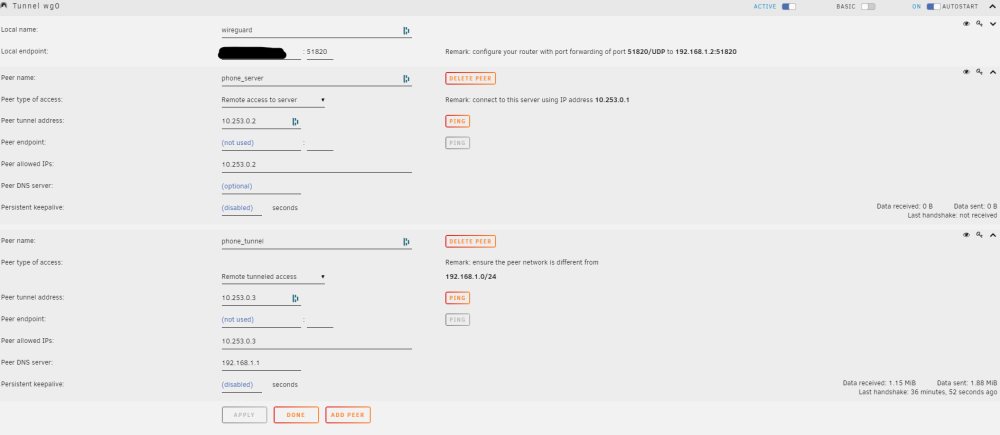
Hi, I was playing around with setting up VPN on my server and have it pretty much working fine when using "Remote Tunneled Access". I can install the client on my phone and connect and ping local network assets fine. I do want to set up a tunnel that only accesses my server for remote backups. The issue is when I configure a peer with Remote Tunneled Access it doesn't seem to connect (Last Handshake remains "not received") and the server is not pingable (either by it's LAN ip or the remote access ip assigned). Attached is a screenshot of my config. Any advice would be appreciated.
-
Hi, I have 2 unraid servers, one that operates as a clone backup of the main server. That backup system sleeps all the time and is woken by a script from the main server nightly and a backup script is run. I recently removed a drive from the main server (as I had a lot of space) using the shrink array steps and that worked fine and the main server is running perfectly and added that disk to the backup server. All worked fine and the disk was added to the array no problems. I noticed an issue whereby my nightly backup script started to fail. Upon investigation the issue was flagged as the new disk. But it only shows read errors after resuming from sleep. If I leave the system running my backup script works fine. It's only if I resume from sleep that we receive the read errors. I have attached my diagnostics from just after one of the incidences. tower2-diagnostics-20220701-0957.zip
-
I had the same issue. Instructions are difficult to come by to sort this. I followed the suggestions in this thread and it resolved it for me. NOTE: The first time I did it, Plex did not start up successfully with the following error in the log - "Error: No such container". I rolled back the change, started plex again and ensured it started up. Then applied the plexpass fix again.
