





dest0
Members
-
Joined
-
Last visited
Everything posted by dest0
-
Server crashed a bit ago. been looking into it and in the log it's getting flooded with errors Jun 7 20:00:02 Tower kernel: usb 1-8: device descriptor read/8, error -71 Jun 7 20:00:02 Tower kernel: usb usb1-port8: unable to enumerate USB device that sorta thing. tried searching for fixes and just replaced the usb boot device but still getting the same errors. I'm not really sure what to do next tower-diagnostics-20240607-1959.zip
-
oh, i disabled docker, then changed the setting. now re-enabling.
-
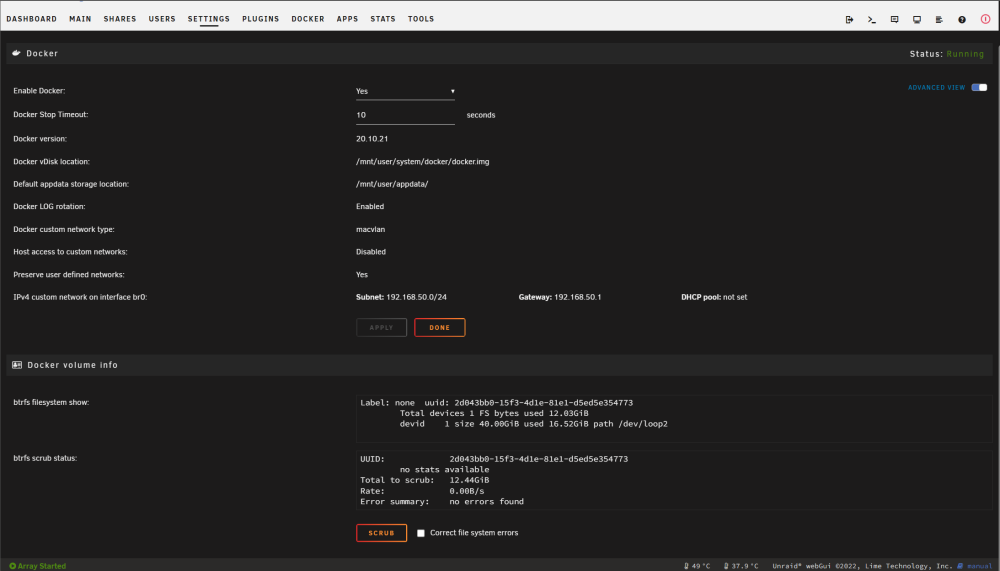
there doesn't appear to be the ability to change the network type from macvlan. screenshot attached
-
server crashed yesterday. attached is the syslog syslog
-
server crashed again. attached are the diags. tower-diagnostics-20230131-1941.zip
-
thanks, ive changed those two bios settings and will see how that affects things - disable c-states - power supply idle control - set to typical current idle
-
My unraid server freezes up every couple of days. After it crashed this morning I snagged the diagnostics and uploaded them to this post. I've already replaced all the ram on the box as that was a suggestion from last year in this forum tower-diagnostics-20230118-1321.zip
-
it took 25 minutes of looking around before i got this working. Incredibly frustrating For the next poor soul that is searching, the information you need to set this up and have it working can be found in this post. Just the powerdown -r does not work Do the moderators here have any suggestions regarding hardware diagnostics?
-
memtest came back clear. What else do you suggest? Is there a way to schedule a graceful reboot daily? system seems to crash about 2 days after a reboot consistently
-
syslogoh maybe this?
-
i told it to mirror locally in appdata, but i don't see a folder for logs so where do i grab them from?the crash was around 11pm pst last nightok it crashed last night. i had enabled the syslog data capture before the tower-diagnostics-20211223-1056.zipcrash. Is this what you need or do i need to grab logs from somewhere else?Server froze up again yesterday. What else can I try?ok thank you. I've disabled the global c-states. Will see how that goes for a whileHi there, I'm running unraid and daily it seems to crash. I have to hard reset it. I'm not really sure on what next steps i should be taking for troubleshooting. I've attached the diagnostics tower-diagnostics-20211217-0704.zipremoved MFA and it worked right away.i've copied and pasted the password from my password manager and it works on plex login. I do have mfa enabled with Plex, would this cause an issue? Does the displayname have to match the displayname in plex? does the username mean the username or email address I use with plex. I've tried bothI've installed plexripper but when i try to login i get the following errors: [ { "reasons": [], "message": "The result from the PlexSignIn was null", "metadata": {} }, { "reasons": [], "message": "The plexAccount with dest***** was invalid when sent to the PlexApi", "metadata": {} } ] any ideas?I'm not sure i have a backup from before the corruption happened. What are my next steps?Hi all, I'm getting an error on the dashboard when i login that says: "Warning: syntax error, unexpected '!' in /boot/config/domain.cfg on line 1 in /usr/local/emhttp/plugins/dynamix.vm.manager/include/libvirt_helpers.php on line 478" when I was looking around online for solutions it sounded like i might need to replace my usb key but I wanted to get some confirmation here before I did that in case it's something else that is wrong. I've attached the diagnostics as well. Thank you in advance! tower-diagnostics-20210625-1530.zip


