





Tidus
Members
-
Joined
-
Last visited
Everything posted by Tidus
-
Thank you sooo much for your kind help! I've already solved my problem by changing the path, linking /var/lib/dav/data to the dir I needed. But I ignored the other mount "Config" you mentioned aboved. I don't know why but it seemed everything is fine up to now. I have the access to my webDAV and the dir is what I specified (I don't want to have access to all the files in my NAS through this webDAV so I did need to specify the very dir). I know nothing about coding but everything now is perfect for me. Thank you once again for your kind help!
-
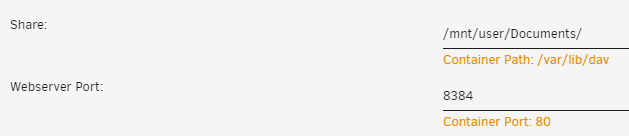
Thank you so much for your kind effort. I tried just now and the problem has perfectly solved. But it seems there is another problem: I specified the share path for this container as above: /mnt/user/Documents/ When I log in through webdav remotely, I did have access to the webdav server, but it was empty. Then I carefully checked everything and found that it seemed that this container created a new folder (/mnt/user/Documents/data) under Documents where I specified, which means that I can only have access to /mnt/user/Documents/data instead of what I specified (/mnt/user/Documents/) I'll be so grateful if you may tell me how to fix it. I do need to have access to /mnt/user/Documents/ through webdav. Thank you so much!
-
Hi Mgutt! Thanks a lot. But I encountered a problem. After I edit a file (for example an Excel file) by opening it through webdav, I can only open the same file with READ ONLY mode when I come back home where my unRaid server is through smb. Could you please tell me why and how to fix it? Thank you so much!
