Sherr0
Members
-
Joined
-
Last visited
Everything posted by Sherr0
-
Unraid 6.10.3 M/B: ASUSTeK COMPUTER INC. ROG STRIX Z490-H GAMING Version Rev 1.xx - s/n: 200670041900187 BIOS: American Megatrends Inc. Version 2601. Dated: 05/17/2022 CPU: Intel® Core™ i9-10850K CPU @ 3.60GHz HVM: Enabled IOMMU: Enabled Memory: 48 GiB DDR4 I have two Nvida graphics cards in my server 1st PCIE slot [GeForce GTX 1050 Ti] and 2nd PCIE slot [Quadro P2000] . I wish to use the i915 integrated VGA for local console and boot GUI mode [UHD Graphics 630]. I have integrated graphics selected as default in the Bios, at boot the monitor plugged into it shows boot process all the way to when the GUI should show log in, at that point that screen goes blank the the monitor that is plugged into the GeForce GTX 1050 Ti shows the GUI log in screen and works as you would expect. When I bind the GeForce GTX 1050 Ti to VFIO at boot for pass-through to VM the same thing happens but to the Quadro P2000. If I bind both cards to VFIO the i915 (onboard) works showing the full boot process and the GUI screen at the end with log in and works as expected. The problem is I want to use the second card Quadro P2000 for dockers and not bind it to VFIO and still use the i915 for GUI. How do i tell Unraid to use the i915 regardless of the availability of discrete VGA cards. Thanks in advanced Bret laurelin-diagnostics-20220919-1448.zip
-
when i ticked the box that said remove the missing devices and start the array all was good stoped the array again and re-assigned the correct drives and restarted the array all fixed thanks a lot
-
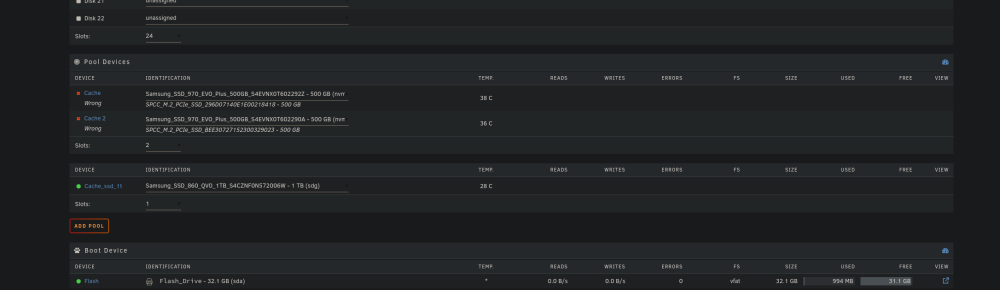
array wont start with none selected in both slots can i do any harm by removing the phantom devices form the config file ? I should add that i had replaced both of these ssd a week ago but have not had any problems until today. Is it safe to asume that the phantom drives that the system is looking for where the old ones i took out ? and that is why i have two lots of entrys in the config file?
-
So this is the contents of confg > pools > cache.cfg should edit this file and remove the lines ? diskId="SPCC_M.2_PCIe_SSD_296D07140E1E00218418" diskId.1="SPCC_M.2_PCIe_SSD_BEE30727152300329023" or am i on the wrong track ? ========================================= diskFsType="btrfs" diskComment="" diskWarning="" diskCritical="" diskUUID="1d576a90-08fc-4b93-851e-0f7c1134e608" diskShareEnabled="yes" diskShareFloor="0" diskExport="-" diskFruit="no" diskSecurity="public" diskReadList="" diskWriteList="" diskVolsizelimit="" diskCaseSensitive="auto" diskExportNFS="-" diskExportNFSFsid="0" diskSecurityNFS="public" diskHostListNFS="" diskId="SPCC_M.2_PCIe_SSD_296D07140E1E00218418" diskId.1="SPCC_M.2_PCIe_SSD_BEE30727152300329023" diskIdSlot="Samsung_SSD_970_EVO_Plus_500GB_S4EVNX0T602292Z" diskIdSlot.1="Samsung_SSD_970_EVO_Plus_500GB_S4EVNX0T602290A" diskType="Cache" diskType.1="Cache" diskSpindownDelay="0" diskSpindownDelay.1="0" diskSpinupGroup="" diskSpinupGroup.1="" ===============================================
-
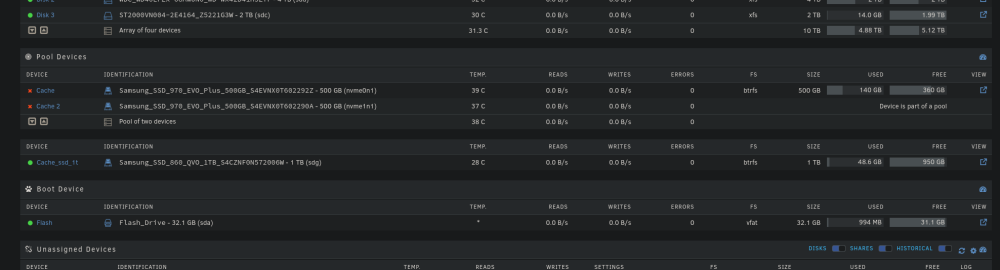
Hi guys I have a problem, after I updated my motherboard Bios both of my SSDs in my cache pool are marked as wrong. When i log in the array is stopped after reboot. They both seem to have the same names that they had when installed but unraid is expecting different drives. when i start the array the pool looks to be working, I can browse the files and start and run docker containers that live on the cache. I have tried using the new config tool preserving array allocations only to no avail. any help would be appreciated laurelin-diagnostics-20220910-1605.zip