





squarebob
Members
-
Joined
-
Last visited
-
Your output looks correct now. Did you try and run the update again?
-
You could use the terminal in web gui (from the row on the top right in gui), then cd /mnt/user/appdata/nextcloud/
-
@gevsan It is probably an issue with file owner. In you nextcloud appdata folder you can check it by doing: ls -la it should say "nobody users" as owner. If it dosnt, you can run: chown nobody:users -R * then re-run the update command
-
I experience this as well on occasion when restarting the docker. Docker uses around 70% CPU. When I check the web interface, only the BI splash screen shows. I need to restart the docker probably around 2-4 times to get it out of this loop. I have not experienced this problem, but does it consistently reoccur if you remove the docker and folder associated with it, and reinstall?
-
I added a path to pooled devices outside the array.
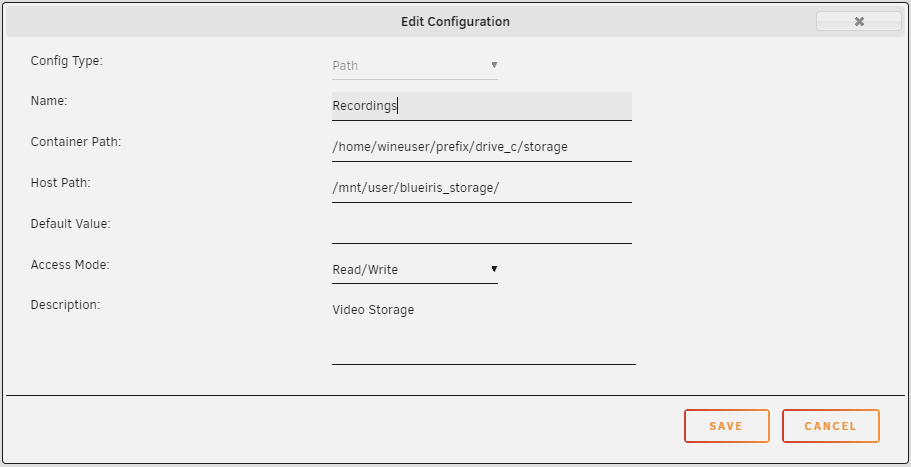
-
@Shesakillatwo what is your setup details? Ive been running it for a few weeks now, and its mostly ok. Its frozen a few times for me, but Im not sure if thats due to my meddling. Ive set my docker up with an IP on br0, and have no issues connecting to it from the BlueIris app on my mobile. My server runs on Ryzen 5 2600X. I got about 9 dockers running, and BlueIris is using around 2%-3% with 4 cameras. I ran BlueIris in demo mode for a while to test, but my impression is that it works a lot better registered as a docker. Well worth the price as well. A bit on the side, I recently set up deepstack for motion trigger using these two excellent guides. Configure BlueIris as demonstrated here: https://www.youtube.com/watch?v=fwoonl5JKgo For the deepstack part, use this guide: https://github.com/danecreekphotography/node-deepstackai-trigger/issues/349
