






sirhotness
Members
-
Joined
-
Last visited
Everything posted by sirhotness
-
it didnt recreate the docker image in the system folder. how can i recreate this docker image so it can be enabled? says i have 10g free of space. i bumped my docker image to 30g, should i make it more?
-
i followed space invaders yt vid and increased the docker image size, deleted the docker image and re-enabled. damn i might have made this worse. let me move some data also. right now trying to figure out how to re-enable my docker again. thanks jorgeB, new to this.
-
also, just downloaded the new diag zip. see attached. blacksheep2-diagnostics-20220309-0805.zip
-
no, full regular sas cable from array to server. looks like it booted back up and i can see everything, but the docker says its corrupted now. so trying to find the link i saw in the forum on how to replace the docker.
-
thanks jorgeB, really appreciate you. working on rebooting it right now.
-
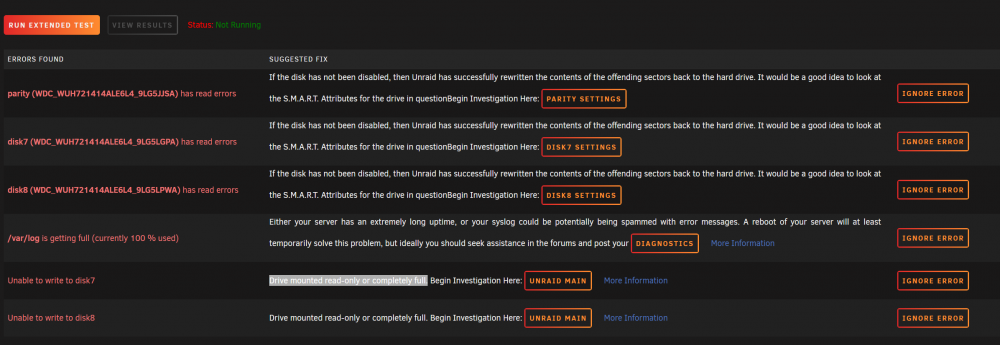
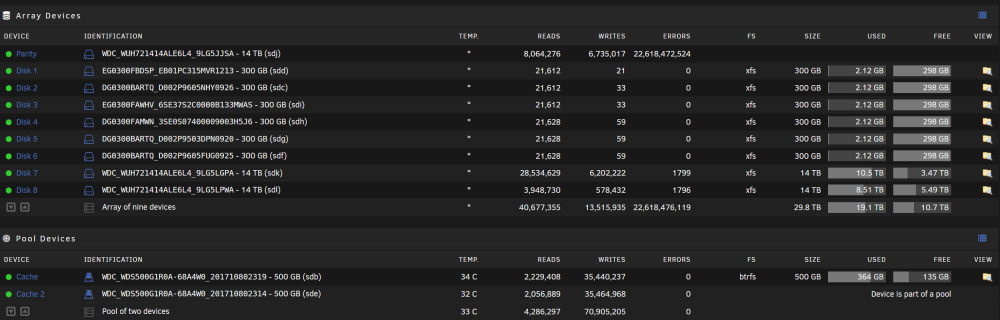
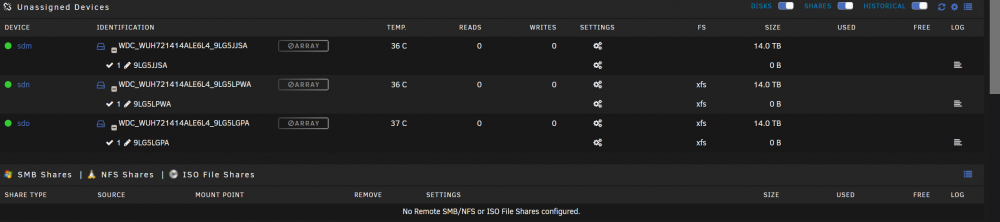
woke up this morning to 3 of my hdds on my array giving no access. 1 is a parity drive and the other 2 are where all my media is stored. i can't see them in shared, but i can see them on the dashboard and the main tabs and healthy and 75% usage. the 3 hdds show up under unassigned devices, but have a greyed out section saying array. fix common problems gives me, "Drive mounted read-only or completely full." and none of my shares are showing to be able to access the data. please help as i am new to unraid and i dont know what to do to ensure i dont lose data and can get my server back to normal. i have attached screenshots for reference. in addition, i added the tools/diagnostic file i downloaded. blacksheep2-diagnostics-20220308-2025.zip
-
ok so far to fix my issue to my plex problem not loading quick by changing the path. i found the answer at this reddit post. i also installed fix common problems plugin and then ran/fixed all issues. plus i updated al my plugins and dockers. and i restarted graphql. im not sure if all this fixed my unclean shutdown, but the most recent was changing the path. ever since then i havent had an unclean shutdown. figured i'd update this post in case someone else is having the same issue that has been plaguing me for over 4months.
-
ok thank you, i will report back once i do this.
-
ok so i checked the usb flash drive and found these files. FSCK0000.REC what does the FSCK file do?
-
ok so unclean shutdown happened again. here is the log if anyone can help me figure out what is going on. maybe im missing a setting somewhere. 2021-12-06 syslog-192.168.1.224-night time.log
-
so after reading your post, i had an unclean shutdown yet again. i attached both syslogs. i also went in and changed the mover settings as you suggested. not sure what keeps causing this unclean shutdown. i have setup the vm etc. timeouts to be far apart from each other. do you see anything in these logs causing this issue that seems to not go away? 2021-12-02 syslog-192.168.1.224.log syslog.txt
-
ok thank you. was that the correct logs? i want to make sure the next time this situation happens it captures what is going on. plus i can't access the log until i spin up the array and grab it. thanks for your help i appreciate it.
-
still having the same unclean shutdown issues. i have attached both logs that i can find on my server. its so intermittent and i'm at wits end figuring out how to solve this. any advice is appreciated. 2021-11-28 syslog-192.168.1.224.log syslog.txt
-
the only other log is this one that i take from the tools section. i dont know what else to do, im literally stumped. 2021-11-11 syslog-unlcean shutdown.txt
-
ok so i was finally able to setup a server log using the server itself. within this last week i've had 2 unclean shutdowns. i've attached the log. can you help me decipher what is going on? syslog-192.168.1.224.log
-
great. ty for the help. im a work on setting this up. im new to this and this ks an intermittent issue so I definitely want to have a log for future issues.
-
thank you this is helpful. what should i do in this instance. i switched the times w the vm and the server like joegeb said above. hoping this fixes this problem. should maybe i do a remote log server?
-
damn ok, do you know where the logs folder usual is on the flash? i'm going to check again, but i swear i can't find a logs folder. possible there is some hidden setting i dont know about?
-
is this the log you need? syslog.txt
-
ok let me check again because i didnt see a logs folder anywhere. just bare with me because im new so im still figuring things out
-
ok i just realized i dont have the syslog enabled. i will have to enable this and then the next time this happens grab the diags you're talking about from the log folder on the flash drive. im thinking it might be better to use my old server since its still running to to dump the syslog that you need instead of using the flash drive in order to save wear and tear on the flash drive. this problem doesnt happen all the time, so would you also suggest the same method i just described? i have changed the timeouts as you described earlier in this post and im hoping that was the issue, but just incase i'd rather enable the syslog server.
-
im hoping someone can help me. my server shuts down the arrays and vm, etc. when i run the log it says there is an unclean shutdown error. im not sure what this is and im new so i dont really know how to fix it. hoping this is an easy solution. it happens intermittently, so say every few weeks or so, then when i start the array back up the parity check starts. i have attached the syslog i grabbed before starting the array back up. any help is much appreciated. 2021-10-27 syslog-unclean shutdown.txt
-
thank you to everyone in this thread. i'm new to Unraid and purchased the pro. i'm also new to building servers as i'm coming from desktop environment. i have the DL380 G7 with its disc storage array partner that i want to hook up. i will have all my data on the array and then hook it to the server. i do however have 2 backplanes 8drives on each for a total 16 on the server itself i'd like to make use of, so i'm currently dealing with this JBOD issue in order to have Unraid do what its supposed to do. people are saying go w/the H220/240 and a SAS expander to get the best performance and is the best solution. is this true because others are using LSI HBA to get the job done? i would think either way i need the sas expander for my situation. I am also understanding i would need to flash whatever controller card i get in order for it to work properly? if so, can someone point me in the right direction for the firmware i would need to flash maybe w/ a tutorial? im assuming i hook the sas expander directly to the controller once everything is setup and the drives to the internal ports on the sas expander and the array to the external ports on the controller. i found another thread on here that says they used sas2flash to get the job done. https://forums.unraid.net/topic/79188-difference-between-hp-h220-card-models/ is this correct? Side note, can someone explain to me what a RAID key is and how do i find it or get it so i can back it up properly in case i need it in the future.? would it be under manage license in the RAID config menu? i'm new so im trying to get a real understanding for this, so all advice and education is welcome and very much appreciated. Update to my question above about a tutorial and firmwares, etc. Friend gave me this cool guide that maybe can help someone else out here. https://www.truenas.com/community/resources/detailed-newcomers-guide-to-crossflashing-lsi-9211-9300-9305-9311-9400-94xx-hba-and-variants.54/ UPDATE: For anyone wondering what i did for my HP DL380-G7, read below. First i watched this video by Art of Server. https://youtu.be/hTbKzQZk21w I bought 2 different raid controller cards based on his video off eBay (both came in half height brackets; so double check what you need as far as full height or half height). SuperMicro-AOC-S2308L-L8E (8 port internal PCI-E card) - used this for my internal drives LSI-HP-SAS9200-8E (8 port external PCI-E card) - used this for my disc array both came in IT mode already, so i didnt even need to flash the firmware. server seems to be as noisy and hot as i expect, but i will update this post if anything changes over time. any questions let me know i can try to help.


