






sirhotness
Members
-
Joined
-
Last visited
Everything posted by sirhotness
-
in case anyone else has similar situations. i used the wiki. https://docs.unraid.net/unraid-os/manual/storage-management/#drive-shows-as-unmountable i decided to use the command line to check the drives. it spit the above post error out. i stopped the array in the maintenance mode and then started the array up normally and noth disk8 and disk9 are now mounted and showing all the data.
-
was checking out the wiki and ran the following command with following output if this helps. xfs_repair -v /dev/sdn1 Phase 1 - find and verify superblock... - block cache size set to 6080528 entries sb root inode value 18446744073709551615 (NULLFSINO) inconsistent with calculated value 128 resetting superblock root inode pointer to 128 sb realtime bitmap inode value 18446744073709551615 (NULLFSINO) inconsistent with calculated value 129 resetting superblock realtime bitmap inode pointer to 129 sb realtime summary inode value 18446744073709551615 (NULLFSINO) inconsistent with calculated value 130 resetting superblock realtime summary inode pointer to 130 Phase 2 - using internal log - zero log... zero_log: head block 553400 tail block 553396 ERROR: The filesystem has valuable metadata changes in a log which needs to be replayed. Mount the filesystem to replay the log, and unmount it before re-running xfs_repair. If you are unable to mount the filesystem, then use the -L option to destroy the log and attempt a repair. Note that destroying the log may cause corruption -- please attempt a mount of the filesystem before doing this.
-
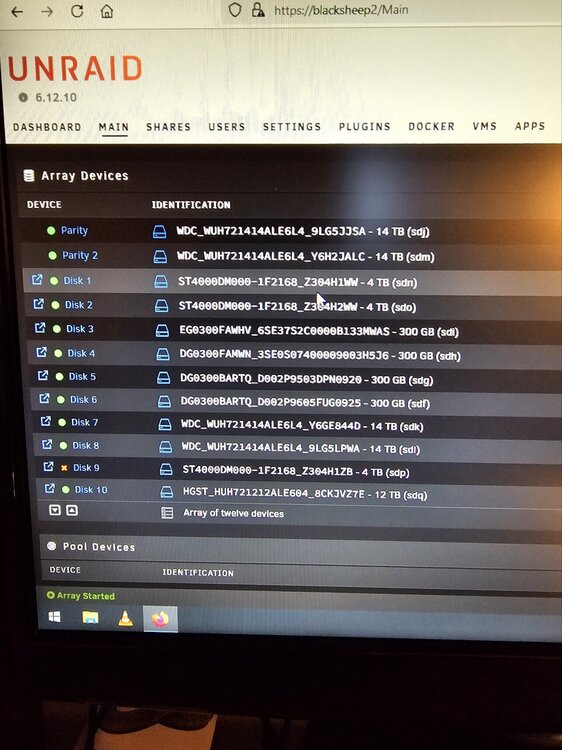
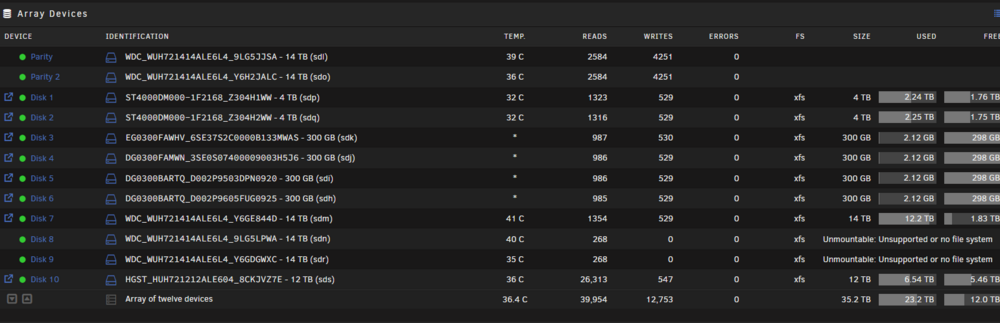
i recently had an emulated failing drive error. swapped out the drive (disk 9) with a larger new hdd. when adding disk9 back in the ID had changed on disk8. the system wanted me to do a rebuild on both drives, which i did. now all my drive IDs have changed including both my parity drives. in addition, both disk8 and disk9 keep saying unmountable or unsupported file system. i havent formatted anything, etc. so i'm hoping all my data is still intact and just need to re-arrange things back. before swapping the the bad drive out i had added two new controllers to an empty riser card i had in my pci express slot for my array, but the IDs were fine at this point so i proceeded to swap the bad drive out. in addition, i noticed one of my 400w psu had failed on the disc array, i'm currently waiting for a replacement as i'm not sure if this is the real issue or caused the issue or both. i have attached a before ID screenshot along with an after ID screenshot of the hdds in the array. is there a way to put the array back to the old ID system. i'm afraid to do anything because i dont want to lose data. i have also attached current diagnostics.blacksheep2-diagnostics-20240705-2035.zip
-
thank you for this. i will try again after i do a full backup of the appdata section. i want to make sure i have the pms db backed up before trying to change the paths again, then i will run all logs to post. appreciate you.
-
so i'm trying to move transcode to RAM to see if it works better like everyone says. im using the below documentation to do the settings. https://github.com/binhex/documentation/blob/master/docker/faq/plex.md however, everytime i change and apply the settings the entire plex container disappears from the docker. i have to change the settings back to my ssd for transcode for it to reappear and work again. is there something i'm doing wrong or missing? i have transcode settings in plex set to /transcode even after i change the container settings. any advice is appreciated.
-
just wanted to finally report back in case anyone else needs help. i had to reinstall the vm from scratch after i updated to the new 6.12.8 OS, then i pointed it to vdisk 2 and reinstalled all programs etc on vm fresh and it worked no problem.
-
i'm having this same issue all of a sudden on 6.12.8. i'm running 2 vms, one windows, one linux, but my win10 keeps pausing. i have both running on a 512g ssd cache with 50% free. i just shut down the linux vm to see if this solves the issue. i tried clicking on the above link in this post for how to solve, but it won't let me view the thread. can someone let me know what to do in order to solve this problem? as usual, thank you for all our help in advance.
-
so basically the next solution is to start from scratch on the VM by reinstalling everything. hopefully i can just point to the vdisk2 since it's separate otherwise that's going to be a pain to copy. thank you for all the help. once everything is back up in running i will close this thread as a solution.
-
blacksheep2-diagnostics-20240113-1846.zip
-
thanks, i will try this and report back after i do.
-
unfortunately when i update to 6.12.6, VM freezes, i cant do anything in it. pegs my cpus 100%, i have to force stop the VM, but on 6.11 i'm completely fine. so something is w the new update is causing the conflict w/ VM only. the dockers seem to work. i had to rollback because i need the VM. so until i can figure this out i have to stay on 6.11. however, being on 6.11 i dont have access to apps to update. real dilemma here if someone can help me fix the issue. apparently multiple users are having very similar issues or the same issue. running on an HP DL380-G7 so everything is intel as far as the NIC as i'm using the onboard. i'm not running an adaptec HBA. i've attached diagnostics log. any help is appreciated as i'm stuck on 6.11 until this can be fixed. blacksheep2-diagnostics-20231209-1444.zip
-
is there anyway to use pasta to force the multi-channel audio across a tv series. there are 4 options, small, med, lg, huge under this option for MC Boost, but currently you have to do it per episode and it would be nice to use pasta to force it throughout the series. thank you.
-
ive also tried to remove the docker and reinstall the docker containers w/ no luck. also, my unbalanced doest open to the webgui. is there a fix i can do
-
hi squid, the webgui when you click the icon and the dropdown comes up on the docker app. no matter which docker i click on (webgui) it wont load. it opens and times out to a blank page.
-
so i was adding another cache pool to my server following space invaders tutorial. all drives, etc seem up and running, however the docker webgui won't load at all. dockers are all online and up to date. my plex docker works and i can access the media via the app, so i am unsure what is going on. even unbalanced in the plugin section wont load, but other plugins are working because i was able to run FCP. i've tried changing http to https and opening ports in my router. ive been searching the forums for hours to try and fix this issue and i'm at a dead end. can someone help? diagnostics attached. blacksheep2-syslog-20220320-1423.zip
-
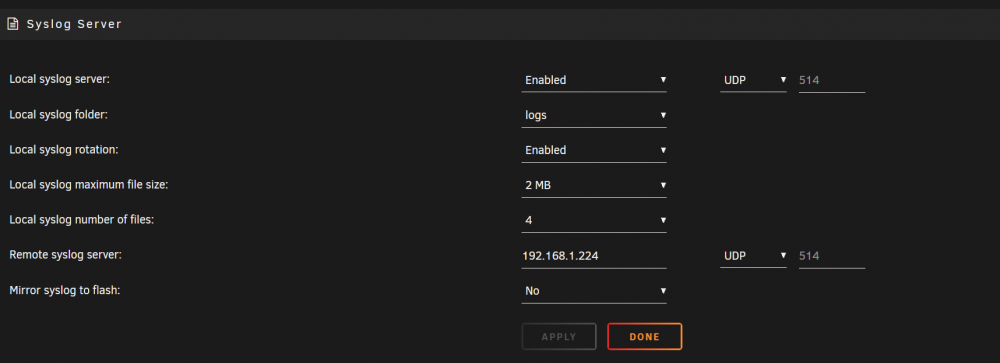
yes its still enabled on my end. attached a screenshot for you.
-
and thank you for the help, i appreciate it.
-
sorry about that i forget the diags. just dled them and attached them for you. can i delete it? blacksheep2-diagnostics-20220310-1333.zip
-
thanks. i dont see the settings as an issue when i checked it out. im going to delete it.
-
i have this same issue currently and have found that a i have 2 syslogs and one of them is 300g+ in size taking up all of the 500g cache pool space. do i need this file? what is it, can i move it, delete it or replace it w/ the smaller one etc? i'm new and just fixed a few other things from the other days hdds being taken offline out of nowhere and i'm now trying to make sure the cache has enough space to function. or do i need a larger cache pool? thank you for the help in advance.
-
jorgeB, im going to be doing the VM stuff tonight since i have free time. question, i noticed why my cache drive pool is filled. theres is a file called "syslog-192.168.1.224.log.1" and that is over 300g out of 500g of space and why i can't move anything else. what is this file for? can i move it, delete it, etc? i have 2 in there but the other syslog doesnt have .1 at the end and is 6.25kb. should i replace the small one w/ this one?
-
thanks jorgeB, really appreciate this. im going to try the VM restore, etc later. my friend helped me set that part up so not sure if we have a back up or not.
-
ok great. thank you so much. i seem to have lost my VM i was running. how can i get that back? or do i have to re-create?
-
ok update, i did a move, then i just restarted the docker and it worked. now im installing apps again. maybe i should set up the schedule differently w/ the move so this doesnt happen again? or, right now i havfe 500g on my cache ssd, should i go to a 1tb to avoid his problem?
-
also, between the yt vid and another thread i removed the docker image and went to apps, prev apps, and it wont let me install the apps. gives me this error. Docker Service Not Enabled - Only Plugins Available To Be Installed Or Managed



