





EarendilD
Members
-
Joined
-
Last visited
Everything posted by EarendilD
-
Thank you all so much for your input! I have already disabled Read check for now, as suggested. @Frank1940 I'll definitely pay attention to your point about SATA connectors!! I have had grief with that, unrelated to Unraid, so I'm always cautious. You only learn that if someone tells you or by experience. Thank you also for your insights on how parity works. I've watched a great video from SpaceInvaderOne and thought I got the gist of it, but didn't know what would happen in my case. I'll tag this as solved. But I'll report back after pre-clearing the new drive and rebuilding.
-
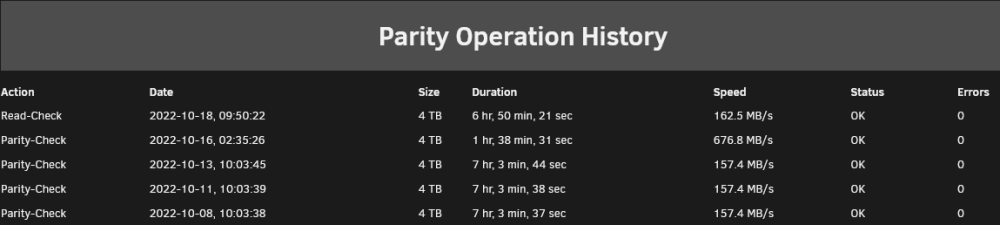
Indeed it was, but my confusion came from the terminology used until Unraid OS v6.10 (see attached picture). Diagnostics are attached. Thank you for your time and answers! homenas-unraid-diagnostics-20221019-1340.zip
-
Hi everyone! So, I'm running my Unraid server with one parity drive and 3 array drives, all 4 of them being Seagate Ironwolfs, the 4 TB, 5900 RPM variant. For one of them (Disk 2), SMART started reporting pending and reported uncorrect sectors. At first, it was a couple and so I thought I had time. But, of course, you can see where this is going, I was too late and the drive got disabled. From 6 or 7 bad sectors, it jumped to 72 reallocated and 64 more pending. At the moment that that happened, the faulty drive reported a full capacity of ~28 GBs, which was strikingly low compared to the other 2 drives, 179 GB and 1,35 TB respectively. Maybe this is more related to the way I have setup my shares, but I have a secret hope that the OS 'realized' the drive was dying and moved data to the other 2 disks. Don't know if Unraid works that way, would be nice if anyone can confirm that. That's my first question. I'm pretty certain that the drive got disabled during parity check, because it was the first time ever that parity was paused at 80+% . I resumed it and it actually finished without reporting other errors. So, I'm now in a state where I have a valid parity check (it has run once more since this incident) and a faulty drive. I have already ordered a replacement and my main question is related to what will happen once I pop in the new drive and I try to rebuild it after pre-clear. Should I expect that I get valid data back in disk 2, or should I expect some data loss? Especially now, that parity has run once more after the disk got disabled, has it overwritten the good data of that disk? Thank you for any answers in advance.
