laplace
Members
-
Joined
-
Last visited
-
Yes, there was 1 partition, but it was being reported as 2 TB. Should wipefs be part of the formatting procedure from the GUI?
-
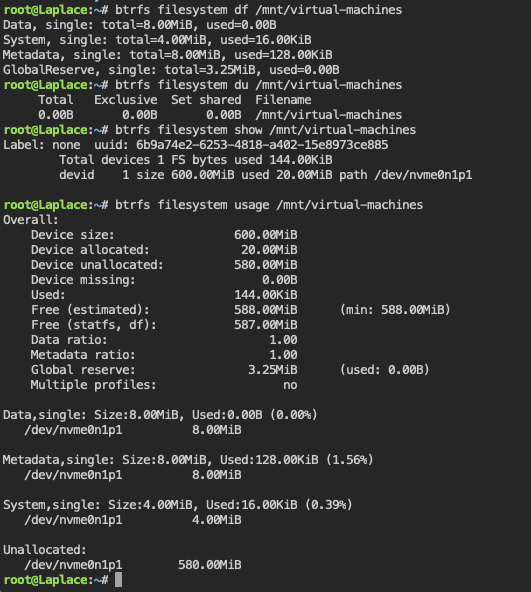
Thanks @jonp and @itimpi. The wipefs command did the trick. I'd note that strangely enough, no strange partitions were reported via lsblk (and fdisk).
-
All, I just installed Unraid on a fresh server with 2 NVMe drives: SAMSUNG_MZ1LB1T9HALS-000077 - 1.9 TB (nvme1n1) INTEL_SSDPE2KX020T8 - 2 TB (nvme0n1) I have no applications/docker containers or VMs yet on this installation. I've created 2 pools, "Cache" and "Virtual-Machines", corresponding to the 2 drives. Unraid is reporting an incorrect free space and device size for the Intel NVMe drive (nvme0n1 and the "Virtual-machines" pool). The device size is being reported as 600 MB instead of 2 TB. Diagnostics are attached. laplace-diagnostics-20210802-1042.zip