





fhj74784
Members
-
Joined
-
Last visited
-
Hey so I just tried this, not sure where I messed up. I basically want a fresh install as well, getting errors at boot since doing a CPU upgrade. Would just prefer to wipe everything except for the data on my array. I flashed a new USB drive (my old one is about 7 years old I think), and then copied over my .key file from the old USB to the new. Unraid says its registered to the wrong UUID or something. Looking at the steps on the website - I need to email them?!?! Also, If i just select the disks exactly as they were before during setup (as parity, 1, 2 ,3 etc) then will all my data still be there, or will it not understand how data is stored across drives? Should I also copy over some config files about my array? I want a fresh start with plugins, iommu groups, whatever its bugging me about at boot, etc.
-
When you say old assignments - your saying what drive is assigned to what right? Can I do that manually? If I know which drive is what and just match them up exactly when setting up my array? Or do I NEED to do it this way?
-
I upgraded my CPU and have installed a lot of stuff I don't need on my Unraid machine. I kind of want to do a fresh start on this machine and will start my setup from scratch (besides the data on my disks). I also used a really shitty USB drive on my initial install and never switched it (I think its like a batman drive best buy had on sale). So I would also like to swap that out for a new drive. So in short I need to: 1. Fresh install of Unraid with brand new USB drive 2. copy over license from old drive to new How do I go about this without losing my license? Ive already backed up my current drive from the unraid "flash backup" option and have that saved. Is there a file I can just copy over? Anything special I need to know about using my "old" disks on this fresh install?
-
Just wondering if this is good practice or not. My array right now is an 8TB parity, and then a few 8TB and 5TB in my array. I picked up 2 14TB drives on sale the other day, so i was about to replace my parity with a 14TB and one of the smaller drives as well. The problem I have is what if the new parity or the new 14TB storage drive fails and I need to replace quickly. I would order another 14TB asap, but shipping might be a few days and Id be worried about losing data during that time period. Ideally Id order a spare 14TB that would be unused and it would be ready to be swapped in when/if needed. Would it make more sense to just install the drive and use it as a 2nd parity? This would mitigate some of the worry I have about the quality of these drives. (so 2 decent drives is better than 1 great drive). Or is it better to just buy an extra to use when needed? TLDR: Should I keep a spare drive on hand (unused) or use that spare drive as a parity?
-
Do you run any vms? Right now I have windows on a SSD that is not part of my array, but if it were on the array like most - wouldnt I need a really good SSD cache to use with it?
-
Saw this deal - might pick up for my cache: https://slickdeals.net/f/16946068-2tb-solidigm-p41-plus-m-2-2280-pcie-4-0-nvme-gen-4-solid-state-drive-65-free-shipping?src=frontpage&v=1 Right now I have a 860 Evo 2.5" SSD as my cache drive. This is an m.2 so it would free up a SATA drive as well. I'd imagine any SSD is better than reading from the array, but should I go for something higher quality? 2TB for $65 seems like a good deal.
-
Running a windows 10 VM and have been using Parsec for about a year now. On initial setup I had a screen attached to the card, so installing the driver was a breeze. Now my server is in the basement for the time being and no screen hooked up to it. I could probably run a cable to the TV in the next room if i had a 25ft HDMI, but there has to be a better way. Right now I can remove my GPU and boot into windows using VNC. My other method of using this VM is Parsec, so normally I'd log in using that. I made the mistake of trying to update a video card driver through parsec, and now I cant get in using parsec becaue of lack of installed gpu driver (during install process). Anyone have a solution here?
-
For some reason it is working now. I have no idea why it wasnt working before, but for some reason I can now go to the WebUI page. Im completely stumped. But to answer your question - it would previously give me the same error - the site cant be reached. I tried many different combinations, with/without "/web/index.html#!/wizardstart.html" to the end, but nothing worked. But like I said - for NO REASON AT ALL - its working now.
-
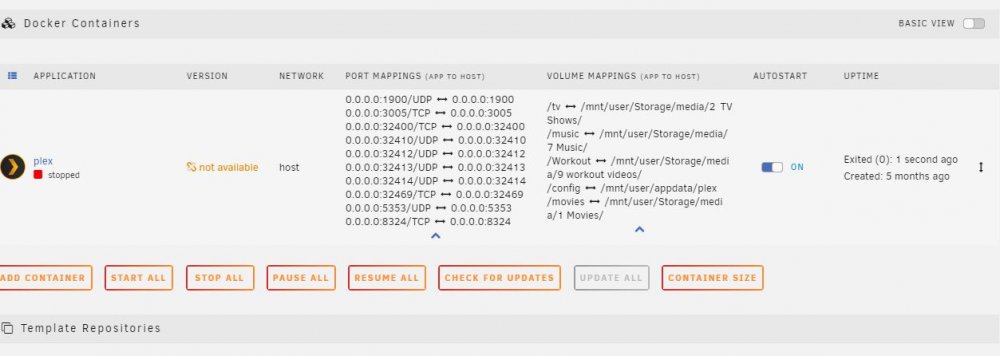
Ok very weird, just removed jellyfin and photoview, installed plex media server, and now the webui seems to be working!!! I then tried jellyfin, but that still seems to not work for some reason. Tried in both bridge (default) and host mode. Heres the port mappings of both: EDIT: Also just removed plex incase of shared ports - so jellyfin is the only container installed, and same deal.

-
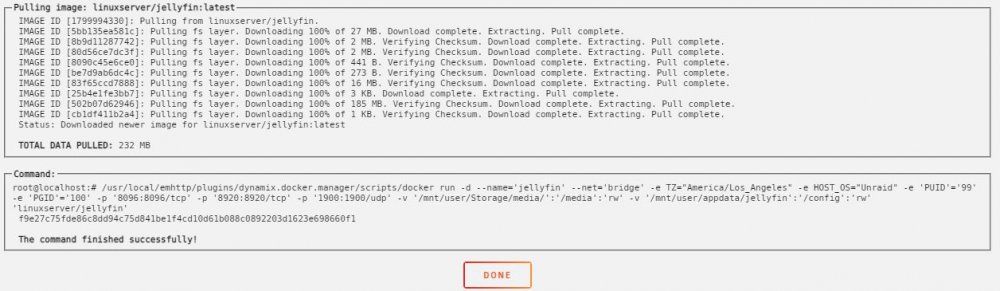
According to the address when I go to web I think its 8096. This happens is EVERY container right now, for example, I went and installed photoview, start up the container, and then I get the same "This site can’t be reached" message when I try to go to the WebUI. I took a screenshot of my OLD plex install before deleting it, and the port mappings look very different to what they are now. Its also set to "bridge" now, and was "host" before. All this was just how it was set up out of the box - I didn't manually choose any ports or settings in either instance. Attached below - plex is old, jellyfin/photoview is current:

-
Sorry I'm new here. Uninstalled and reinstalled. Attached below.
-
Set up my server a year or two ago and really havent touched anything since. I noticed my plex container might have been an old version or something, so I decided this would be a good time to finally make the switch to jellyfin. After deleting the old containers, I installed jellyfin, and then when I go to the docker tab, click the icon, and go to WebUI, I get "this site can't be reached" page everytime: Ive tried in brave, firefox and chrome, and from multiple PCs with no difference. Happens with ALL containers now (tried plex, and a few others - no webui will work) tried resetting router, rebooting unraid server, etc - no difference. I did switch my router from DDWRT back to stock firmware a few months ago - could that have had an effect on this? I am out of ideas. Any guesses?


