neal_is_king
Members
-
Joined
-
Last visited
-
Just to close the loop on this, I got it all sorted out and the last parity check finished without any errors. Thanks for your help JorgeB and itimpi
-
I am officially under way now, 200+ hours of pre-clearing on these new disks and step 1 should be finished overnight. I had a question from the "Clear Drive Then Remove Drive" documentation, wondering if anyone knows: By the time I get to this step, I'll have Disk 1 (the new 16TB data disk with everything on it) and Disk 2 (the old 12TB disk that I am shrinking out of the array). Just want to make sure, but for each share that is not set to "Cache: Only", I want to change the Included Disks option from "All" to only "Disk 1", and I can safely leave Excluded Disks the way it is for all of these shares (which is "None")? And the reason for this is in case a file is written to the array after I've already cleared everything off of Disk 2, to prevent unraid from placing that new file on Disk 2?
-
I like duplicati a lot, I use it for unraid and my mail server. The only thing I don't like about it is you can only have one destination for each backup set, so if you want data to end up in 2 offsite locations you have to roll your own. It has a "run-script-after" feature, which I use to rclone many of my backup sets from their primary location in s3 to backblaze b2. It works well but I'd be keen to evaluate something that simply allows multiple destinations.
-
I got the 9207-8i pre-flashed to IT mode from some guy on Amazon. It has treated me well. If 8 drives is all you plan to run, I'd look at the Node 804 too. The footprint is impressive for how much you can get in there. I switched from an Arc Midi 2 maybe 5 years ago, I love it. Speaking of love it, unRAID is awesome.
-
That is a disk image with space allocated for running containers, so anything they write to a path that is not specified as a volume mapping when the container is launched.
-
Ah, yes. I missed it copying the steps line by line from my editor trying to use the ordered list feature here on the forum. So then, the full procedure looks like this. Sounds like it'll work. 1. Follow procedure for upgrading parity, replacing OP1 with NP 2. Remove OP2 (Stop array, unassign OP2, start array) 3. Follow procedure for upgrading a data disk, replacing OD1 with ND 4. Move everything from OD2 to ND using unBalance plugin 5. Follow the "Clear Drive Then Remove Drive" Method for OD2
-
Thanks JorgeB. That oversight certainly does foil my plan. Back to the drawing board, does this look right? Follow procedure for upgrading parity, replacing OP1 with NP Remove OP2 (Stop array, unassign OP2, start array) Follow procedure for upgrading a data disk, replacing OD1 with ND Follow the "Clear Drive Then Remove Drive" Method for removing OD2
-
Hey, awesome! Yeah my box is headless 99.9% of the time so I just have some $5 usb keyboard in a drawer. If you're in a similar situation it's probably easier to just replace.
-
Are you pressing a key on the keyboard? I want to say that aborts the timer. Also this sounds similar:
-
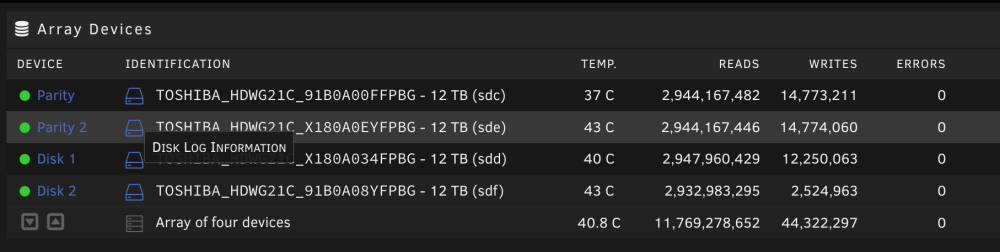
Hi all! I am experiencing a funky issue with my 4 12TB N300 drives (details here), they cannot run SMART self tests and I do not trust them. My array is setup with 2 parity, 2 data disks. I plan to migrate to 2 16TB drives (IronWolf Pro, WD Red Pro), at least for the time being. I'm pre-clearing these disks now. My current data usage is 11TB so everything will fit in just 16TB. Below is my plan for the migration. I am trying to keep it relatively simple and while parity is not preserved, I'm not deleting anything from the old drives yet and the old drives still seem to be working so that's my "backup plan" tbh. Although I do have critical data backed up in multiple offsite locations. Hoping to get a sanity check on the following plan. I refer to the 4 old parity/data disks as OP1-2/OD1-2, and the new ones as NP/ND. Replace Disk 1 (OD1) with ND and rebuild from parity Disable the mover and stop docker Copy everything from OD2 to ND using unBalance plugin Shut down and remove all old disks New config Preserve Pool assignments (NVME cache pool) Assign NP as Parity, keep ND as Disk 1 Start Array, parity will rebuild Try to get money from Toshiba WDYT?
-
Man, I just can't get this out of my head. I want to believe these drives are alright but I just can't. Maybe if it was one but all four of them can't run SMART self tests? What is that... I ordered 2 16TB drives from different manufacturers that are not Toshiba, and I'm going to move my whole setup to 1 parity, 1 data for a time. I read in a few places I might be able to get a refund when I RMA these 4 N300s. Fingers crossed.
-
Yeah... it's unnerving, that's for sure. I think I'll order an IronWolf 12TB and preclear it so I have a standby if anything starts failing. And maybe I'll replace a drive every few months for a year. Can't return... don't see much point in an RMA when this happened with all 4 drives, I'm not going to trust the replacements. I only went with N300 because the mount holes were the right spacing for my Node 804 drive cage. It took a few months to get mounting adapters from Fractal Design and I didn't want to wait. So the $1200 lesson here is patience. And don't buy Tosihba drives I guess.
-
In case it might help someone with a similar issue in the future, here is the SMART log of one of the disks mentioned above. # smartctl -a /dev/sdc smartctl 7.3 2022-02-28 r5338 [x86_64-linux-5.19.17-Unraid] (local build) Copyright (C) 2002-22, Bruce Allen, Christian Franke, www.smartmontools.org === START OF INFORMATION SECTION === Model Family: Toshiba N300/MN NAS HDD Device Model: TOSHIBA HDWG21C Serial Number: redacted LU WWN Device Id: 5 000039 b28cb91ec Firmware Version: 0601 User Capacity: 12,000,138,625,024 bytes [12.0 TB] Sector Sizes: 512 bytes logical, 4096 bytes physical Rotation Rate: 7200 rpm Form Factor: 3.5 inches Device is: In smartctl database 7.3/5417 ATA Version is: ACS-3 T13/2161-D revision 5 SATA Version is: SATA 3.3, 6.0 Gb/s (current: 6.0 Gb/s) Local Time is: Mon Jan 30 14:08:35 2023 PST SMART support is: Available - device has SMART capability. SMART support is: Enabled === START OF READ SMART DATA SECTION === SMART overall-health self-assessment test result: PASSED See vendor-specific Attribute list for marginal Attributes. General SMART Values: Offline data collection status: (0x82) Offline data collection activity was completed without error. Auto Offline Data Collection: Enabled. Self-test execution status: ( 65) The previous self-test completed having a test element that failed and the test element that failed is not known. Total time to complete Offline data collection: ( 120) seconds. Offline data collection capabilities: (0x5b) SMART execute Offline immediate. Auto Offline data collection on/off support. Suspend Offline collection upon new command. Offline surface scan supported. Self-test supported. No Conveyance Self-test supported. Selective Self-test supported. SMART capabilities: (0x0003) Saves SMART data before entering power-saving mode. Supports SMART auto save timer. Error logging capability: (0x01) Error logging supported. General Purpose Logging supported. Short self-test routine recommended polling time: ( 2) minutes. Extended self-test routine recommended polling time: (1177) minutes. SCT capabilities: (0x003d) SCT Status supported. SCT Error Recovery Control supported. SCT Feature Control supported. SCT Data Table supported. SMART Attributes Data Structure revision number: 16 Vendor Specific SMART Attributes with Thresholds: ID# ATTRIBUTE_NAME FLAG VALUE WORST THRESH TYPE UPDATED WHEN_FAILED RAW_VALUE 1 Raw_Read_Error_Rate 0x000b 100 100 050 Pre-fail Always - 0 2 Throughput_Performance 0x0005 100 100 050 Pre-fail Offline - 0 3 Spin_Up_Time 0x0027 100 100 001 Pre-fail Always - 7089 4 Start_Stop_Count 0x0032 100 100 000 Old_age Always - 650 5 Reallocated_Sector_Ct 0x0033 100 100 050 Pre-fail Always - 0 7 Seek_Error_Rate 0x000b 086 001 050 Pre-fail Always In_the_past 0 8 Seek_Time_Performance 0x0005 100 100 050 Pre-fail Offline - 0 9 Power_On_Hours 0x0032 083 083 000 Old_age Always - 7026 10 Spin_Retry_Count 0x0033 100 100 030 Pre-fail Always - 0 12 Power_Cycle_Count 0x0032 100 100 000 Old_age Always - 91 23 Helium_Condition_Lower 0x0023 100 100 075 Pre-fail Always - 0 24 Helium_Condition_Upper 0x0023 100 100 075 Pre-fail Always - 0 191 G-Sense_Error_Rate 0x0032 100 100 000 Old_age Always - 114 192 Power-Off_Retract_Count 0x0032 100 100 000 Old_age Always - 76 193 Load_Cycle_Count 0x0032 100 100 000 Old_age Always - 658 194 Temperature_Celsius 0x0022 100 100 000 Old_age Always - 37 (Min/Max 18/51) 196 Reallocated_Event_Count 0x0032 100 100 000 Old_age Always - 0 197 Current_Pending_Sector 0x0032 100 100 000 Old_age Always - 0 198 Offline_Uncorrectable 0x0030 100 100 000 Old_age Offline - 0 199 UDMA_CRC_Error_Count 0x0032 200 200 000 Old_age Always - 0 220 Disk_Shift 0x0002 100 100 000 Old_age Always - 17825794 222 Loaded_Hours 0x0032 083 083 000 Old_age Always - 7006 223 Load_Retry_Count 0x0032 100 100 000 Old_age Always - 0 224 Load_Friction 0x0022 100 100 000 Old_age Always - 0 226 Load-in_Time 0x0026 100 100 000 Old_age Always - 591 240 Head_Flying_Hours 0x0001 100 100 001 Pre-fail Offline - 0 SMART Error Log Version: 1 ATA Error Count: 2 CR = Command Register [HEX] FR = Features Register [HEX] SC = Sector Count Register [HEX] SN = Sector Number Register [HEX] CL = Cylinder Low Register [HEX] CH = Cylinder High Register [HEX] DH = Device/Head Register [HEX] DC = Device Command Register [HEX] ER = Error register [HEX] ST = Status register [HEX] Powered_Up_Time is measured from power on, and printed as DDd+hh:mm:SS.sss where DD=days, hh=hours, mm=minutes, SS=sec, and sss=millisec. It "wraps" after 49.710 days. Error 2 occurred at disk power-on lifetime: 6986 hours (291 days + 2 hours) When the command that caused the error occurred, the device was active or idle. After command completion occurred, registers were: ER ST SC SN CL CH DH -- -- -- -- -- -- -- 04 53 00 91 f4 2c 02 Error: ABRT Commands leading to the command that caused the error were: CR FR SC SN CL CH DH DC Powered_Up_Time Command/Feature_Name -- -- -- -- -- -- -- -- ---------------- -------------------- b0 d4 00 82 4f c2 00 00 00:59:05.943 SMART EXECUTE OFF-LINE IMMEDIATE b0 d0 01 00 4f c2 00 00 00:59:05.941 SMART READ DATA ec 00 01 00 00 00 00 00 00:59:05.935 IDENTIFY DEVICE ec 00 01 00 00 00 00 00 00:59:05.934 IDENTIFY DEVICE 60 20 50 08 00 00 40 00 00:58:53.442 READ FPDMA QUEUED Error 1 occurred at disk power-on lifetime: 6986 hours (291 days + 2 hours) When the command that caused the error occurred, the device was active or idle. After command completion occurred, registers were: ER ST SC SN CL CH DH -- -- -- -- -- -- -- 04 53 00 90 f4 2c 02 Error: ABRT Commands leading to the command that caused the error were: CR FR SC SN CL CH DH DC Powered_Up_Time Command/Feature_Name -- -- -- -- -- -- -- -- ---------------- -------------------- b0 d4 00 81 4f c2 00 00 00:51:51.844 SMART EXECUTE OFF-LINE IMMEDIATE b0 d0 01 00 4f c2 00 00 00:51:51.842 SMART READ DATA ec 00 01 00 00 00 00 00 00:51:51.836 IDENTIFY DEVICE ec 00 01 00 00 00 00 00 00:51:51.835 IDENTIFY DEVICE b0 d0 01 00 4f c2 00 00 00:51:29.383 SMART READ DATA SMART Self-test log structure revision number 1 Num Test_Description Status Remaining LifeTime(hours) LBA_of_first_error # 1 Short offline Completed: unknown failure 10% 6988 0 # 2 Short offline Completed: unknown failure 60% 6987 0 # 3 Short offline Completed: unknown failure 90% 6987 0 # 4 Short offline Completed: unknown failure 90% 6986 0 # 5 Short offline Completed: unknown failure 90% 6986 0 # 6 Extended offline Completed: unknown failure 90% 6986 0 # 7 Extended captive Completed: unknown failure 90% 6986 0 # 8 Short captive Completed: unknown failure 90% 6986 0 # 9 Short offline Completed: unknown failure 90% 6986 0 #10 Short offline Completed without error 00% 0 - #11 Short offline Aborted by host 60% 0 - SMART Selective self-test log data structure revision number 1 SPAN MIN_LBA MAX_LBA CURRENT_TEST_STATUS 1 0 0 Not_testing 2 0 0 Not_testing 3 0 0 Not_testing 4 0 0 Not_testing 5 0 0 Not_testing Selective self-test flags (0x0): After scanning selected spans, do NOT read-scan remainder of disk. If Selective self-test is pending on power-up, resume after 0 minute delay.
-
Indeed, I saw that in the many threads I read through before I posted - I was actually hoping you would reply to this! I did end up yanking one of the drives and running a SMART short test with it plugged into another machine, failed "Unknown failure". I guess I just can't run self tests on these 4 drives for whatever reason. Probably won't be buying any more because that's quite odd, but as long as the rest of the attributes stay healthy I'll just be hoping for the best. Thank you for your help JorgeB!
-
Thanks for your reply JorgeB. See attached screenshots; parity check ran successfully. Would you not be worried in my situation or would you be looking to RMA and/or replace drives? I will probably try yanking one of the drives and running SMART from an external enclosure attached to another machine. I read somewhere in my various searching over the last few days that these drives can abort if SMART status is polled too often while the test is running. I see the unraid UI updating live when I run a test, 10%, 20%, etc... wonder if that's killing the SMART run.