





shabos
Members
-
Joined
-
Last visited
-
Replaced all disks with SMART errors, parity works now.
-
I did individual RAM tests on each pair and they passed. I think faulty disks is most likely the problem - I'm replacing disk 1, 5, 9 and 10. (Disk 7 is empty) I will let you know how it goes, will be a 3 day process at least. Thanks for the help.
-
Yes. I did a non-correcting check for a few minutes after two back to back parity correcting checks just to see if the errors still occured. I have definitely done correcting checks.
-
Sync errors are different every time, that box is indeed checked.
-
Hi I am getting sync errors every time I run a parity check. I have done a memtest for 24 hours and the RAM is solid, passed all the tests. At my wits end here - parity checks take 2 days! bitpartnas-diagnostics-20240517-0920.zip
-
Once again, after updating - it is still stuck on umounting disks. bitpartnas-syslog-20230904-1629.zip
-
Several problems with this: 1) When I started rebuilding the drive from parity it still said "unmountable" - not "rebuilding" or anything - I wasn't sure it was doing the right thing - so I canned it - this is poor UI 2) Once I formatted it - it still let me rebuild from parity. Why?? So then it merrily "rebuilt" for 2 days and did absolutely nothing in the end - poor design to still allow the rebuild button if it will only spin my entire array for 2 days to achieve nothing. Both of these issues are poor design and UI feedback - previously when I have installed a brand new unused drive and purposefully replaced a failed one, it would give the correct feedback (not "unmountable") - although that was on reiserfs - maybe different prompts for XFS? Frustrating to say the least.
-
No dude - it was marked as emulated and unmountable. I am a software engineer that has been using plex for 10 years - I'm not making this up - since the last few updates I have noticed a ton of errant behaviour - and the problem is its not reflected in the logs.
-
So why would unraid mark a brand new disk as unmountable when it has never been formatted?
-
Hi I wanted to replace an old drive that was possibly failing, and so I put in a new one. It was then immediately "unmountable file system". So I formatted it - then I started the data rebuild. The rebuild took 2 days and has just finished - the drive is still empty!!!! Please help. Thanks bitpartnas-syslog-20230831-1709.zip
-
Hi In the last while since I have formatted and upgraded most of my disks from Reiserfs to XFS, I am unable to stop the array - it keeps getting stuck unmounting disks. Please help! Thanks! bitpartnas-syslog-20230829-2022.zip
-
My point is this filesystem is SO much less robust than reiserfs - I've had multiple power failures, system interrupts, etc over more than 10 years - the moment I move to XFS - this is the second drive that has done this in 2 weeks (first one after a power failure), and they instantly corrupt. How is that remotely better? The point of unraid is to make sure I don't lose data..... this seems to be a massive step backwards. UFS explorer - am I going to have to use that in windows?
-
This is the outcome of a -vL operation: No resolution it seems? I'm out of ideas - did I really just lose 2TB of data because of an interrupted unmount???
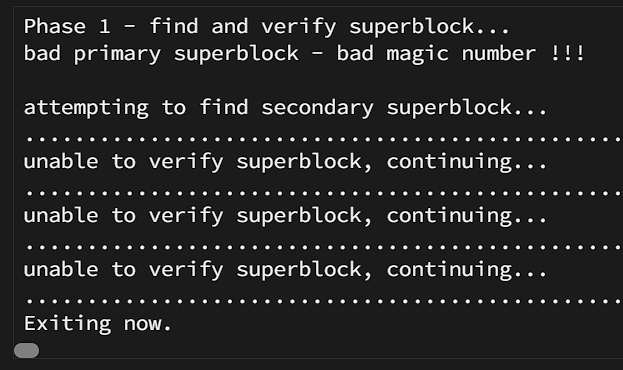
-
I didn't, no
-
root@BitpartNas:~# blkid /dev/sda1: LABEL_FATBOOT="UNRAID" LABEL="UNRAID" UUID="B4EA-2880" BLOCK_SIZE="512" TYPE="vfat" PARTUUID="04dd5721-01" /dev/loop1: TYPE="squashfs" /dev/sdf1: UUID="03d2824f-a980-43d5-8c1f-3eb12afdff6b" BLOCK_SIZE="512" TYPE="xfs" PARTUUID="4bbd886f-1b64-4713-b938-1fd5f7f7d00e" /dev/md9p1: UUID="c90c83cb-1c67-431f-8fdb-f0efca047f4c" BLOCK_SIZE="512" TYPE="xfs" /dev/sdd1: UUID="c90c83cb-1c67-431f-8fdb-f0efca047f4c" BLOCK_SIZE="512" TYPE="xfs" PARTUUID="75b100a4-1383-468c-9afa-574ef8384a62" /dev/md2p1: UUID="391043f8-a362-42b4-9ca2-4d0a290f7b04" BLOCK_SIZE="512" TYPE="xfs" /dev/sdm1: UUID="c87871ca-05e8-4519-9179-447c1fb0de8c" BLOCK_SIZE="512" TYPE="xfs" PARTUUID="6b60ec31-8d56-4d0b-a9be-e3cd44de10b1" /dev/sdb1: UUID="d97cc953-ee9a-404f-83ba-c998aa13e771" UUID_SUB="063d30a7-a090-43fe-b6e3-7c2873febdec" BLOCK_SIZE="4096" TYPE="btrfs" /dev/md5p1: UUID="e6a6b944-0e65-48a5-9caf-e181a95ec119" BLOCK_SIZE="512" TYPE="xfs" /dev/sdk1: UUID="e6a6b944-0e65-48a5-9caf-e181a95ec119" BLOCK_SIZE="512" TYPE="xfs" PARTUUID="64267629-6e1c-4eb5-a5bc-885bc94d23dd" /dev/md11p1: UUID="03d2824f-a980-43d5-8c1f-3eb12afdff6b" BLOCK_SIZE="512" TYPE="xfs" /dev/md8p1: UUID="226ecde4-d538-4acb-a790-7931a52f70eb" BLOCK_SIZE="512" TYPE="xfs" /dev/sdi1: UUID="65411ed0-2cc7-46ee-822f-c7b8542ba8d2" BLOCK_SIZE="4096" TYPE="reiserfs" /dev/md1p1: UUID="c87871ca-05e8-4519-9179-447c1fb0de8c" BLOCK_SIZE="512" TYPE="xfs" /dev/sdg1: UUID="391043f8-a362-42b4-9ca2-4d0a290f7b04" BLOCK_SIZE="512" TYPE="xfs" PARTUUID="4551df66-7274-4a79-95f8-06c7d71b7584" /dev/md4p1: UUID="65411ed0-2cc7-46ee-822f-c7b8542ba8d2" BLOCK_SIZE="4096" TYPE="reiserfs" /dev/loop0: TYPE="squashfs" /dev/sde1: UUID="e4e076d9-a029-4d1f-b232-58c28e5f986f" BLOCK_SIZE="512" TYPE="xfs" PARTUUID="b12b60ba-9824-4bad-b01a-64c18740bef0" /dev/md10p1: UUID="e4e076d9-a029-4d1f-b232-58c28e5f986f" BLOCK_SIZE="512" TYPE="xfs" /dev/sdc1: UUID="226ecde4-d538-4acb-a790-7931a52f70eb" BLOCK_SIZE="512" TYPE="xfs" /dev/sdj1: UUID="0753e2e4-27f9-463f-bb93-34f446824e08" BLOCK_SIZE="4096" TYPE="reiserfs" /dev/md3p1: UUID="0753e2e4-27f9-463f-bb93-34f446824e08" BLOCK_SIZE="4096" TYPE="reiserfs" /dev/sdh1: PARTUUID="16d2ff3f-6584-46dd-9c12-2da4a8484628" root@BitpartNas:~# ^C root@BitpartNas:~# root@BitpartNas:~# fdisk -l /dev/sdl Disk /dev/sdl: 1.82 TiB, 2000398934016 bytes, 3907029168 sectors Disk model: ST2000DL003-9VT1 Units: sectors of 1 * 512 = 512 bytes Sector size (logical/physical): 512 bytes / 512 bytes I/O size (minimum/optimal): 512 bytes / 512 bytes Disklabel type: dos Disk identifier: 0x00000000 Device Boot Start End Sectors Size Id Type /dev/sdl1 64 3907029167 3907029104 1.8T 83 Linux root@BitpartNas:~#
