





Tuur
Members
-
Joined
-
Last visited
Everything posted by Tuur
-
Alright, thanks for checking. I'll update this post if I find a solution.
-
nas-diagnostics-20210818-1228.zip
-
Yes, I'm keeping my system turned off for now as I don't want to make things worse by mounting the array. The output was identical: Phase 1 - find and verify superblock... sb root inode value 18446744073709551615 (NULLFSINO) inconsistent with calculated value 128 resetting superblock root inode pointer to 128 sb realtime bitmap inode value 18446744073709551615 (NULLFSINO) inconsistent with calculated value 129 resetting superblock realtime bitmap inode pointer to 129 sb realtime summary inode value 18446744073709551615 (NULLFSINO) inconsistent with calculated value 130 resetting superblock realtime summary inode pointer to 130 Phase 2 - using internal log - zero log... - scan filesystem freespace and inode maps... sb_icount 0, counted 32 sb_ifree 0, counted 29 sb_fdblocks 732208911, counted 732208907 - found root inode chunk Phase 3 - for each AG... - scan and clear agi unlinked lists... - process known inodes and perform inode discovery... - agno = 0 - agno = 1 - agno = 2 - agno = 3 - process newly discovered inodes... Phase 4 - check for duplicate blocks... - setting up duplicate extent list... - check for inodes claiming duplicate blocks... - agno = 0 - agno = 2 - agno = 1 - agno = 3 Phase 5 - rebuild AG headers and trees... - reset superblock... Phase 6 - check inode connectivity... - resetting contents of realtime bitmap and summary inodes - traversing filesystem ... - traversal finished ... - moving disconnected inodes to lost+found ... Phase 7 - verify and correct link counts... SB summary counter sanity check failed Metadata corruption detected at 0x47518b, xfs_sb block 0x0/0x200 libxfs_bwrite: write verifier failed on xfs_sb bno 0x0/0x200 xfs_repair: Releasing dirty buffer to free list! xfs_repair: Refusing to write a corrupt buffer to the data device! xfs_repair: Lost a write to the data device! fatal error -- File system metadata writeout failed, err=117. Re-run xfs_repair.
-
Hi JorgeB, thanks for taking a look The output of xfs_repair (without a flag) was identical to the one in this post: Here's the diagnostic file, keep in mind that I also plugged in the clone of the broken disk (WDC_WD40EZAZ...). nas-diagnostics-20210818-0845.zip
-
To clarify: I did the second xfs_repair check on a second cloned drive (newly bought), mounted with UD and it produced the same result, so I believe it's not a hardware issue. Though I guess the initial corruption might have indeed been caused by a hardware issue. Right, I should've realized that, thanks for clarifying. The parity check is likely what caused the issue as it reported (and auto corrected) an error a few hours before it started: Meaning the parity will only help to undo me running "xfs_repair -L" and not the initial issue 🤔 Let's hope someone can chime in then, as I ...drumroll... don't have backups for the data of this drive (was actually in the process of creating them).

-
Small update: I also tried the same instruction on the clone I took, so xfs_repair isn't failing because of a hardware issue. This might come of as ungrateful, but I'm a bit scared for my data. Are there other avenues I could take in case I don't get any replies (not sure how active the forum is for these kind of issues)? I can definitely wait a few more days, but knowing there are more options would ease my mind. For example: can I somehow fix the corrupt disk with the parity disk (read in a few posts this isn't possible, but it's not clear to me why)?
-
I did indeed do it from the webui. I already executed it without the no modify flag before I made this post. Doing so lessened the amount of errors, but now whenever I try I get the following output: Phase 1 - find and verify superblock... sb root inode value 18446744073709551615 (NULLFSINO) inconsistent with calculated value 128 resetting superblock root inode pointer to 128 sb realtime bitmap inode value 18446744073709551615 (NULLFSINO) inconsistent with calculated value 129 resetting superblock realtime bitmap inode pointer to 129 sb realtime summary inode value 18446744073709551615 (NULLFSINO) inconsistent with calculated value 130 resetting superblock realtime summary inode pointer to 130 Phase 2 - using internal log - zero log... - scan filesystem freespace and inode maps... sb_icount 0, counted 32 sb_ifree 0, counted 29 sb_fdblocks 732208911, counted 732208907 - found root inode chunk Phase 3 - for each AG... - scan and clear agi unlinked lists... - process known inodes and perform inode discovery... - agno = 0 - agno = 1 - agno = 2 - agno = 3 - process newly discovered inodes... Phase 4 - check for duplicate blocks... - setting up duplicate extent list... - check for inodes claiming duplicate blocks... - agno = 0 - agno = 1 - agno = 2 - agno = 3 Phase 5 - rebuild AG headers and trees... - reset superblock... Phase 6 - check inode connectivity... - resetting contents of realtime bitmap and summary inodes - traversing filesystem ... - traversal finished ... - moving disconnected inodes to lost+found ... Phase 7 - verify and correct link counts... SB summary counter sanity check failed Metadata corruption detected at 0x47518b, xfs_sb block 0x0/0x200 libxfs_bwrite: write verifier failed on xfs_sb bno 0x0/0x200 xfs_repair: Releasing dirty buffer to free list! xfs_repair: Refusing to write a corrupt buffer to the data device! xfs_repair: Lost a write to the data device! fatal error -- File system metadata writeout failed, err=117. Re-run xfs_repair.
-
Hi trurl Here you go, before starting the array: And after:
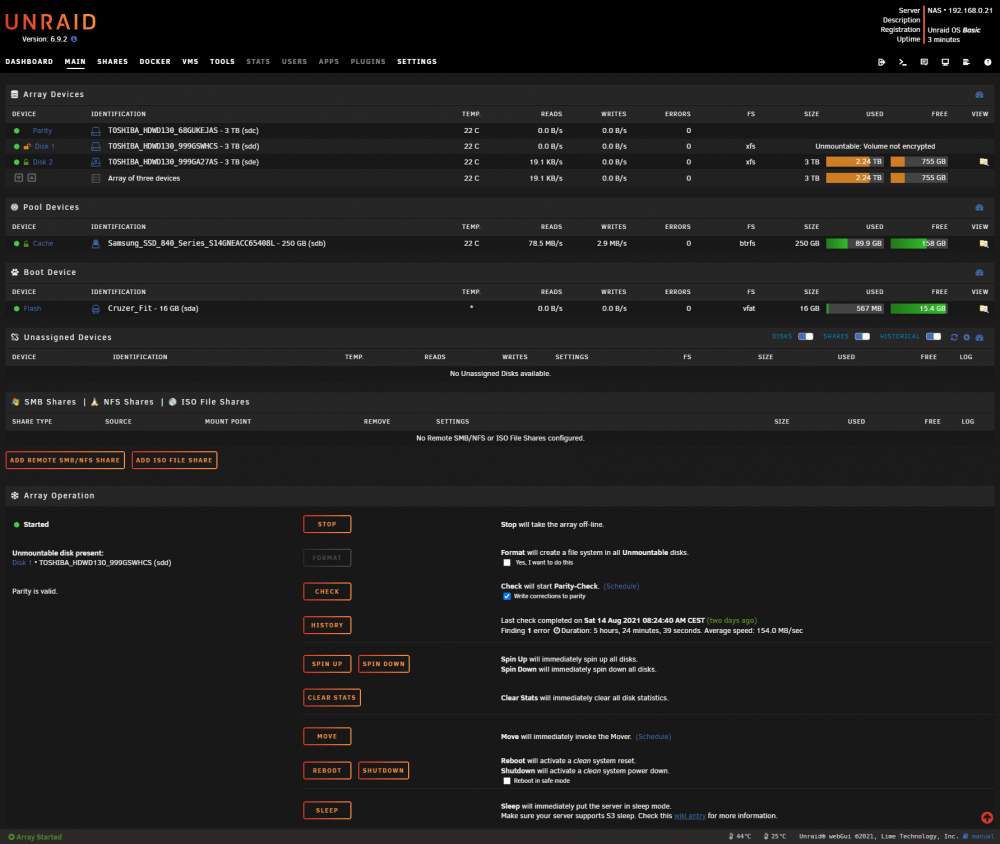
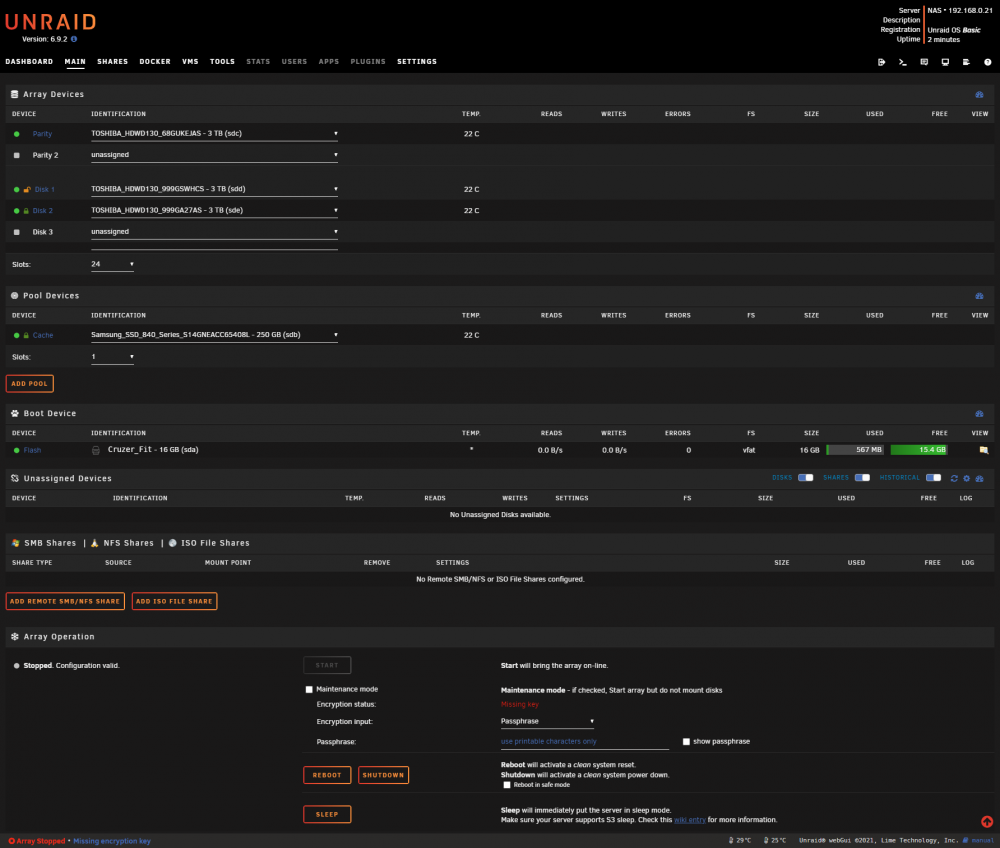
-
To make sure you get as good a picture as possible, I also ran the "Check Filesystem Status" tool again (with the no-modify flag) since I didn't see it in the diagnostics package: Phase 1 - find and verify superblock... sb root inode value 18446744073709551615 (NULLFSINO) inconsistent with calculated value 128 would reset superblock root inode pointer to 128 sb realtime bitmap inode value 18446744073709551615 (NULLFSINO) inconsistent with calculated value 129 would reset superblock realtime bitmap inode pointer to 129 sb realtime summary inode value 18446744073709551615 (NULLFSINO) inconsistent with calculated value 130 would reset superblock realtime summary inode pointer to 130 Phase 2 - using internal log - zero log... - scan filesystem freespace and inode maps... sb_icount 0, counted 32 sb_ifree 0, counted 29 sb_fdblocks 732208911, counted 732208907 - found root inode chunk Phase 3 - for each AG... - scan (but don't clear) agi unlinked lists... - process known inodes and perform inode discovery... - agno = 0 - agno = 1 - agno = 2 - agno = 3 - process newly discovered inodes... Phase 4 - check for duplicate blocks... - setting up duplicate extent list... - check for inodes claiming duplicate blocks... - agno = 1 - agno = 2 - agno = 0 - agno = 3 No modify flag set, skipping phase 5 Phase 6 - check inode connectivity... - traversing filesystem ... - traversal finished ... - moving disconnected inodes to lost+found ... Phase 7 - verify link counts... No modify flag set, skipping filesystem flush and exiting.
-
Yes, I'm 100% certain both disks were encrypted. Since I started questioning it myself, I found some screenshots from early 2020 that show they were. Also something I forgot to mention in my first post: I swapped sata cables (same port on mobo) but that didn't change anything. nas-diagnostics-20210815-2220.zip
-
Alright, thanks for taking a look! 🙂 I've uploaded them via the dialog window this time. nas-diagnostics-20210814-0052.zip nas-diagnostics-20210815-1239.zip nas-diagnostics-20210815-1944.zip
-
Hi guys While in the middle of attempting to backup my nas with Duplicati over USB (with Unassigned Devices) for the past week, one of the disks (xfs) in my array seems to have been corrupted (great timing 😟). After almost 2 years of no issues it seems I got my first parity error last night. When I rebooted the server this morning Disk 1 started showing up as "Device to be encrypted". (Tangent: strangely enough the same thing was happening to my backups after 8h/~1TB of writes. Suddenly the disk became unmountable independent of formatting.) (Tangent 2: could the parity correction have caused this?) I have tried to repair the disk with the included "Check Filesystem Status" tool: first I tried with, then without the -n parameter, then adding -L as the logs prompted me to do so. When this didn't work I got scared and cloned the device using a hdd dock. (Tangent 3: I probably should've done this before adding the -L option? Not sure as I cannot find a clear answer what this actually does.) Unfortunately I do not have another 3TB disk on hand (only the 4TB I was trying to backup to) which means I cannot attempt to repair the file system on the cloned disk as the array won't let me start with a bigger data than parity disk. When I try to remove the disk and attempt to access my data via "emulated mode" , Disk 2 also shows up with "Device to be encrypted" and I am unable to fill in the keyphrase. However this clears when I reinsert the corrupt Disk 1. However, all files from Disk 1 are still missing when I browse the mounted array. I've included 3 diagnostics zips: before the issue occured (downloaded this zip to debug the backup issue, that issue can be ignored for now) nas-diagnostics-20210814-0052.zip directly after the issue occured nas-diagnostics-20210815-1239.zip when I unplug the corrupt disk nas-diagnostics-20210815-1944.zip How can I go about fixing this? Do I spend another €80 to buy a 3TB disk that I have no further use for to attempt a repair that way? Can I somehow fix the corrupt disk with the parity disk (read in a few posts this isn't possible, but it's not clear to me why?) Perhaps I can fix and mount the cloned corrupted drive somehow and access everything that way?

