




Skip to content
View in the app

A better way to browse. Learn more.

Unraid

A full-screen app on your home screen with push notifications, badges and more.

To install this app on iOS and iPadOS
  1. Tap the Share icon in Safari
  2. Scroll the menu and tap Add to Home Screen.
  3. Tap Add in the top-right corner.
To install this app on Android
  1. Tap the 3-dot menu (⋮) in the top-right corner of the browser.
  2. Tap Add to Home screen or Install app.
  3. Confirm by tapping Install.

fxqq

Members
  • Joined

  • Last visited

Everything posted by fxqq

  1. i hope unraid can add nbox image to the icon list, thank you!
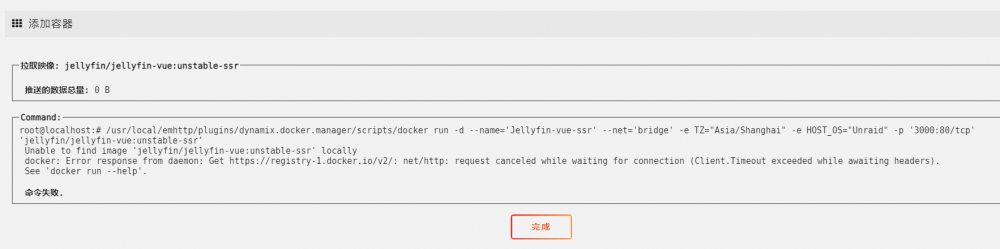
  2. 求助,在商店里下载app下载不下来,已安装的docker显示版本不可用,无法更新,已经搭建科学环境,确认科学环境没有问题
  3. 感谢提醒,再次排查了一遍,发现是虚拟的win10系统的问题导致了unraid系统重启,禁用了win10的虚拟机以后,openwtr的虚拟机运行正常,看来需要重新安装下win10的虚拟机了
  4. 由于NAS机箱升级,换了一块新主板,之前用的是I4702HQ+B85N 3D,现在换成了华硕H97M PLUS的主板,然后问题就出现了,最开始是在主板端开启虚拟化支持unraid系统就无法正常启动,反复试验几次后发现unraid系统关闭虚拟机以后,可以正常启动,但是当我在unraid上要开启虚拟机以后,unraid就会重启,反复无解,求助各位。。主板上快速启动已关闭

Account

Navigation

Search

Search

Configure browser push notifications

Chrome (Android)
  1. Tap the lock icon next to the address bar.
  2. Tap Permissions → Notifications.
  3. Adjust your preference.
Chrome (Desktop)
  1. Click the padlock icon in the address bar.
  2. Select Site settings.
  3. Find Notifications and adjust your preference.