SquishyDave
Members
-
Joined
-
Last visited
Everything posted by SquishyDave
-
I'd been using unraid for years before they introduced a cache drive, and when they did I never bothered to put one in because I never noticed a performance issue that required it as a fix. It's plenty fast enough for all my needs. I didn't realise it didn't have to be used for shares, but I don't need any of its advantages so I probably won't bother. Sure it bit me on the arse this time, but I know what happened now and can avoid it in future. So that's the reason, works fine, can't be bothered.
-
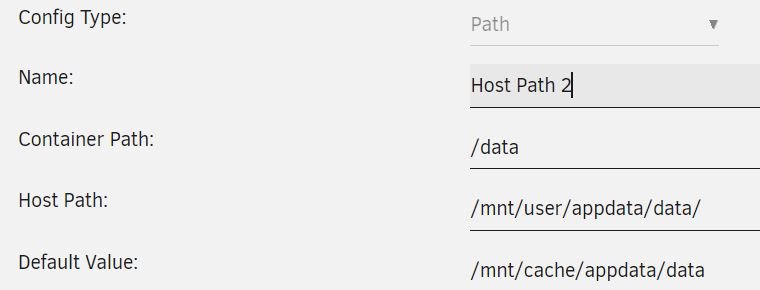
Thanks again. I'll just say that I think at least the binhex dockers by default point to cache for data, maybe other dockers do too, not sure. See the default value below. And it worked fine for literal years before this issue showed up. If anyone is searching for this issue and comes across this thread they'll know why at least. I'm not sure I actively chose to browse to cache, it seems like that's how they came out of the box. I'll go back and double check these dockers and see if I missed a note telling me to make sure to change this path if I don't have a cache drive. I almost certainly did miss such a note, but if not I'll see if I can let the binhex guys know, but I'm guessing I didn't RTFM closely enough. Thanks again for all your help.
-
Ah I see, so it moved files to the cache afterwards even though they were created under user. Thank you for your knowledge. You've been a massive help, I've learned a lot, and now I can fix up my mappings and spend the time to recreate everything knowing it won't disappear again. I really appreciate you taking the time to explain to me what happened here. Thank you.
-
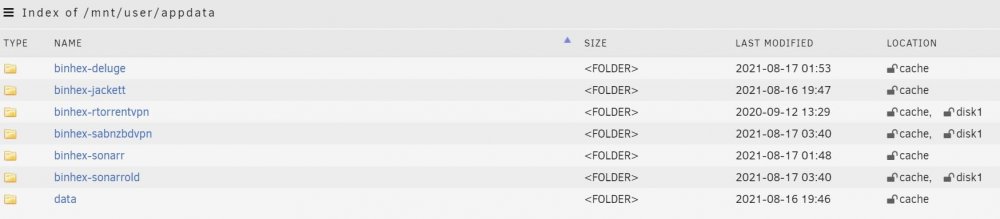
Thank you very much for the reply. Stepping through it myself, I thought something like that might be the case. I'm sure I mapped it wrong way back when I set it up. I understand now, but didn't then. However binhex-sabnzbdvpn only has user mappings, and it lost config. Also why is all of binhex-deluge, jacket and sonarr being listed as located on cache after a reboot? (see first post) All three of deluge, jacket and sonarr have the incorrect cache mapping for data, but the correct user mapping for config, so the config at least should be on the array. And sabnzbvpn has the correct user mapping for both, but some of it's tree is still on the cache somehow.
-
Sorry, yes, here it is. squishystore-diagnostics-20210817-1251.zip
-
Running Unraid 6.9.2. My docker apps were acting a little funny, so rebooted the server, and then discovered all my docker apps had lost config. No idea how, I hadn't updated, or changed anything recently. I was looking at the appdata share and noticed settings for cache. (cache pool has nothing to select.) Don't have a cache drive, never have, not even briefly. I'm very confused as to where all my dockers settings went. All my data in binhex-sonarr, gone, same with binhex-sabnzbdvpn, as far as I can tell back to factory. binhex-sabnzbdvpn won't even boot because no ovpn file. I don't know linux, I'm a windows sys admin, so I'm comfortable fiddling with computers but don't know much about linux. Is that cache a linux thing and normal for unraid without a cache drive? Why when I browse the share does a lot of it sit on a cache? Is that a red herring and some other thing caused my settings to go away? Apologise for my linux ignorance and for posting at all, I searched google and the forums and couldn't find anyone else with this exact problem or any clear explanation on those cache settings being normal or not. Any insight would be greatly appreciated, it's going to be a lot of work for me to redo all my settings.