




Skip to content
View in the app

A better way to browse. Learn more.

Unraid

A full-screen app on your home screen with push notifications, badges and more.

To install this app on iOS and iPadOS
  1. Tap the Share icon in Safari
  2. Scroll the menu and tap Add to Home Screen.
  3. Tap Add in the top-right corner.
To install this app on Android
  1. Tap the 3-dot menu (⋮) in the top-right corner of the browser.
  2. Tap Add to Home screen or Install app.
  3. Confirm by tapping Install.

imadness26

Members
  • Joined

  • Last visited

Everything posted by imadness26

  1. Noticed the lights don't come on after plugging in ethernet cable so I've replaced the motherboard and now it works properly. It was a defective motherboard. Thanks!
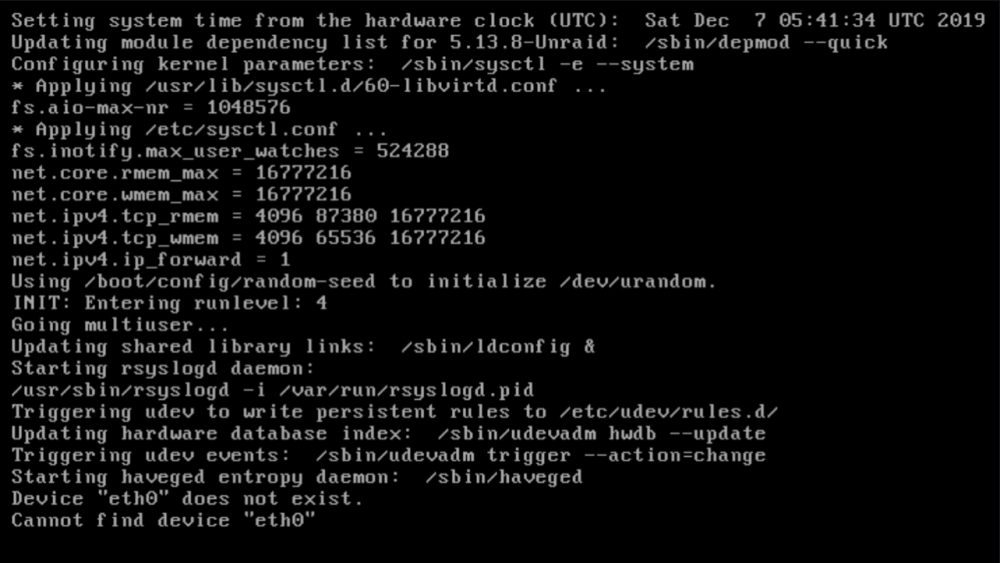
  2. Anyone using an Asus TUF Gaming x570-Pro (wifi) board successfully with Unraid 6.10-rc1? It has an Intel i225-v onboard NIC and it can't find eth0. I'm unsure if there's some BIOS setting that may help? System: Asus TUF Gaming x570-Pro (wifi) AMD Ryzen 5700G Corsair Vengeance LPX 32GB DDR4 3600MHz Thanks for any help here!

Account

Navigation

Search

Search

Configure browser push notifications

Chrome (Android)
  1. Tap the lock icon next to the address bar.
  2. Tap Permissions → Notifications.
  3. Adjust your preference.
Chrome (Desktop)
  1. Click the padlock icon in the address bar.
  2. Select Site settings.
  3. Find Notifications and adjust your preference.