TQ
Members
-
Joined
-
Last visited
Everything posted by TQ
-
No, it is a file that has the contents that is listed below. Yes. -f is the shorthand version of --file-list
-
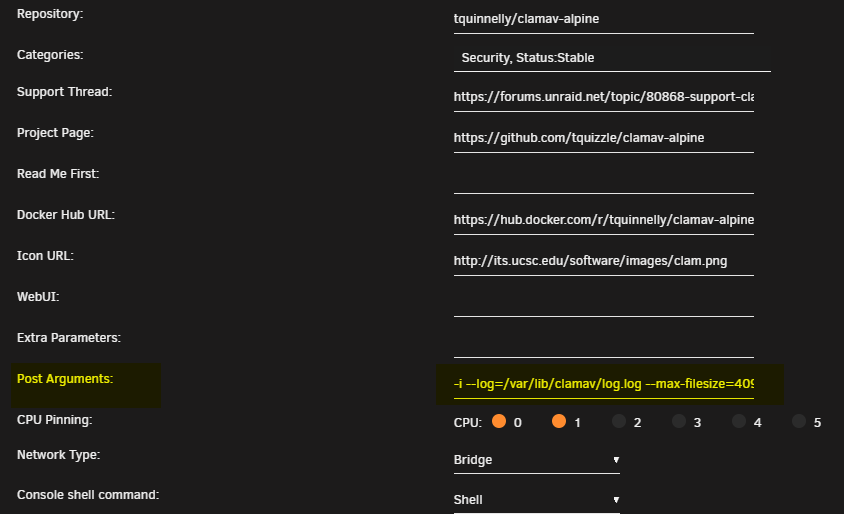
I was able to utilize the --file-list option and scanned a specific directory (a subdirectory of /scan) ... daily.cld database is up-to-date (version: 27178, sigs: 2052470, f-level: 90, builder: raynman) main.cvd database is up-to-date (version: 62, sigs: 6647427, f-level: 90, builder: sigmgr) bytecode.cvd database is up-to-date (version: 334, sigs: 91, f-level: 90, builder: anvilleg) Freshclam updated the DB ClamAV 1.2.1/27178/Wed Feb 7 03:35:39 2024 Scanning /scan WARNING: Only scanning files from --file-list (files passed at cmdline are ignored) ----------- SCAN SUMMARY ----------- Known viruses: 8684340 Engine version: 1.2.1 Scanned directories: 29 Scanned files: 1427 Infected files: 0 Data scanned: 65.70 MB Data read: 25121.64 MB (ratio 0.00:1) Time: 271.660 sec (4 m 31 s) Start Date: 2024:02:07 16:40:51 End Date: 2024:02:07 16:45:23 2024-02-07T16:45:23-06:00 ClamAV scanning finished Latest reconfigured container options: docker run -d --name='ClamAV' --net='bridge' --cpuset-cpus='0,1' -e TZ="America/Chicago" -e HOST_OS="Unraid" -e HOST_HOSTNAME="" -e HOST_CONTAINERNAME="ClamAV" -e 'USER_ID'='99' -e 'GROUP_ID'='100' -l net.unraid.docker.managed=dockerman -l net.unraid.docker.icon='https://github.com/tquizzle/clamav-alpine/blob/master/img/clamav.png?raw=1' -v '/mnt/cache/appdata/downloads/':'/scan':'ro' -v '/mnt/cache/appdata/clamav':'/var/lib/clamav':'rw' 'tquinnelly/clamav-alpine' -i --file-list=/var/lib/clamav/scanfiles --log=/var/lib/clamav/log.log --max-filesize=2040M File list: scanfiles /scan/subdirectory/another-directory The key point here is that the reference to these supporting files passed in as vars are from the containers path, not the host. Hope this helps anyone facing this challenge.
-
Permissions have nothing to do with @Masterwishx script. The should inherit from the UID/GID passed via the container.
-
Maybe try without scan targets txt file. In the errors, you can see the container cannot open that file
-
Permissions are correct. But the error persists. Perhaps your volume mounts are not correct. Do you have a volume mounted for the directory you are trying to scan as well as the file that has the scan folders in it? From my Github documentation: docker run -d --name=ClamAV \ --cpuset-cpus='0,1' \ -v /path/to/scan:/scan:ro \ -v /path/to/sig:/var/lib/clamav:rw \ tquinnelly/clamav-alpine -i --log=/var/lib/clamav/log.log --max-filesize=2048M That path to "signatures" is the path you are working with. Is that path mounted? If not, you have to mount it before calling a file in it. It also is relevant to the container path, not the host. --file-list: Can't open file /scan/appdata/clamav/clamavtargets.txt If you've mounted it as in my example, it would be: --file-list=/var/lib/clamav/clamavtargets.txt
-
-
ERROR: --file-list: Can't open file /scan/appdata/clamav/clamavtargets.txt WARNING: Only scanning files from --file-list (files passed at cmdline are ignored) ERROR: --file-list: Can't open file /scan/appdata/clamav/clamavtargets.txt WARNING: Only scanning files from --file-list (files passed at cmdline are ignored) ERROR: --file-list: Can't open file /scan/appdata/clamav/clamavtargets.txt This error is at the top. This is your issue. You've explicitly set "--file-list" but the container cannot see that file, or has no permission to it.
-
I would start with the docker logs of the container. See what the errors tell you.
-
Thanks Masterwishx for highlighting this. Indeed, 99:100 is the "Docker Safe Permission" user:group that is set when you run that script (nobody:users). Also, the built-in "newperms" runs this same change. If you have permission issues in your environment, I'd recommend either of these options on your ClamAV folder and running again.
-
Good catch! XML is updated.
-
It's further up on the screen.
-
Someone created the "Official", then pointed to my repo. SMH.
-
Reviewed the diags. Nothing stands out as being wrong. I would do the following: Manually, review the docker containers you have as well as their "appdata" or "config" directories. Review where that is on your cache drive (likely) and remove things from that directory that no longer align with containers your running. I have this issue after trying and testing tons of containers from the CA. `mc` can be your friend to quickly navigate **hint hint. Run 'du' on your cache drive to see what folders are holding the massive amounts of data. /mnt/cache# du -h * --summarize Lastly, run newperms (which looks like you ran recently after looking at the logs) on your cache drive to reset permissions.
-
Welcome! Sent from my iPhone using Tapatalk
-
Updates today to squash CVEs and update ClamAV. | Tag | ClamAV Version | Alpine Version | | --- | --- | --- | | latest | 1.1.2-r0 | 3 | | edge | 1.2.0-r1 | Edge |Same issue I believe. You are using the "Official" clamav image which includes clamd (the underlying daemon, which I do not have in my image). So, I'm not sure what the issue is with that container, but if you pull mine, and install via CA, you should have a working clamscan.Something tells me you are having the same issue as Can you do a `docker inspect ClamAV` and paste the contents? Sanitize to your level of paranoia.This doesnt look like the output from my container. I think some wires are crossed. Socket for clamd not found yet, retrying (18/1800) ...Sat Jul 22 20:29:14 2023 -> Limits: Global time limit set to 120000 milliseconds. Sat Jul 22 20:29:14 2023 -> Limits: Global size limit set to 419430400 bytes. Sat Jul 22 20:29:14 2023 -> Limits: File size limit set to 104857600 bytes. Sat Jul 22 20:29:14 2023 -> Limits: Recursion level limit set to 17. Sat Jul 22 20:29:14 2023 -> Limits: Files limit set to 10000. Sat Jul 22 20:29:14 2023 -> Limits: MaxEmbeddedPE limit set to 41943040 bytes. Sat Jul 22 20:29:14 2023 -> Limits: MaxHTMLNormalize limit set to 41943040 bytes. Sat Jul 22 20:29:14 2023 -> Limits: MaxHTMLNoTags limit set to 8388608 bytes. Sat Jul 22 20:29:14 2023 -> Limits: MaxScriptNormalize limit set to 20971520 bytes. Sat Jul 22 20:29:14 2023 -> Limits: MaxZipTypeRcg limit set to 1048576 bytes. Sat Jul 22 20:29:14 2023 -> Limits: MaxPartitions limit set to 50. Sat Jul 22 20:29:14 2023 -> Limits: MaxIconsPE limit set to 100. Sat Jul 22 20:29:14 2023 -> Limits: MaxRecHWP3 limit set to 16. Sat Jul 22 20:29:14 2023 -> Limits: PCREMatchLimit limit set to 100000. Sat Jul 22 20:29:14 2023 -> Limits: PCRERecMatchLimit limit set to 2000. Sat Jul 22 20:29:14 2023 -> Limits: PCREMaxFileSize limit set to 104857600. Sat Jul 22 20:29:14 2023 -> Archive support enabled. Sat Jul 22 20:29:14 2023 -> AlertExceedsMax heuristic detection disabled. Sat Jul 22 20:29:14 2023 -> Heuristic alerts enabled. Sat Jul 22 20:29:14 2023 -> Portable Executable support enabled. Sat Jul 22 20:29:14 2023 -> ELF support enabled. Sat Jul 22 20:29:14 2023 -> Mail files support enabled. Sat Jul 22 20:29:14 2023 -> OLE2 support enabled. Sat Jul 22 20:29:14 2023 -> PDF support enabled. Sat Jul 22 20:29:14 2023 -> SWF support enabled. Sat Jul 22 20:29:14 2023 -> HTML support enabled. Sat Jul 22 20:29:14 2023 -> XMLDOCS support enabled. Sat Jul 22 20:29:14 2023 -> HWP3 support enabled. Sat Jul 22 20:29:14 2023 -> Self checking every 600 seconds. Sat Jul 22 20:29:14 2023 -> Set stacksize to 1048576 socket found, clamd started. My container does not use `clamd`, only Freshclam and Clamscan.Added tzdata in new build. LMK if that works.FIxing it is simple. The permissions are incorrect. Passing the UID and GID should solve this problem. If not, you can use the snippet below and this should solve the problem for you. chmod -R u-x,go-rwx,go+u,ugo+X /mnt/cache/appdata/clamav && chown -R nobody:users /mnt/cache/appdata/clamav Updating the xml file to include these details...Googled these for ya. Bytecode run timed out in interpreter after 205000 opcodes This indicates that ClamAV was running a bytecode signature and that it exceeded a time limit. Normally safe to ignore... cli_html_normalize: style chunk size underflow You can ignore the error message. It is a part of a safety bounds check that was added in a new feature in ClamAV 1.1.0. We did not expect that error message to occur within a normal file. The file causing the error message would be visible in the logs right after this message.I cannot replicate this. Do you have the logs handy for the container?If you have removed the container, and pruned the image; it cannot be there. Perhaps another container is using the same port and for some reason is hosting the same content as the PufferPanel appdata. I cant think of any other reason this would/could be happening.