




Skip to content
View in the app

A better way to browse. Learn more.

Unraid

A full-screen app on your home screen with push notifications, badges and more.

To install this app on iOS and iPadOS
  1. Tap the Share icon in Safari
  2. Scroll the menu and tap Add to Home Screen.
  3. Tap Add in the top-right corner.
To install this app on Android
  1. Tap the 3-dot menu (⋮) in the top-right corner of the browser.
  2. Tap Add to Home screen or Install app.
  3. Confirm by tapping Install.

reap3r11

Members
  • Joined

  • Last visited

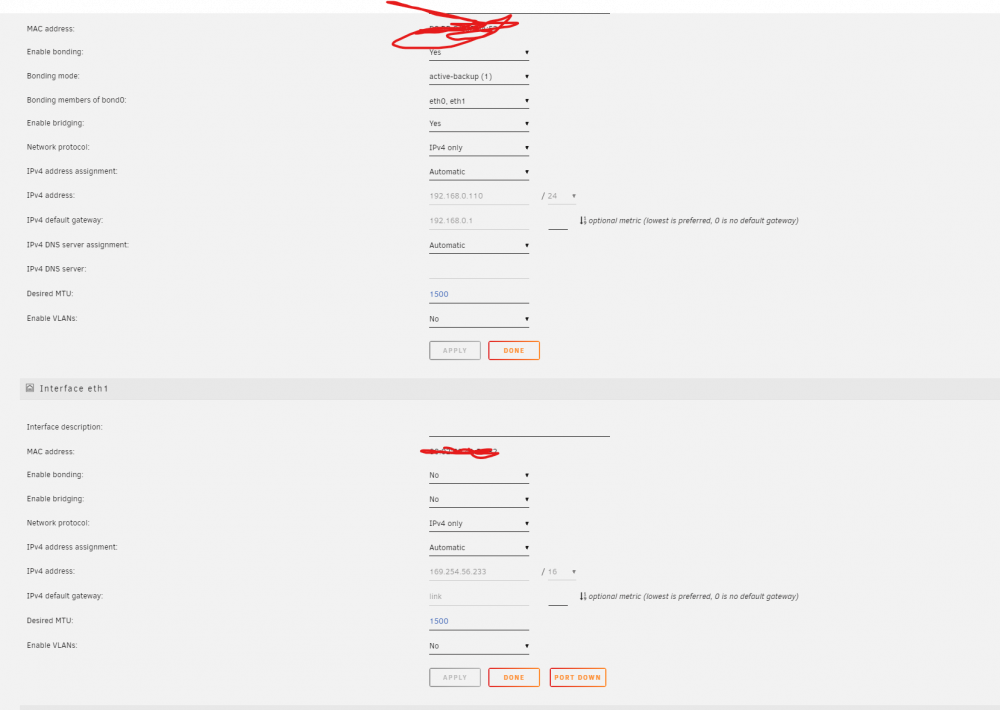
  1. Hey Guys, I have a 1 GB & a dual port 10GB Mellanox 2 Card. It appears correctly in Unraid. However when I try and get it it assign an IP it does not work. I think the Bonding and bridging is causing issues. It should be in the 192.168.0.* range but it appears as 169.254.56.233 The 1GB card works fine. My router is a UDP Pro and the device does not appear under clients. Here is how I have it set but its not working.
  2. Hey All, I am building a new unraid server and have this nic: HP Mellanox ConnectX-2 10 GbE PCI-e G2 Dual SFP+ Ported Ethernet HCA / NIC. (Rev. C) Does unraid support this nic out of the box? -- R

Account

Navigation

Search

Search

Configure browser push notifications

Chrome (Android)
  1. Tap the lock icon next to the address bar.
  2. Tap Permissions → Notifications.
  3. Adjust your preference.
Chrome (Desktop)
  1. Click the padlock icon in the address bar.
  2. Select Site settings.
  3. Find Notifications and adjust your preference.