




Skip to content
View in the app

A better way to browse. Learn more.

Unraid

A full-screen app on your home screen with push notifications, badges and more.

To install this app on iOS and iPadOS
  1. Tap the Share icon in Safari
  2. Scroll the menu and tap Add to Home Screen.
  3. Tap Add in the top-right corner.
To install this app on Android
  1. Tap the 3-dot menu (⋮) in the top-right corner of the browser.
  2. Tap Add to Home screen or Install app.
  3. Confirm by tapping Install.

MarUl

Members
  • Joined

  • Last visited

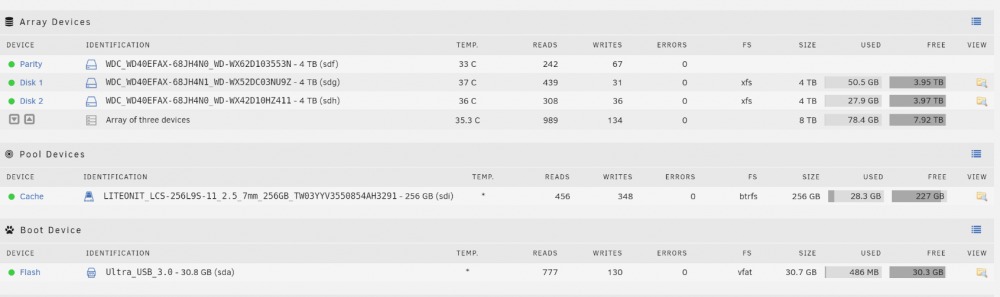
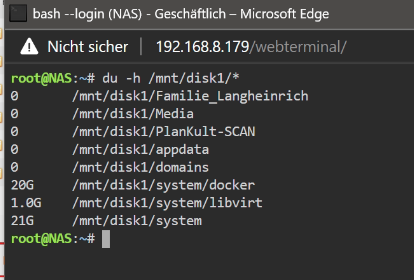
  1. So one additional info: The Disk size shows up 50gb used while in the console there is only 21gb used. so hopefully the data is there somewhere anymore - please help me!
  2. MarUl joined the community
  3. Hi, ich have an array of 2 disks and one parity. After disk 1 had errors we decided to change it with a new one, but same hardware model. Did the steps like in the manual, unassign, shutdown, replace, rebuild. All worked fine - but all the shares are missing. If I manually browse the disks, they are empty. But there seems to be 80GB of Data on trhe disks. In the downloaded diagnostics there are the cfg for all the share, but with ther # the share is on no disk. Is there a way to reread the data and shares, that the data can be back? Need very very urgent help here.... thnaks a lot!

Account

Navigation

Search

Search

Configure browser push notifications

Chrome (Android)
  1. Tap the lock icon next to the address bar.
  2. Tap Permissions → Notifications.
  3. Adjust your preference.
Chrome (Desktop)
  1. Click the padlock icon in the address bar.
  2. Select Site settings.
  3. Find Notifications and adjust your preference.