




Skip to content
View in the app

A better way to browse. Learn more.

Unraid

A full-screen app on your home screen with push notifications, badges and more.

To install this app on iOS and iPadOS
  1. Tap the Share icon in Safari
  2. Scroll the menu and tap Add to Home Screen.
  3. Tap Add in the top-right corner.
To install this app on Android
  1. Tap the 3-dot menu (⋮) in the top-right corner of the browser.
  2. Tap Add to Home screen or Install app.
  3. Confirm by tapping Install.

jodirt

Members
  • Joined

  • Last visited

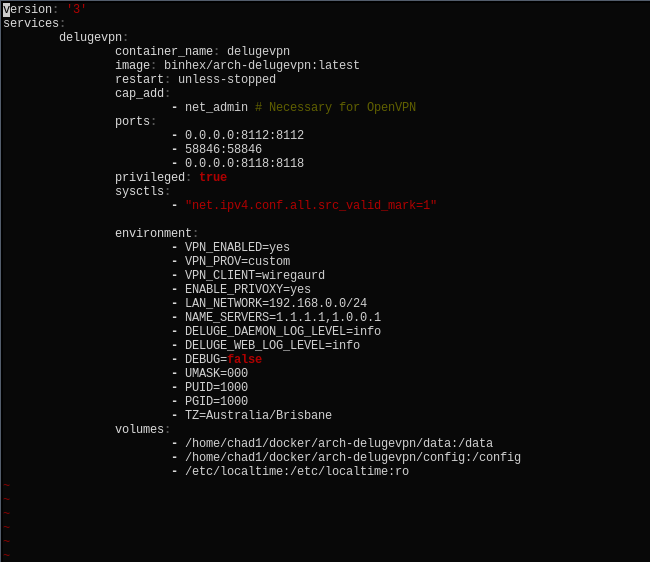
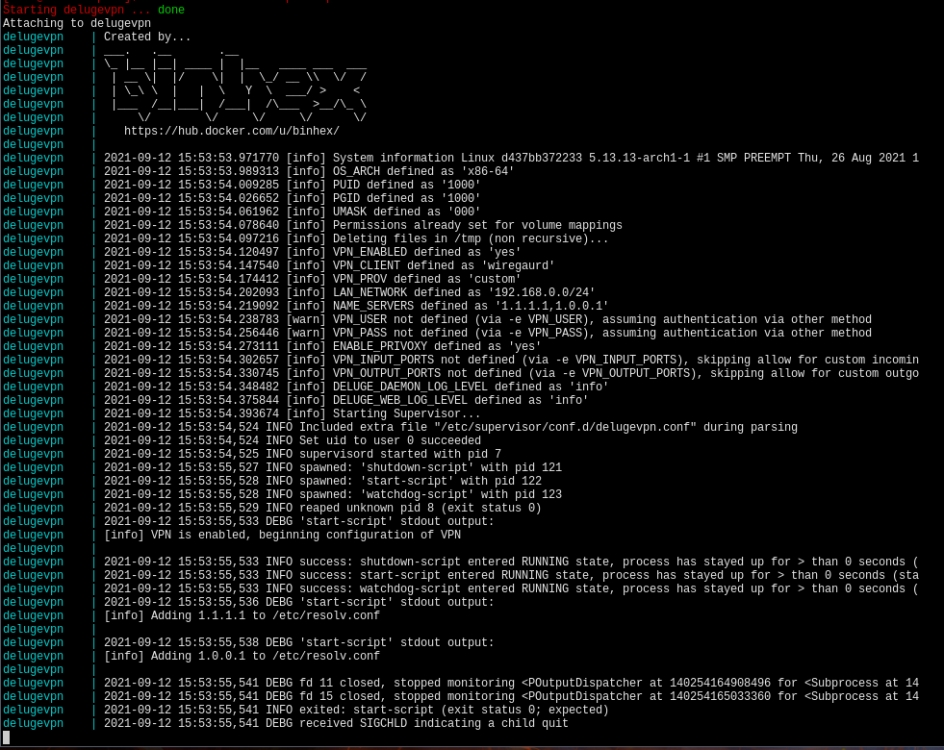
  1. Hi I recently installed Delugevpn but I've been having trouble setting it up. To my knowledge it should say "privoxy process listening to port 8118" at the bottom but it doesn't and I can't access the webui. I'm pretty new to docker and vpns in general so I apologize if the fix is really obvious. I've looked around and I can't work out what the issue is so any help would be appreciated. I'm on arch-linux by the way. Here's the logs when I start it and here's the compose file
Account

Navigation

Search

Search

Configure browser push notifications

Chrome (Android)
  1. Tap the lock icon next to the address bar.
  2. Tap Permissions → Notifications.
  3. Adjust your preference.
Chrome (Desktop)
  1. Click the padlock icon in the address bar.
  2. Select Site settings.
  3. Find Notifications and adjust your preference.