





jcofer555
Members
-
Joined
-
Last visited
Everything posted by jcofer555
-
added option to disable the unraids mover schedule :)
-
unraid doesn't make this easy to do because to do so you have to hijack the native mover entirely and the other complication is for when users have the mover tuning plugin which already hijacks the native move. not that it can't be done but i have thought of this myself and might try digging into it further, i just wish unraid itself would include a never option for the mover schedule
-
glad to hear it :)
-
@drmetro and @Johann the reporting of 1% on your pools has been fixed. it was zfs related, thanks drmetro for mentioning zfs and thanks @Rysz for further helping to determine where the issue was to be fixed
-
this issue is fixed is the 2025.10.01.1 update i pushed
-
what kind of zfs pool are you running? and how many drives in the pool?
-
hmm will keep digging for why this might be happening, nothing coming to mind and i can't reproduce it yet i will test with zfs though, what zfs pool layout are you using?
-
i can reproduce this issue, will work on a fix for this tonight
-
how about the cat /var/local/emhttp/disks.ini command?
-
what is your pools names? also do you see the names if you do cat /var/local/emhttp/disks.ini
-
what do you get when you run the command i suggested for the above user?
-
haven't been able to replicate your issue with my test box using the same pool names thinking maybe something in the names were tripping it up, if you run this command df --output=pcent /mnt/cache | tail -1 | tr -d ' %\n' and change the path to each pool one at a time does it report the correct usage?
-
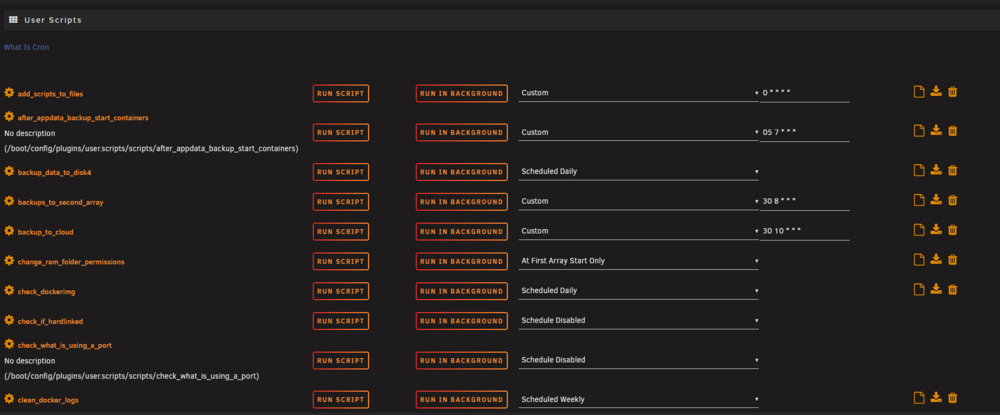
7.2 userscripts has some formatting issues, schedule field is to close to the custom schedule field
-
i can look into adding it as an option, not sure when i'll get the chance but i can see this being a good addition
-
i've noticed that too, i'll try and see if i'm good enough to try and optimize that at all
-
the chevron for general info is pushed to far to the right
-
checkbox support has been added and double click method removed, archive name changing to output directory is done also
-
i noticed the footer got pushed to the left and with anymore additions they might get cut off lol
-
i'm assuming it's because i don't have the connect plugin installed so it's harmless? Aug 1 16:10:25 unraid root: #033[33m[Nest] 15068 - #033[39m08/01/2025, 4:10:25 PM #033[33m WARN#033[39m #033[38;5;3m[ConfigFileHandler:api.json] #033[39m#033[33mError loading config. Attempting to migrate...#033[39m Error Aug 1 16:10:25 unraid root: #033[33m[Nest] 15068 - #033[39m08/01/2025, 4:10:25 PM #033[33m WARN#033[39m #033[38;5;3m[ConfigFileHandler:api.json] #033[39mError: Config file does not exist at '/boot/config/plugins/dynamix.my.servers/configs/api.json'
-
unassigned devices buttons overlay the text like shown in the screenshot. loving the mobile friendly webui though otherwise :)
-
i like that idea of the archive name defaulting to whatever the name of the folder picked for the output directory. I went with double clicking to add so there wasn't a need for a "add selected" button but i'll put some thought into it
-
realized there was a block in the extraction page too for them, i've now added them for total support both extract and archiving
-
i added extract to same folder button to click
-
yes, i'm one of the discord mods there in the unraid official discord
-
both should be doable on the backend but getting the right spot in the webui is the tricky part haha


