





Medic1
Members
-
Joined
-
Last visited
-
Fixed with the xfs_repair -vL command using the above link. Thanks.
-
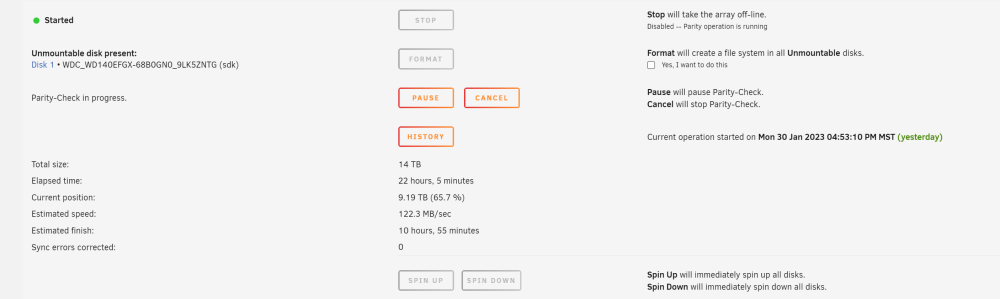
Hi all, I've had a new stable server for about a month. Yesterday while browsing through files I received a windows credential login error while accessing the shares through explorer. I didn't notice any errors with the tower but while troubleshooting I decided to do a clean reboot. Unfortunately I didn't collect diagnostics. I was able to reboot the server cleanly but I have lost access to one of my drives. Disk 1 is showing Unmountable: Wrong or no file system I have lost a significant amount of data. I have not rebuilt parity, and a parity check currently running is showing 0 errors after about 22 hours of running. I don't see the files nor the file contents any more. I don't understand how parity can be valid if there's a whole drive that's suddenly unmountable. tower-diagnostics-20230131-1353.zip

-
Thank you. Everything looks to be working correctly now.
-
Yes. I recently formatted to XFS and was in the process of moving data from smaller drives on to it. The drive itself is about 2 years old I think and has been working in the array with no issues until now.
-
new diagnostics are attached. tower-diagnostics-20221228-2037.zip

-
Ok so running the array now and the disk2 is back. The 2 nvme cache drives are still being emulated for some reason. Thoughts?
-
Not sure. Should be on the cache drive, no?
-
The cache drives are disabled with contents emulated. Not sure why. The cache drives are NVME and as far as I know haven't had an issue before. Repeating the test with -L gave this: Phase 1 - find and verify superblock... Phase 2 - using internal log - zero log... ALERT: The filesystem has valuable metadata changes in a log which is being destroyed because the -L option was used. - scan filesystem freespace and inode maps... clearing needsrepair flag and regenerating metadata sb_icount 64, counted 46400 sb_ifree 57, counted 293 sb_fdblocks 2908768556, counted 2740391589 - found root inode chunk Phase 3 - for each AG... - scan and clear agi unlinked lists... - process known inodes and perform inode discovery... - agno = 0 - agno = 1 - agno = 2 - agno = 3 - agno = 4 - agno = 5 - agno = 6 - agno = 7 - agno = 8 - agno = 9 - agno = 10 - process newly discovered inodes... Phase 4 - check for duplicate blocks... - setting up duplicate extent list... - check for inodes claiming duplicate blocks... - agno = 1 - agno = 4 - agno = 0 - agno = 3 - agno = 9 - agno = 2 - agno = 10 - agno = 8 - agno = 6 - agno = 7 - agno = 5 Phase 5 - rebuild AG headers and trees... - reset superblock... Phase 6 - check inode connectivity... - resetting contents of realtime bitmap and summary inodes - traversing filesystem ... - traversal finished ... - moving disconnected inodes to lost+found ... Phase 7 - verify and correct link counts... Maximum metadata LSN (1:103640) is ahead of log (1:8). Format log to cycle 4. done
-
I was in the process of using unBALANCE to move data from one drive to another in order to remove a smaller drive from the array. While planning the move it appeared that none of my files were available through explorer/unraid GUI. The folder structure was there but there were no files contained in any of the folders. I decided to reboot and the array showed one of the drives (disk2) as "unmountable: wrong or no file system". I have checked the filesystem as described here: https://wiki.unraid.net/Manual/Storage_Management#Drive_shows_as_unmountable These are the results: Phase 1 - find and verify superblock... - block cache size set to 1438032 entries Phase 2 - using internal log - zero log... zero_log: head block 103768 tail block 103704 ALERT: The filesystem has valuable metadata changes in a log which is being ignored because the -n option was used. Expect spurious inconsistencies which may be resolved by first mounting the filesystem to replay the log. - scan filesystem freespace and inode maps... sb_icount 64, counted 46400 sb_ifree 57, counted 293 sb_fdblocks 2908768556, counted 2740391589 - found root inode chunk Phase 3 - for each AG... - scan (but don't clear) agi unlinked lists... - process known inodes and perform inode discovery... - agno = 0 - agno = 1 - agno = 2 - agno = 3 - agno = 4 - agno = 5 - agno = 6 - agno = 7 - agno = 8 - agno = 9 - agno = 10 - process newly discovered inodes... Phase 4 - check for duplicate blocks... - setting up duplicate extent list... - check for inodes claiming duplicate blocks... - agno = 0 - agno = 3 - agno = 2 - agno = 5 - agno = 1 - agno = 7 - agno = 6 - agno = 8 - agno = 4 - agno = 9 - agno = 10 No modify flag set, skipping phase 5 Phase 6 - check inode connectivity... - traversing filesystem ... - agno = 0 - agno = 1 - agno = 2 - agno = 3 - agno = 4 - agno = 5 - agno = 6 - agno = 7 - agno = 8 - agno = 9 - agno = 10 - traversal finished ... - moving disconnected inodes to lost+found ... Phase 7 - verify link counts... No modify flag set, skipping filesystem flush and exiting. XFS_REPAIR Summary Wed Dec 28 19:18:46 2022 Phase Start End Duration Phase 1: 12/28 19:18:37 12/28 19:18:37 Phase 2: 12/28 19:18:37 12/28 19:18:37 Phase 3: 12/28 19:18:37 12/28 19:18:42 5 seconds Phase 4: 12/28 19:18:42 12/28 19:18:42 Phase 5: Skipped Phase 6: 12/28 19:18:42 12/28 19:18:46 4 seconds Phase 7: 12/28 19:18:46 12/28 19:18:46 Total run time: 9 seconds I have also attached the tower diagnostics file. Can someone help with explaining how to proceed? tower-diagnostics-20221228-1932.zip



