jhylands
Members
-
Joined
-
Last visited
-
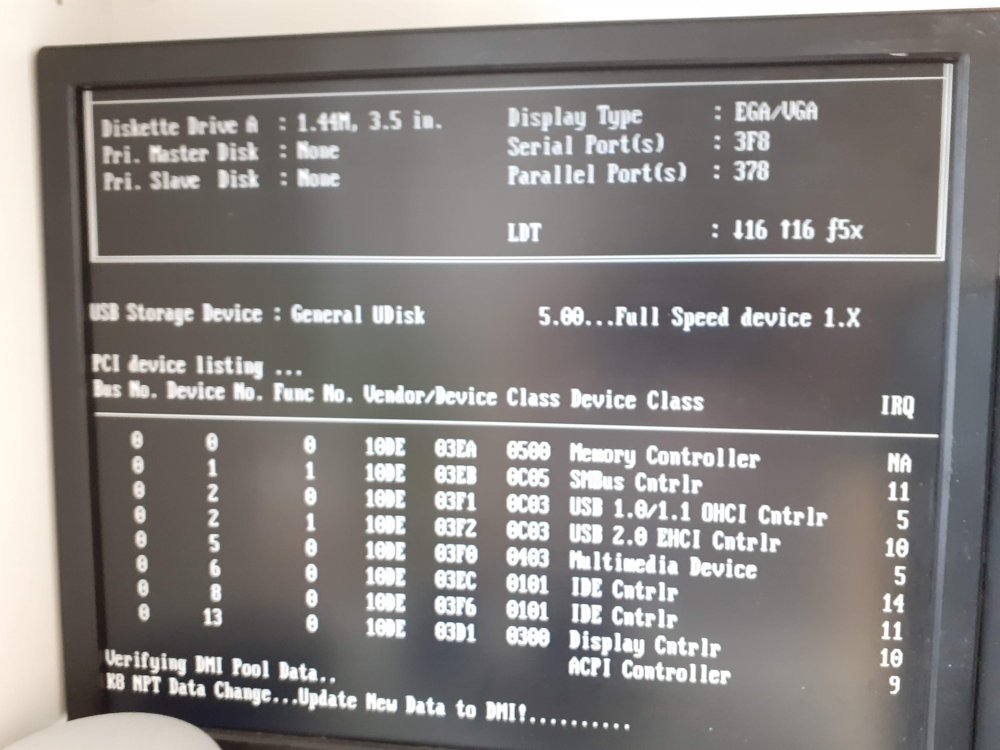
I've left it for over an hour with the screen not changing from my screen shot. I feel like it should get to the grub screen.
-
Interesting the motherboard is a gforce 6100SM v :1 The cpu is AMD Athlon 64 X2 4850e ADH4850IAA5DO Dual-Core 2.5GHz Socket AM2 Processor CPU 8gb ram in two sticks. Trying it in other ports doesn't seem to change anything. Maybe it does only have usb 1
-
Was running it on a mac but yes and yes. Wayback machine Upgraded the cpu to 64bit
-
I have recently acquired an older machine that I am trying to boot unraid on. I'm currently only getting to the following screen: (Attached image) What I have tried so far? I have spent many hours trying various bios settings. I have tried multiple USB sticks I have tried multiple versions of unraid both 6 and 5 I have tried installing ubuntu using one of the memory sticks (I also tried unraid with that memory stick) that work successfully, installing to a local hard drive. Tried all the usb ports on the machine I am absolutely lost as to how to get this to work. I'm considering giving up and just using the ubuntu image I managed to get working. Thank you for your help in advanced!