Archetype486
Members
-
Joined
-
Last visited
-
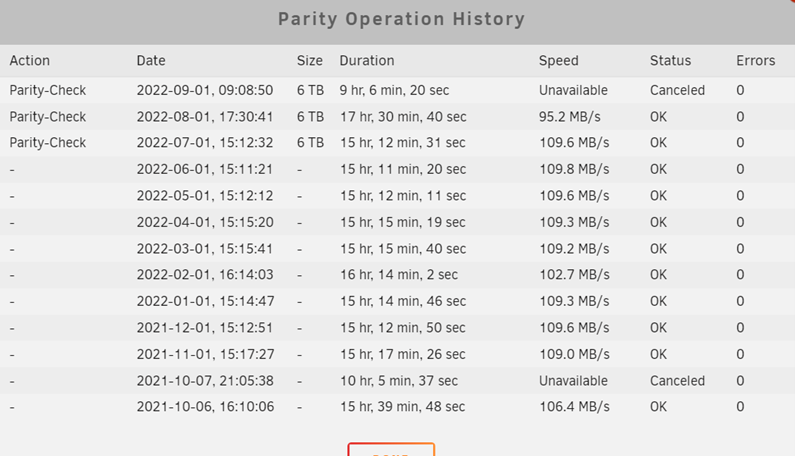
Just a follow up. I replaced the driver, rebuilt the array and re ran the parity check and it has retuned to its original speed. Thank you for the help
-
Thank you for that I will swap it it and test.
-
Thank you for th reply. It is at 38.8% and now running at 135.6MB/sec. Is it likely to be that drive? Any idea on why it would start slow and can it be fixed? Or should I remove/replace it? Thanks again
-
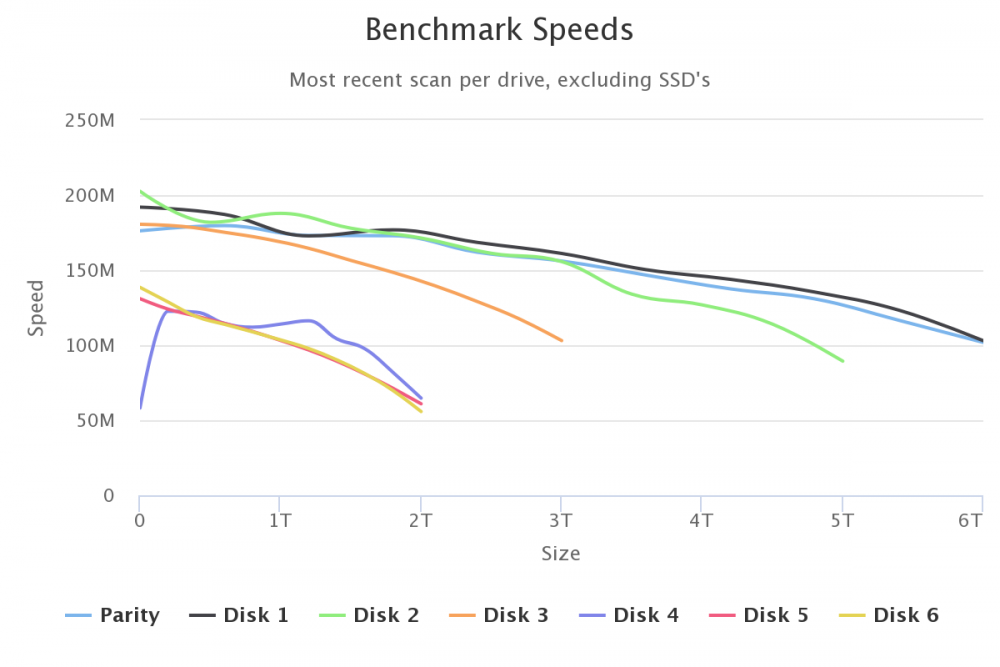
Hi, Could someone please have a look at my diagnostics and disk speed. The diagnostics was taken during the parity check. I have tried to understand them but don’t know what to look for. I know I don’t have the fastest drives, especially the lower size drives. Diskspeed shows disk 4,5,6 are very slow when full but the have very little data on them. Last month I noticed it took longer. This month it is hovering around 65MB/sec. I have stopped all dockers and the one VM that was running. Thank you mere-diagnostics-20220901-1445.zip