





wlsn0chrs
Members
-
Joined
-
@Yivey_unraid I have not resolved what is going on yet. I had a few things come up and haven't gotten around to recreating the pool yet. Please let me know if you figure out is going on with your set up.
-
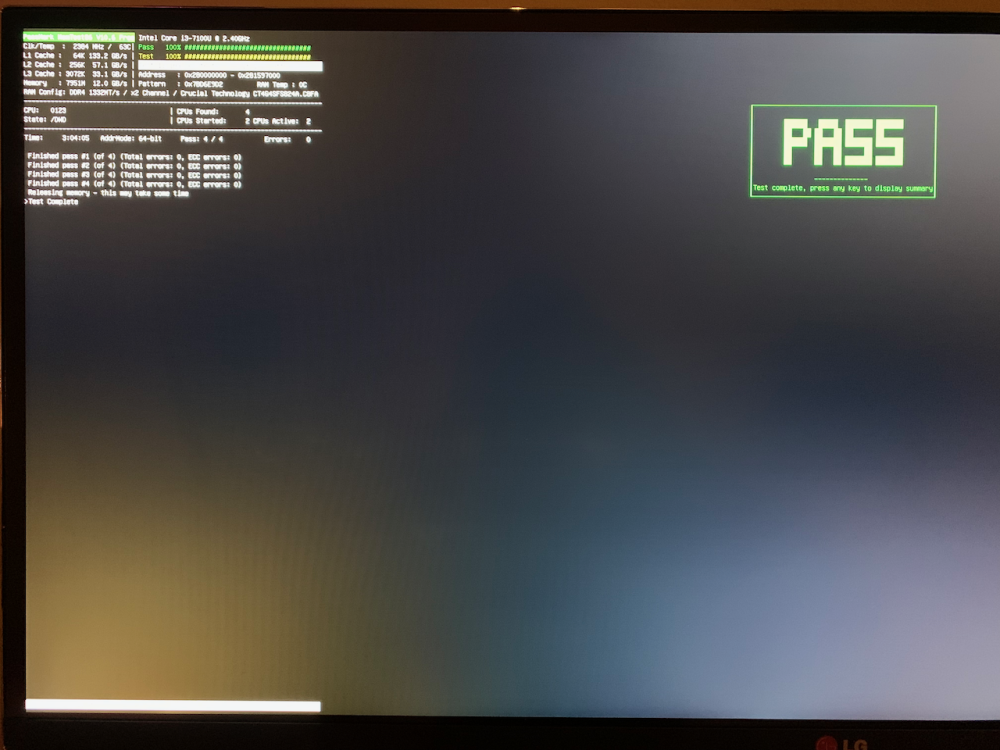
Memtest86 run four times using the default test. No errors. Reports for the last 3 tests attached (s/n removed). MemTest86-Report-20230913-053317 [redacted].rtfd.zip MemTest86-Report-20230913-151514 [redacted].rtfd.zip MemTest86-Report-20230913-233352 [redacted].rtfd.zip
-
Docker image deleted and recreated. System rebooted 3 days ago. Please find logs attached. Network error when trying to update to 6.12.4: BTRFS error: nuc-diagnostics-20230901-1009.zip
-
Disk read error has occurred again. Please see attached diags. nuc-diagnostics-20230809-2341.zip
-
Yes, unfortunately the machine was inadvertently unplugged last week around the 8/1. I've enabled the local syslog server to avoid losing the logs going forward. Does the disk read error count get reset on a system reboot? I've gone through my dump of old log files and unfortunately don't have any covering the periods of the listed disk read errors. Screenshot of the archived disk error notifications below.

-
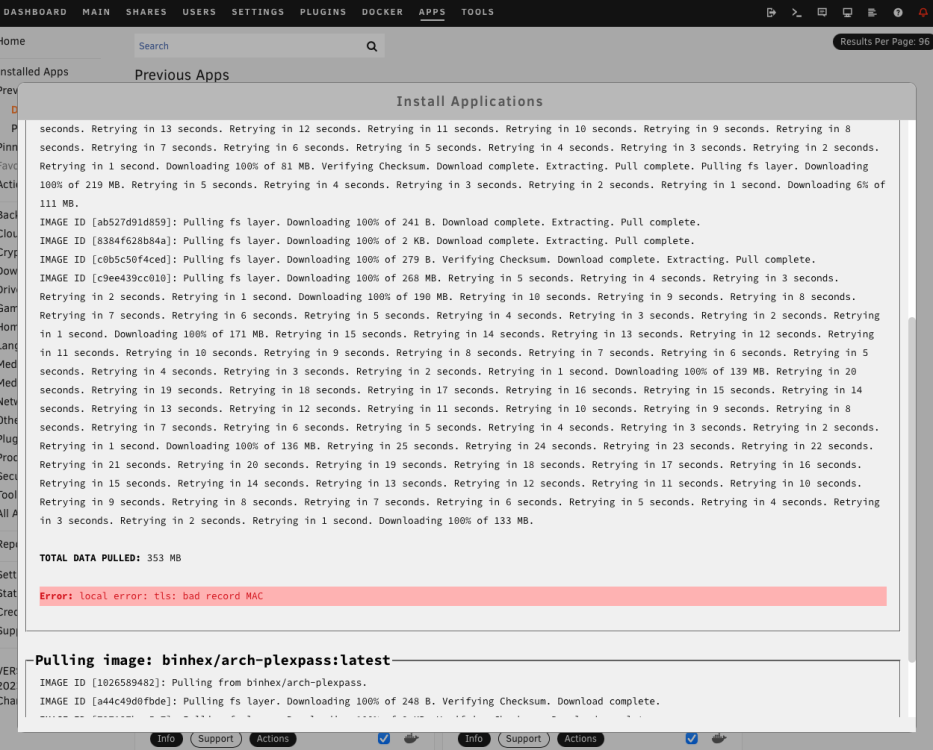
1. Recreated the docker image per your linked instructions. Ran scrub w/ no errors found. Logs attached. 2. Reinstall docker apps via CA. During the installs, many of the dockers have to repeatedly retry downloading the files. Two dockers fail with "Error: local error: tls: bad record MAC". These two dockers are continuing to fail to install. I will retry again later in the week (see screenshot). 3. The system log is being spammed "kernel: tpm tpm0: A TPM error (257) occurred attempting get random". 4. In the archived notifications I have two disk warnings: "Array has 1 disk with read errors warning Disk 2 - WD_Game_Drive_57583332443331443556374A-0:0 (sda) (errors 1)". However, the disk log and attributes do not reflect this. nuc-diagnostics-20230806-2203.zip
-
Thank you, that appears to have resolved the external USB HDD not mounting. After rebooting it has remounted and docker is running. Checking the system log, I now have some BTRFS warnings again. Does this indicate the cache drive is failing? Any advice on how to resolve the issue? A few weeks ago I had a BTRFS warning for a different sector on the cache drive which mapped to the docker.img file. I removed the file, performed a balance, scrub, checked the file system status, and ran a SMART test of the cache drive. For good measure, I ran memtest X86 a few times. All OK. I then reinstalled the previous dockers via CA. This took several attempts with the installers failing mid download reporting a "Network failure" until it finally succeeded. Everything seemed OK after that. The cache drive is an internal m.2 NVME SSD. I tried seeing what file was mapped to 144457728, but nothing is returned when I execute the command through the terminal. nuc-diagnostics-20230730-2156.zip
-
I would really appreciate some help on how to proceed with trouble shooting. I've been having intermittent issues with Unraid over the last 1.5 years. Any time I resolve what seems to be the immediate issue, another one crops up. I am now back where I started. I am concerned that through all my effort I am just solving symptoms and not the assumed underlying root cause. The system was stable for over 3 years prior to these issues with no hardware changes. I am running this as a bare bones setup, it's an intel NUC with one internal HDD, one M.2 cache drive, and one external USB HDD. No parity drive (I acknowledge the data loss risk in doing this). Trouble Shooting Attempts: check / repair bad filesystem, replace a bad HDD (new USB cable w/ new HDD), wiped and rebuilt the array / dockers from scratch, move key directories to the cache drive, review system logs, review drive logs, run SMART tests on the drives, run memtest X86, run disk repair on the Unraid thumb-drive, updated the BIOS. Issues: Unraid UI slow / unresponsive, docker start errors, disk errors, disks missing, docker permission errors, Unriad fails updating (intermittent network error), TPM error, other intermittent weird issues. If someone could advise on how to solve what I assume is a root problem causing these issues, I'd greatly appreciate it. Logs as of today are attached. nuc-diagnostics-20230730-1219.zip


