Nammertat
Members
-
Joined
-
Last visited
-
Will do. I think you're right that my controller is now the most likely candidate. I ran extended SMART tests on all drives without error, and found lots of examples of my controller failing in other builds. Going to replace with an ASM1064 controller and not look back. Now - for the shocking news. I upgraded to the newest Unraid version (not stable) and the updated xfs_repair was able to successfully bring my array back online. This means I can copy off all of my docker config (saving me ~15-20 hours), my img-converted VMs (saving me another ~24 hours of process/wait), and my updated plex metadata and paths. Not to mention I'll be able to leave the server online until the new controller gets here this weekend. @JorgeB - when I get the new controller in, would you recommend I start fresh with a new config/array and copy back all of my docker/vm files given that I've had corruption/fragments on this array?
-
The SATA controller is totally plausible. It's the one thing that wasn't utilized before (these disks were in an external USB3.2 enclosure and my OS was on the nvme. Any idea how to go about testing that controller?
-
I'll try the new version today. Assuming that fails as well, do you have any recommendations for identifying the underlying hardware issue? It's worth noting that this hardware ran a Windows environment for the prior 6 months without a problem, although I suppose it's possible windows was compensating for something that is killing xfs.
-
Thanks so much for the reply - I really appreciate it. I should have been more clear above - I ran memtest for ~13 hours (overnight the night before). I tried the check file system steps before posting, and attached the logs/output in the initial post.
-
With docker down, I've got ~80TB of inaccessible library. Does anyone have thoughts on troubleshooting steps here?
-
Memtest86 completed without errors.
-
Running memtest now. Add'l detail that could impact it - I added my nvme drive as cache last night, and mover did it's thing overnight (before the reboot I confirmed it wasn't still going).
-
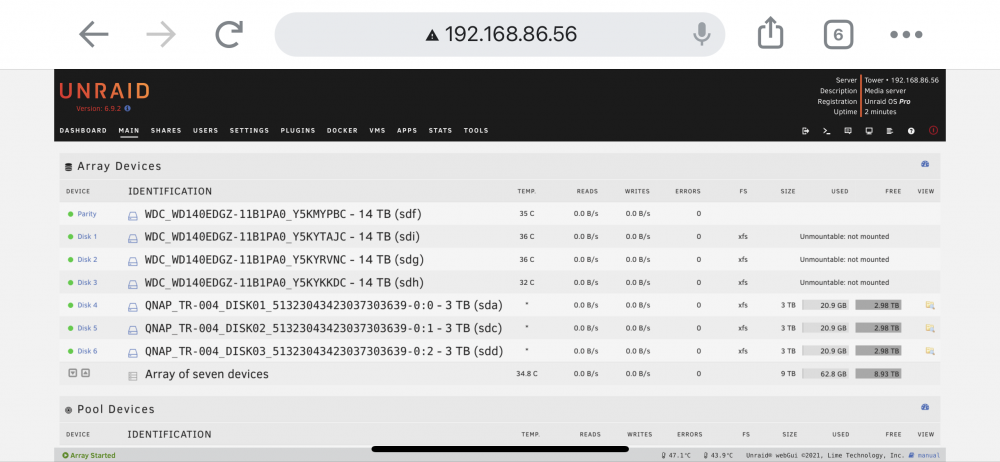
Hi all, I'm ~5 days into Unraid as a recovering Windows addict, and appear to have a serious situation on my hands. After battling my lack of linux knowledge, I was able to get my plex instance migrated to Docker and running great yesterday. I added a few 3tb drives, and let them complete the format/mounting overnight last night. I was having an issue getting Libvert Service to start, so this morning I rebooted my unraid box. On reboot, all three of my main data drives went to unmountable, leaving only the newly added 3TB in the array. Terrified I've lost all of my progress and a ton of production data. Any help would be immensely appreciated! I'm showing file system corruption in the logs, and something has gone wonky with the UUIDs: Sep 28 09:30:40 Tower kernel: XFS (md1): Corruption detected. Unmount and run xfs_repair Sep 28 09:30:40 Tower kernel: XFS (md1): log has mismatched uuid - can't recover Sep 28 09:30:40 Tower kernel: XFS (md1): failed to find log head Sep 28 09:30:40 Tower kernel: XFS (md1): log mount/recovery failed: error -117 Sep 28 09:30:40 Tower kernel: XFS (md1): log mount failed Sep 28 09:30:40 Tower root: mount: /mnt/disk1: mount(2) system call failed: Structure needs cleaning. Sep 28 09:30:40 Tower emhttpd: shcmd (5272): exit status: 32 Sep 28 09:30:40 Tower emhttpd: /mnt/disk1 mount error: not mounted Sep 28 09:30:40 Tower emhttpd: shcmd (5273): umount /mnt/disk1 Sep 28 09:30:40 Tower root: umount: /mnt/disk1: not mounted. Sep 28 09:30:40 Tower emhttpd: shcmd (5273): exit status: 32 Sep 28 09:30:40 Tower emhttpd: shcmd (5274): rmdir /mnt/disk1 Sep 28 09:30:40 Tower emhttpd: shcmd (5275): mkdir -p /mnt/disk2 Sep 28 09:30:40 Tower emhttpd: shcmd (5276): mount -t xfs -o noatime /dev/md2 /mnt/disk2 Sep 28 09:30:40 Tower kernel: XFS (md2): Mounting V5 Filesystem Sep 28 09:30:40 Tower kernel: XFS (md2): Internal error !uuid_equal(&mp->m_sb.sb_uuid, &head->h_fs_uuid) at line 259 of file Metadata corruption detected at 0x439218, xfs_agf block 0x27fffffd9/0x200 Metadata corruption detected at 0x439218, xfs_agf block 0x2ffffffd1/0x200 Metadata corruption detected at 0x439218, xfs_agf block 0xfffffff1/0x200 Metadata corruption detected at 0x439218, xfs_agf block 0x1/0x200Metadata corruption detected at 0x464290, xfs_agi block 0x2ffffffd2/0x200Metadata corruption detected at 0x464290, xfs_agi block 0x27fffffda/0x200 Metadata corruption detected at 0x439218, xfs_agf block 0x17fffffe9/0x200 bad uuid b89f9a81-1193-47c1-9df7-29bef286d1ca for agf 5 bad uuid b89f9a81-1193-47c1-9df7-29bef286d1ca for agf 6 bad uuid b89f9a81-1193-47c1-9df7-29bef286d1ca for agi 5 bad uuid b89f9a81-1193-47c1-9df7-29bef286d1ca for agi 6 tower-diagnostics-20210928-1006.zip MD1 MD2 MD3 xfs_repair output.txt